
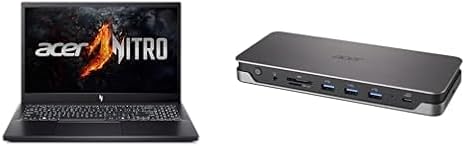

Available to buy here:
Welcome back to Reviews inside tv! Today, we’re looking at a laptop that promises a mix of gaming performance and creative power — the Acer Nitro V. This machine brings together a solid Ryzen 5 processor and the power of an RTX 4050 GPU, all packed into a 15.6-inch chassis. But is it really the powerhouse it claims to be? Let’s get into the details and see how it performs in the real world.
The Acer Nitro V is designed to cater to gamers, content creators, and power users alike. It’s powered by the AMD Ryzen 5 7535HS, a 6-core, 12-thread processor that runs at up to 4.3 GHz with Precision Boost. Paired with the NVIDIA GeForce RTX 4050 Laptop GPU, it promises solid gaming performance and decent creative potential, especially with AI-powered features. The 8GB DDR5 RAM (expandable to 32GB) and a 512GB PCIe Gen 4 SSD round out the core specs, ensuring quick load times and fast multitasking. The 15.6-inch Full HD display with a 144Hz refresh rate is another standout, aimed at providing smoother gaming and a more responsive feel for everyday tasks.
Let’s talk about what all these specs mean in everyday use. The Ryzen 5 7535HS is designed to handle everyday multitasking, like web browsing with many tabs open, document editing, and streaming video. It’s a solid chip for office productivity and will allow for smooth video calls and document work. When it comes to gaming, the RTX 4050 GPU can handle most modern titles at medium to high settings. For content creators, like those doing photo editing or video work, the combination of the Ryzen processor and RTX GPU offers the ability to tackle medium-level creative projects, though it may struggle with heavy 4K video editing tasks.
The laptop also sports a 15.6-inch Full HD IPS display with a 144Hz refresh rate, a real treat for gamers looking for smooth, fluid visuals. The higher refresh rate helps reduce motion blur, offering an edge in competitive gaming. For media consumption, the display offers crisp details, vibrant colors, and decent brightness, though it’s not quite in the league of premium OLED panels. The 82.64% screen-to-body ratio gives you more display area, making it feel spacious without sacrificing portability.
In terms of real-world usage, you’ll notice the Nitro V performs well in office and productivity tasks. Web browsing with a dozen tabs open, word processing, and video conferencing are all handled smoothly, thanks to the combination of a fast SSD and the Ryzen 5’s processing power. When streaming content, the laptop’s display does a good job of showing bright, colorful videos, though it may not reach the peak brightness levels of high-end laptops. As for gaming, titles like Call of Duty: Warzone and Cyberpunk 2077 can be played at medium to high settings, but you may need to tweak the settings for ultra-performance in the most demanding titles.
In terms of thermal performance, the Nitro V does a good job keeping things cool under light to moderate loads. The fan noise is noticeable when the laptop is under heavy use, like gaming or exporting video, but it’s not overwhelming. Under load, the temperatures on the keyboard deck and the underside rise a bit, but the device doesn’t reach uncomfortable levels. However, after extended gaming sessions, you might notice the performance starts to drop slightly due to thermal throttling. This is something to keep in mind for long gaming sessions or intense creative tasks.
The 8GB of DDR5 RAM is adequate for most tasks, but if you plan to multitask heavily or run demanding creative software, you might want to upgrade to 16GB or more. The 512GB SSD is fast, but you may run into storage limitations over time, especially with large game installs or media files. The SSD is PCIe Gen 4, so data transfer speeds are impressive, allowing for quick load times and fast file transfers.
Battery life on the Acer Nitro V is decent, offering around 6 to 8 hours of light office work or streaming, though it will dip significantly under heavier workloads like gaming or video editing. For gamers, expect a few hours of playtime before needing to plug in. It charges via USB-C with 85W power delivery, which is convenient for quick top-ups, though the charger is a bit bulky to carry around for frequent travelers. The laptop weighs in at around 5.3 pounds, making it somewhat on the heavier side for a 15-inch laptop, but it’s still portable enough for taking to class or work.
The keyboard and trackpad on the Nitro V are both comfortable for extended use. The key travel is decent, and the feedback is solid for typing long documents. The layout is standard, with full-sized arrow keys and a number pad. The trackpad is responsive, and palm rejection works well, though it’s not the most precise in terms of tracking accuracy compared to some premium models. The trackpad’s size and responsiveness are perfectly serviceable for everyday tasks.
On the port front, the Nitro V comes with a solid selection, including USB Type-A, USB Type-C, HDMI, and DisplayPort, which should be more than enough for connecting to external displays or peripherals. The inclusion of an SD card reader is useful for content creators who work with cameras, and the Ethernet port is a nice touch for those who prefer a wired connection. Wi-Fi 6 ensures faster internet speeds and more reliable connections, and Bluetooth is standard for pairing wireless peripherals.
When it comes to build quality, the Nitro V is a little more utilitarian. The chassis is made of plastic, which keeps the weight down but doesn’t feel as premium as metal alternatives. The hinge feels sturdy, and the build as a whole is solid, but it lacks the premium feel of more expensive gaming laptops. Still, it feels durable enough to withstand the rigors of daily use.
As for value for money, the Acer Nitro V offers strong performance at its price point, especially when compared to other gaming laptops in this range. Competitors like the ASUS TUF Gaming F15 and the Lenovo Legion 5 offer similar specs but at slightly different price points. The Nitro V stands out with its solid Ryzen 5 CPU, RTX 4050 GPU, and a 144Hz display, making it a great option for casual gamers and content creators on a budget.
If you’re in the market for a laptop that balances gaming performance with productivity and creative capabilities, the Acer Nitro V is a strong contender. Its solid build quality, decent display, and powerful internals make it a good choice for anyone who needs a versatile machine. However, if you’re looking for top-tier gaming performance or a premium design, you might want to explore higher-end options.
Thanks for watching! If you’re interested in getting your hands on the Acer Nitro V, you can find the link in the comments box below. If you’ve already used the laptop, let us know your thoughts — or if you have any questions, don’t hesitate to drop a comment. We’d love to hear from you! Until next time, stay sharp and game on!
Available to buy here:


