
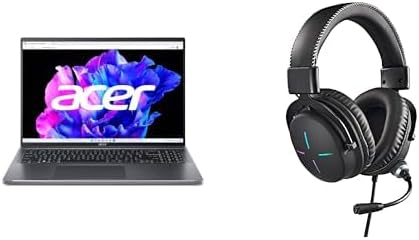

Available to buy here:
Welcome back to “Reviews inside tv”! Today, we’ve got an interesting model on our hands—the Acer Swift Go 16. This thin and light laptop is equipped with some impressive specs that aim to deliver a great experience for a variety of tasks. From work to entertainment, let’s break it down and see how it measures up.
The Acer Swift Go 16 is powered by the 13th Gen Intel Core i5-1335U, an ultra-efficient processor designed for multitasking without draining the battery. Whether you’re handling office work, browsing with multiple tabs open, or streaming your favorite shows, this processor is built to juggle these tasks without breaking a sweat. Paired with Intel Iris Xe graphics, it’s not going to be a gaming powerhouse, but it can certainly handle some light gaming and creative workloads like photo editing or video streaming with ease.
When it comes to memory, the Swift Go 16 comes with 8GB of LPDDR5 RAM, which is great for multitasking, but if you’re into more demanding tasks like video editing or larger creative projects, you might find yourself reaching for more memory. The RAM is onboard, meaning it’s not upgradable, so keep that in mind if you foresee needing more power down the road. Storage is handled by a 512GB PCIe Gen 4 SSD, providing fast boot times, quick file transfers, and plenty of space for your files, apps, and media. That Gen 4 SSD is a nice touch, offering faster read and write speeds compared to older versions, making it ideal for snappy performance.
Now, let’s talk display. The Swift Go 16 features a 16-inch WUXGA (1920 x 1200) display, which gives you a bit more vertical screen real estate than the standard 16:9 aspect ratio. It’s a 16:10 display, great for productivity tasks like editing documents, spreadsheets, or even coding. The display offers vivid color accuracy, making it an excellent choice for content creators who need precise color grading or anyone who simply wants an enjoyable viewing experience. While not an OLED, this screen offers crisp, clear visuals with excellent brightness and contrast for everyday use.
In terms of connectivity, you’ve got Intel Wi-Fi 6E, which is fantastic for high-speed internet and low-latency streaming, even in crowded networks. Plus, it’s backward compatible with older Wi-Fi standards, so you’ll always be able to connect. There’s also Bluetooth 5.1, so you can easily connect wireless peripherals without worrying about compatibility. Ports-wise, you’ve got the essentials, including a microSD card reader, but don’t expect any Thunderbolt support, which could be a dealbreaker if you need fast external storage access or a connection to high-end displays.
When it comes to gaming, this is not a machine for heavy AAA titles, but the Intel Iris Xe graphics do a fine job with lighter games. If you’re into esports or older games, you’ll be able to run them at decent frame rates. For example, titles like League of Legends or CS:GO will run smoothly at medium settings. But, if you’re into graphically intense games like Cyberpunk 2077 or the latest Call of Duty, you might want to look elsewhere, as this laptop won’t give you the best experience at higher settings. On the flip side, for light gaming and streaming, it’s perfectly fine.
Now, let’s dive into how this laptop holds up when it comes to thermals and noise. The Swift Go 16 stays relatively cool during light work, with the fan barely making a noise. It’s only under heavier loads, like gaming or video editing, where the fans kick in and become more noticeable. Even then, the noise is still on the quieter side compared to many other laptops, making this a good option for those who value a peaceful workspace. However, you won’t get a completely silent experience under load, so be aware of that if you prefer complete silence. The chassis remains comfortable to the touch, with no significant hot spots, making it usable on your lap during those longer sessions.
Battery life is another strong suit of the Swift Go 16, with its 50Wh battery lasting between 8 to 10 hours under mixed usage—think web browsing, word processing, and streaming. It won’t last the whole day if you’re pushing it with heavier workloads like video editing or gaming, but for typical office tasks, it does just fine. It also supports fast charging, so if you’re running low, you can quickly top it off and get back to work. The laptop’s portability is another positive. Weighing in at around 1.4 kg (3.1 lbs), it’s light enough to toss into a backpack without breaking your back. Whether you’re heading to class or the office, it’s a device that you won’t mind carrying around all day.
Moving on to the keyboard and trackpad, the Swift Go 16 features a comfortable keyboard with decent key travel and responsive feedback. It’s not the most luxurious typing experience, but for everyday use, it’s more than adequate. The trackpad is spacious and accurate, with good palm rejection. It’s responsive, and the click feel is solid, so you won’t find yourself accidentally selecting things while typing.
As for ports and connectivity, the Swift Go 16 has a good selection for a laptop in this category. You get USB-A, USB-C, and an HDMI port, which covers the essentials for external monitors and devices. The microSD card reader is a handy addition, especially for photographers or anyone who needs to quickly transfer files from cameras. However, there’s no full-size SD card reader, which might be a drawback for some users. As mentioned earlier, the lack of Thunderbolt is a limitation for those who need the fastest data transfer speeds or high-end display connectivity, but for everyday users, this won’t be a dealbreaker.
Let’s talk about the pros and cons. On the positive side, the Acer Swift Go 16 offers solid performance, a vibrant and color-accurate display, and great portability. Its battery life is impressive, and its build quality feels premium considering its thin profile. The keyboard and trackpad are comfortable for everyday use, and its cooling system keeps things relatively quiet. On the downside, the RAM is not upgradeable, and the GPU is not powerful enough for demanding gaming or heavy creative tasks. The lack of Thunderbolt and full-sized SD card reader might also be a turn-off for some.
In terms of value for money, the Swift Go 16 is priced competitively for the specs it offers, especially considering the impressive display and solid all-around performance. If you’re a student, office worker, or casual user who needs a lightweight, reliable laptop for everyday tasks, this is a great option. However, if you’re a gamer or creative professional who needs more power or upgradability, you might want to look elsewhere.
If we compare this to some competitors like the Lenovo ThinkPad X1 Carbon or the Dell XPS 13, the Acer Swift Go 16 comes in at a lower price point while still offering solid performance and a good display. However, the XPS 13 offers slightly better overall build quality and more premium features, while the ThinkPad X1 Carbon offers better performance for heavier workloads and greater upgradability.
The build quality of the Acer Swift Go 16 is good for the price. The chassis is made from a mix of plastic and metal, giving it a sturdy yet lightweight feel. It’s not as premium-feeling as an aluminum model, but it’s certainly not cheap either. There’s no noticeable flex or creaking, and the hinge feels solid, providing a stable base for the screen.
Customer support from Acer is generally reliable, with a decent warranty and a reputation for good service, though it can vary by region. In general, Acer offers a standard one-year warranty, and if you’re outside of the first year, support may depend on your location and the issue you’re dealing with.
In conclusion, the Acer Swift Go 16 is a solid all-around laptop, offering a great balance of performance, display quality, and portability at a reasonable price. It’s ideal for everyday users, students, and professionals who don’t need top-tier graphics or raw power for intensive tasks. If that sounds like you, this could be a great fit. Thanks for watching, and don’t forget to check out the link in the comments to grab your own Acer Swift Go 16. If you’ve used it or have any questions, drop a comment below—I’d love to hear your thoughts. Catch you in the next one!
Available to buy here:


