

Available to buy here:
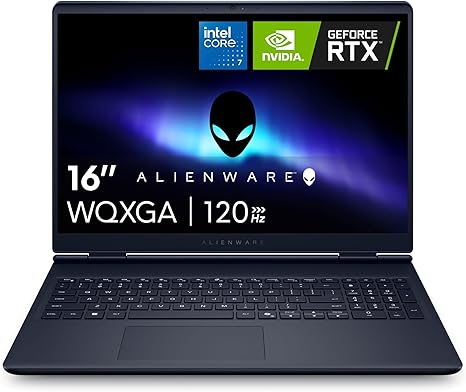
Welcome to Reviews inside tv, where we bring you the inside scoop on the latest tech. Today, we’re looking at the Alienware 16 Aurora laptop, a machine designed to bring next-level gaming and creation to your fingertips. With its 16-inch WQXGA display, the latest Intel Core i7 processor, and the power of NVIDIA’s RTX 50 Series GPU, is this the ultimate tool for gamers and creators? Let’s break it down.
First, let’s talk specs. The Alienware 16 comes equipped with an Intel Core i7-240H Series processor. This is part of Intel’s 13th generation, which means you’re getting solid multi-core performance. The 16GB of DDR5 RAM is an upgrade over older DDR4, offering faster speeds and better efficiency—helping with multitasking, gaming, and even content creation. When it comes to storage, this laptop has a 1TB SSD, which is quick enough for most users, meaning you can load games and large files in no time, and you won’t be running out of space anytime soon.
Now, for the GPU. It features an NVIDIA GeForce RTX 5060, with 8GB of GDDR7 memory. This GPU is built for both gaming and content creation, providing the power needed for smooth frame rates in modern AAA games and fast rendering times for creators. For those diving into ray-tracing or working with AI tools, this GPU offers solid performance that should hold up well for the next few years.
The 16-inch display is a standout. With a WQXGA resolution (2560 x 1600), this laptop’s screen offers a 16:10 aspect ratio, which provides more vertical space for productivity tasks like coding or writing, without feeling too cramped. The 300 nits brightness is decent, but not the brightest in the category. It’s fine for most indoor use, though bright sunlight might cause some issues. The color reproduction is sharp enough for creators and gamers who need accurate visuals, but it won’t match the vibrant OLED displays or high-end IPS screens you see in some premium models.
On the thermal side, Alienware has equipped this laptop with a Cryo-Chamber cooling system. This new structure focuses airflow on the critical components, ensuring the laptop stays cool under load. While gaming or rendering videos, this system should prevent significant throttling, maintaining high performance without overheating. The fans are decently quiet during everyday tasks, though you’ll notice some noise when pushing the machine during heavy gaming or creative workloads.
Battery life is always a key concern with powerful laptops like this. The Alienware 16 comes with a relatively large battery, but with a high-end CPU and GPU, you’re not going to get all-day use unless you’re doing very light tasks. Expect around 4-6 hours under moderate use, which is average for a gaming laptop. For more intensive tasks, such as gaming or video editing, you’ll likely be plugged in. The charging speed is fast, though, so you won’t be tied down to the wall for too long.
As for the build, this laptop feels solid. It’s not the lightest in its category, but it’s still fairly portable for a 16-inch gaming machine. Weighing in at a little over 5 pounds, it’s not a burden to carry around, but it’s certainly not ultraportable either. The design is sleek, and the material quality feels premium, which is typical of Alienware’s build standards. The streamlined design helps with thermal management, so it won’t heat up uncomfortably, even after long gaming sessions.
In terms of input devices, the keyboard on the Alienware 16 is well-designed for gaming and productivity. It offers good key travel and feedback, so you won’t tire out your fingers after long typing sessions. The trackpad is precise, though, like most gaming laptops, you might prefer using an external mouse for gaming. The keyboard layout is standard, but Alienware throws in customizable RGB lighting for that signature gamer vibe.
Connectivity is key for a gaming laptop, and the Alienware 16 has you covered. You get a healthy array of ports: USB-A, USB-C, HDMI, and an SD card reader. No Ethernet port, but the Wi-Fi 6E support should keep your internet connection stable, especially for online gaming. Thunderbolt would’ve been a nice addition for those who need faster data transfer speeds, but it’s not a dealbreaker here. There’s also Bluetooth support for wireless peripherals, which is great for a clean desk setup.
When it comes to thermal management, Alienware’s Cryo-Chamber system does a lot to keep things cool, but during extended gaming or high-load scenarios, you’ll still see the CPU and GPU temperature rise. The fans do kick up during this time, which is typical for high-performance laptops, but they’re not overwhelmingly loud—at least not in a way that detracts from the experience.
Now, let’s talk about real-world performance. For productivity, this laptop handles multitasking with ease. You can run multiple browser tabs, office documents, and video calls all at once without slowing down. If you’re into media consumption, the display is solid for streaming movies and TV shows, offering decent contrast and color accuracy for a more enjoyable viewing experience. As for content creators, photo editing, video rendering, and music production tasks run smoothly thanks to the combo of Intel’s powerful i7 chip and the NVIDIA GPU. Export times are quick, and the system doesn’t bog down under pressure.
When it comes to gaming, this laptop performs admirably. It can easily handle modern AAA titles like Cyberpunk 2077 or Call of Duty: Warzone at medium to high settings. Expect smooth 60+ FPS gaming, even with demanding titles. If you’re a competitive gamer aiming for higher frame rates, this might not hit the 120 FPS mark in the most graphically intense games, but it should be more than enough for casual or semi-competitive gaming at 1080p.
For those wondering how it compares to other machines in its class, there are a couple of direct competitors you could consider, like the Razer Blade 16 or the ASUS ROG Strix 16. The Alienware holds its ground in terms of GPU power, but it may fall short in portability compared to the ASUS ROG Strix, which is thinner and lighter. On the other hand, the Razer Blade 16 is slimmer but comes at a higher price for similar specs.
As for the value for money, at this price point, the Alienware 16 delivers solid performance and a reliable design. It’s not the cheapest laptop out there, but if you’re looking for a powerful, durable machine that can handle both gaming and creation tasks, it’s certainly a good investment. The RTX 5060 GPU, combined with a great display and efficient cooling, ensures that it’s ready for demanding applications both now and in the near future.
So, who is this laptop for? If you’re a gamer looking for a high-performance machine that doesn’t break the bank, or a creator in need of reliable power for rendering and editing, the Alienware 16 is a great option. However, if you’re after something more portable or have a tighter budget, you might want to explore alternatives.
Thanks for watching! Don’t forget to check out the laptop link in the comments box below. If you own the Alienware 16, drop a comment with your thoughts or any questions you have—we love hearing from you. Until next time, stay tech-savvy!
Available to buy here:


