Available to buy here:
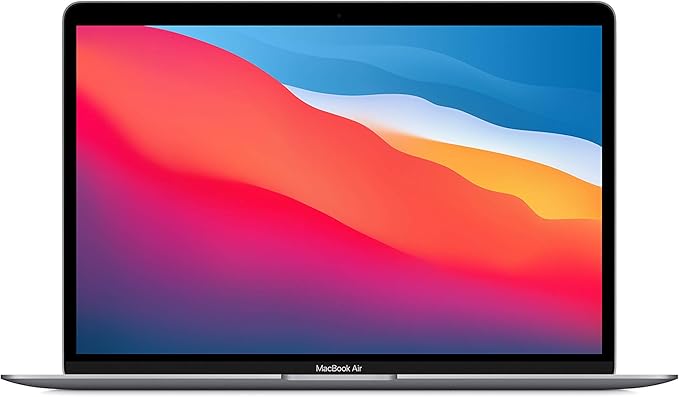
Welcome to “Reviews inside tv”! Today, we’re looking at the Apple 2020 MacBook Air with the M1 chip, a model that’s grabbed attention for being ultra-portable, powerful, and surprisingly affordable for an Apple laptop. If you’re on the hunt for a reliable, efficient machine that combines the ease of Apple’s ecosystem with solid performance, this might just be the perfect match. But is it? Let’s find out.
This MacBook Air is powered by Apple’s M1 chip, which combines an 8-core CPU and an 8-core GPU. This setup offers up to 3.5x faster performance compared to previous Intel-powered MacBooks, all while being more power-efficient. That means smoother multitasking, quicker application launches, and better performance in tasks like photo and video editing, without draining your battery in the process. For everyday office work, such as web browsing, handling multiple documents, and video calls, the MacBook Air performs seamlessly, offering a fluid experience whether you’re working on a few tabs or diving into a larger spreadsheet.
It’s equipped with 8GB of unified memory, which helps speed up system-wide performance. This unified memory architecture allows the CPU and GPU to share memory, making it more efficient for handling heavy workflows. While 8GB of RAM may seem modest, it is more than enough for most users, including those juggling a few apps or editing medium-sized graphics. For those who need more muscle, the MacBook Air also offers 16GB configurations, though this could push the price higher. But for standard multitasking, the 8GB of RAM is a solid choice, especially when combined with the fast SSD storage.
Speaking of storage, this model comes with a 512GB SSD, which offers quick file access and seamless boot times. That’s plenty of space for most users, allowing you to store documents, photos, and a few larger files without feeling cramped. It’s faster than traditional SATA storage and provides a noticeable boost in performance when transferring large files or booting up your system.
Now, let’s talk about the display. The 13.3-inch Retina display on the MacBook Air is a true standout in the laptop world. With vibrant colors, high resolution, and crisp text, it’s a delight to look at. Whether you’re watching videos or editing photos, the 2560×1600 resolution ensures that everything looks sharp, with a solid color accuracy and wide viewing angles, even if you’re working outside in direct sunlight. The 400 nits of brightness means you won’t have to squint, and the glossy screen is well-suited for media consumption, though some may prefer an anti-glare display for long hours in bright environments.
The battery life is another highlight. Apple promises up to 18 hours of use, and in real-world scenarios, that’s not far from the truth. With light office tasks like web browsing and document editing, you can easily get through a full workday without charging. If you’re watching videos or doing more demanding tasks like light photo editing or gaming, expect a bit less—probably closer to 12-14 hours. Either way, the battery life is impressive, especially when compared to other ultraportables in this class.
The fanless design of the MacBook Air is one of its most unique features. No matter how demanding your workload gets, the laptop remains silent, even during extended periods of use. The M1 chip’s efficiency means it doesn’t need a fan to keep things cool, which is a huge plus for those who need to work in quiet environments. Under heavy loads, such as video rendering or gaming, it gets a bit warm, but it doesn’t overheat, and the lack of fan noise makes it a great companion for quiet, focused work.
When it comes to the keyboard and trackpad, Apple delivers a solid experience. The Magic Keyboard is comfortable for long typing sessions, with good key travel and feedback. The layout is clean, with well-spaced keys, and the absence of a number pad is standard in this ultraportable class. The trackpad is large and responsive, offering smooth navigation and accurate gestures, with excellent palm rejection. It’s one of the best trackpads in the business.
Ports are somewhat limited, as you only get two Thunderbolt/USB 4 ports and a headphone jack. While this is enough for most tasks, you’ll need adapters if you plan to connect additional peripherals like an external display, USB-A devices, or SD cards. There’s no HDMI or SD card reader here, which is something to keep in mind if you need those for your workflow. On the plus side, the MacBook Air supports Wi-Fi 6 for faster wireless speeds and improved network reliability, making it future-proof for the next few years.
When it comes to real-world performance, the M1 chip impresses in everything from productivity tasks to media consumption. It handles spreadsheets, email, and web browsing with ease, and even more demanding creative tasks like photo and video editing in apps like Adobe Photoshop and Final Cut Pro. For casual gaming, the M1’s integrated GPU is capable of running titles like “Fortnite” or “Minecraft” smoothly at 1080p, though it’s not a gaming powerhouse. If you’re after high-end gaming performance, look elsewhere, but for light gaming or casual titles, it’s more than capable.
As for performance under load, the MacBook Air doesn’t suffer from thermal throttling, thanks to the efficient M1 chip. Even when tackling more intensive tasks, like rendering a video or working with large files, it maintains steady performance without slowing down. This, combined with its excellent battery life and silent operation, makes it a great all-rounder for productivity and light creative work.
The MacBook Air is also impressively light and portable. At just 2.8 pounds, it’s easy to toss into a bag and take on the go, making it an excellent choice for students or professionals who need to carry their laptop around all day. The slim profile and solid aluminum build quality add to its premium feel, though it’s worth noting that the lid can feel a bit flexible in some instances, which is typical for an ultraportable laptop.
The value for money here is great if you’re looking for an ultraportable laptop with solid performance for everyday tasks and light creative work. Compared to other laptops in its category, it holds its own in terms of power, battery life, and user experience. However, if you need more power for heavier creative workloads or gaming, you might need to look at other models in Apple’s lineup, or perhaps consider options from other brands at a similar price point.
In terms of build quality, the MacBook Air stands out for its premium materials and solid construction. The 100% recycled aluminum enclosure feels durable, and the screen hinges are sturdy, though not as rigid as you’d find on some higher-end models. Apple’s reputation for reliable hardware means you’re likely to get several years of solid use out of this laptop, though it’s always a good idea to invest in AppleCare+ for added peace of mind.
So, who is this laptop for? If you’re a student, office worker, or someone who needs a reliable, portable laptop for everyday tasks, media consumption, and light creative work, the MacBook Air is an excellent choice. It’s also a great option for those who are already immersed in the Apple ecosystem and want a seamless experience with their iPhone or iPad. However, if you’re a gamer or need a workstation-level laptop for demanding video editing or 3D rendering, you might want to look at other models with more powerful GPUs.
Thanks for watching! If you have any questions or thoughts on the MacBook Air, drop them in the comments below. If you’re ready to get one, the link is in the description. Don’t forget to like, subscribe, and hit the bell icon for more reviews from “Reviews inside tv.” Until next time, stay tech-savvy!
Available to buy here: