

Available to buy here:
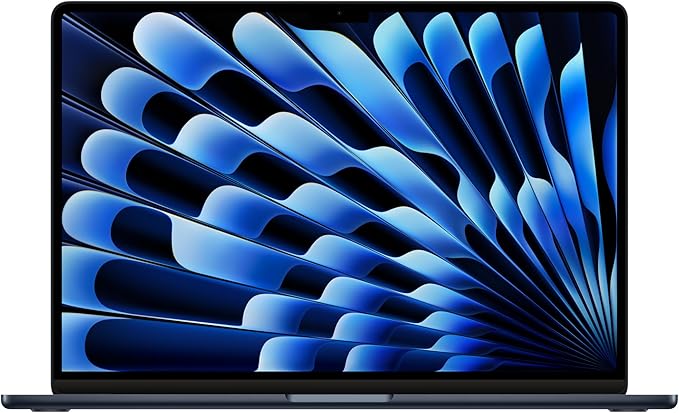
Apple’s 2024 MacBook Air with the M3 chip brings a lot of power packed into a sleek, portable design. It’s got an 8-core CPU and an optional 10-core GPU that promises to make everything from daily tasks to more demanding workloads feel incredibly fast. If you’re after a laptop that blends performance with portability, this could be a strong contender.
At just under half an inch thick and weighing a mere 3.3 pounds, the MacBook Air is an absolute dream for anyone who needs a lightweight device that won’t slow them down. Whether you’re a student carrying it around campus, a professional hopping from meeting to meeting, or a casual user who loves the idea of a laptop that can slip into a bag easily, this MacBook Air does not disappoint in terms of portability.
Looking at the specs, this model comes with 16GB of unified memory, which helps with multitasking, and a 512GB SSD, which ensures fast storage access and smooth performance for everyday tasks like document editing, web browsing, and streaming. The SSD also gives you enough space to store a decent number of files without worrying about running out of space too quickly.
The 15.3-inch Liquid Retina display is one of the standout features. With 1 billion colors and True Tone technology, everything from photos to video calls looks crisp and vibrant. It’s a great screen for creators, students, or anyone who enjoys watching movies or playing games. The resolution is sharp enough to make sure that text and images are clear, and the wide color support ensures that content looks as it should, with rich, true-to-life colors. If you’re used to more basic displays, you’ll notice a big difference when using the MacBook Air for anything related to media consumption or content creation.
Battery life here is another huge win. Apple claims up to 18 hours, and in real-world use, that holds up pretty well. If you’re just working on documents or browsing the web, you can easily make it through an entire day without needing a charge. The fact that it’s so energy-efficient, thanks to Apple Silicon, makes it even more appealing for people who need a reliable laptop for all-day use. And when you do need to charge, MagSafe charging makes reconnecting easier and safer, and the laptop charges up pretty quickly.
In terms of real-world usage, the MacBook Air holds up across a variety of scenarios. For office work, it’s more than capable of handling multi-tab web browsing, email, and document work without breaking a sweat. If you’re in the creative field, this laptop offers enough power to run programs like Adobe Creative Cloud apps, including Photoshop and Illustrator, though it might struggle with some of the heavier tasks like 4K video editing, especially under more intense workloads.
When it comes to gaming, the 10-core GPU certainly helps with casual gaming experiences, but if you’re after ultra-settings in titles like Cyberpunk 2077 or Warzone, you’ll need to lower the resolution or adjust settings for smoother gameplay. The MacBook Air is not designed to be a powerhouse gaming laptop, but it’s perfectly fine for casual games or less demanding titles.
On the keyboard and trackpad front, Apple’s MacBooks are known for providing an excellent typing experience, and the Air is no exception. The key travel and feedback are just right for long typing sessions, whether you’re working on an essay or coding a project. The trackpad is large, responsive, and incredibly accurate, making navigation and gestures a breeze. The backlit keys are useful in low-light environments, and the Touch ID feature adds a layer of security that works seamlessly.
As far as ports go, the MacBook Air comes with two Thunderbolt ports, a headphone jack, Wi-Fi 6E, Bluetooth 5.3, and the aforementioned MagSafe charging port. The Thunderbolt ports are versatile and support high-speed data transfer, external displays, and even fast charging. You can connect up to two external displays even with the lid closed, which is a nice feature for those who like to work with multiple monitors. However, the lack of additional ports, like USB-A or HDMI, might require you to carry an adapter or dongle if you need to connect older peripherals.
When it comes to thermal performance, the MacBook Air doesn’t have a fan, which helps keep it silent and cool under most tasks. However, during heavy workloads like gaming or video rendering, it might heat up a bit, but thanks to its passive cooling system, it avoids loud fan noise. This makes it great for working in quiet environments without the distraction of a noisy fan.
The MacBook Air’s build quality is, as expected, solid and premium. The aluminum body gives it a high-end feel, and the chassis remains rigid, even under slight pressure. There’s no flex or squeak when you hold it, which adds to its sense of reliability.
In terms of value for money, the MacBook Air is priced competitively in the ultraportable laptop market. If you’re primarily looking for a device that offers a balance of performance and portability for tasks like office work, media consumption, and light content creation, the Air is a great choice. However, if you’re into heavy gaming or pro-level video editing, you might want to look elsewhere, as the Air’s integrated GPU won’t deliver the same performance as dedicated graphics cards.
Comparing it to similar laptops, the MacBook Air competes with machines like the Dell XPS 15 and the Microsoft Surface Laptop 5. Both are similarly priced and offer solid performance, but the MacBook Air shines when it comes to battery life, screen quality, and integration with other Apple devices. On the flip side, if you need more ports or a more powerful GPU, the XPS 15 might be a better choice, especially for creative professionals.
Overall, the 2024 MacBook Air with the M3 chip is a fantastic laptop for students, professionals, and casual users who prioritize portability, battery life, and a great display. It’s not a gaming or video editing powerhouse, but for the vast majority of users, it provides everything you need in a sleek, light package. If you’re already embedded in the Apple ecosystem, this laptop makes a lot of sense. If you’re looking for something with more raw performance for intense workloads, you might want to explore other options.
Thanks for watching! If you’re considering the MacBook Air, check out the link in the comments. Let me know if you’ve already got one or if you’ve got any questions—I’d love to hear your thoughts. See you next time, and don’t forget to hit that subscribe button so you don’t miss out on future reviews!
Available to buy here:


