

Available to buy here:
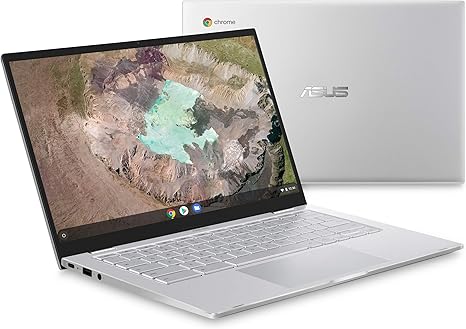
Welcome to “Reviews inside tv.” Today, we’re taking a closer look at the ASUS Chromebook C425, a sleek, ultra-portable laptop aimed at users who need a reliable machine for everyday tasks. Whether you’re a student, office worker, or someone looking for a simple but powerful device, this Chromebook promises a lot in a compact package. But does it live up to the expectations? Let’s find out.
First, let’s go over the core specs. The ASUS Chromebook C425 features a 14-inch Full HD display with a resolution of 1920×1080. Thanks to the 4-way NanoEdge design, it delivers a larger screen in a surprisingly small footprint, offering more screen space while keeping the body compact. This is perfect for users who want a bigger screen but don’t want to carry around a bulky laptop. It’s powered by the Intel Core m3-8100Y processor, which is a low-power, dual-core CPU designed for efficient performance in everyday tasks like web browsing, word processing, and light media consumption. Pair that with 4GB of RAM, and while this isn’t the most power-hungry setup, it should be adequate for most office tasks and casual multitasking. Storage comes in the form of a 128GB eMMC, which is decent for a Chromebook, offering fast enough load times and plenty of space for your documents and apps. Just keep in mind that it won’t offer the same speed or space as an SSD, so you might want to rely on cloud storage for bigger files.
The 180-degree hinge is a nice touch, giving you flexibility in how you use the laptop, whether you’re sharing a screen or trying to get a different angle. The keyboard offers 1.4mm of key travel, making it comfortable for extended typing sessions, and it’s backlit, which is always a nice feature when you’re working in low-light conditions. However, the 4GB RAM might limit you a bit when juggling multiple tabs or running heavier apps, so keep your expectations in check.
In terms of connectivity, the C425 is equipped with two USB Type-C Gen 1 ports and one USB Type-A Gen 1 port. This should cover most needs for connecting peripherals and external devices, although it could be a bit limiting if you rely on a lot of accessories. It also includes a large 6-inch trackpad, which is spacious and easy to navigate. While it may not be as precise as some higher-end models, it’s still a good option for the price.
Now, let’s talk about the display. The Full HD IPS screen is pretty impressive for a Chromebook at this price point. The colors are vibrant, and the viewing angles are solid, making it great for media consumption. Whether you’re streaming movies, watching YouTube videos, or browsing the web, the display delivers sharp visuals and good color accuracy. That being said, it’s not quite as bright as high-end screens, so using it outside in direct sunlight might be a bit of a challenge.
Battery life is another highlight. With a relatively small, low-power processor, you can expect the ASUS Chromebook C425 to last anywhere between 8 to 10 hours on a full charge under typical use—perfect for a day of office work, web browsing, and media consumption. The 2.8lbs weight makes it quite portable, so you can easily carry it around in a bag without it feeling too heavy. However, if you’re looking for something for extended creative or gaming sessions, this may not be the laptop for you.
In terms of performance, the Intel Core m3-8100Y processor is decent for everyday tasks, but don’t expect it to be a powerhouse for intensive workloads like video editing or gaming. It handles web browsing, Google Docs, and office apps like a champ, but it struggles when it comes to multitasking or running demanding programs. For media consumption, it’s fine—streaming video, including 1080p content, looks great on the screen.
Thermals and noise are also worth mentioning. The ASUS Chromebook C425 stays relatively cool during normal use, with the keyboard deck and bottom staying at a comfortable temperature. Under heavier loads, like streaming HD video for hours, the fan is audible but not overwhelmingly loud, which is a plus for comfort.
When it comes to keyboard and trackpad feel, the C425 does a solid job. The 1.4mm key travel feels comfortable for long typing sessions, and the trackpad is responsive, with good palm rejection. It’s not the most advanced trackpad on the market, but it works well for day-to-day use. As for the build, the C425 feels solid and premium for a Chromebook. While it’s made from plastic, the design is sleek, and the lightweight body makes it easy to carry around.
One of the standout features of this Chromebook is its software. Running Chrome OS, it integrates seamlessly with Google apps, including Docs, Sheets, and Slides, which is great for users who are already in the Google ecosystem. The 12-month Google One trial also gives you additional cloud storage, which is a nice bonus, but keep in mind that the offer expires, so it’s not a long-term solution.
On the downside, the 4GB of RAM can feel restrictive for users who tend to keep a lot of tabs open or work with more demanding apps. The eMMC storage, while sufficient for light use, doesn’t offer the same performance benefits as an SSD, meaning that file transfers and app loading could feel a bit slower compared to other laptops in this price range.
Now, let’s talk about value for money. At its current price, the ASUS Chromebook C425 offers solid performance for basic tasks. It’s a great option for students or professionals who need a lightweight, portable laptop for word processing, web browsing, and streaming. However, if you’re someone who needs a bit more muscle for multitasking, or if you’re after a high-performance laptop for creative work or gaming, you might want to look elsewhere.
In comparison, other Chromebooks in this range, like the Acer Chromebook Spin 13 or the HP Chromebook 14, offer similar specs but may have different design elements or screen sizes that appeal to other users. The ASUS Chromebook C425 stands out for its lightweight design and impressive display but falls short in terms of raw power and upgradeability.
When it comes to build quality, the C425 holds up well. The plastic construction feels sturdy, and there are no creaks or flexes in the chassis. However, the overall look and feel are more utilitarian than premium, but for a laptop at this price, that’s to be expected.
Customer support is decent, as ASUS offers a standard warranty and the usual online support options. While I haven’t encountered any widespread issues with this model, ASUS generally has a good reputation for support, which adds peace of mind for buyers.
To wrap it all up, the ASUS Chromebook C425 is a solid option for anyone looking for a reliable, portable Chromebook for everyday tasks. It’s lightweight, has a great display, and offers good battery life. However, it might not be the best choice for users who need more power or storage. If you’re mainly using it for web browsing, office work, and streaming, it could be a great fit, but keep in mind the limitations of the RAM and storage.
Thanks for watching today’s review. If you’re interested in the ASUS Chromebook C425, you can find the link to get it in the comments box below. Feel free to ask any questions or share your experience if you already own one. Don’t forget to like, subscribe, and hit the bell icon to stay updated on all our reviews. Until next time, happy computing!
Available to buy here:


