

Available to buy here:
Welcome to Reviews inside tv, where we take an in-depth look at the products that matter most to you. Today, we’re exploring the ASUS ExpertWiFi EBR63 AX3000 WiFi 6 Business Router. Whether you’re running a business that requires robust, secure networking or you’re looking for a solution to handle heavy traffic across multiple devices, this router promises to deliver. Let’s break down its features and see if it can live up to the hype.
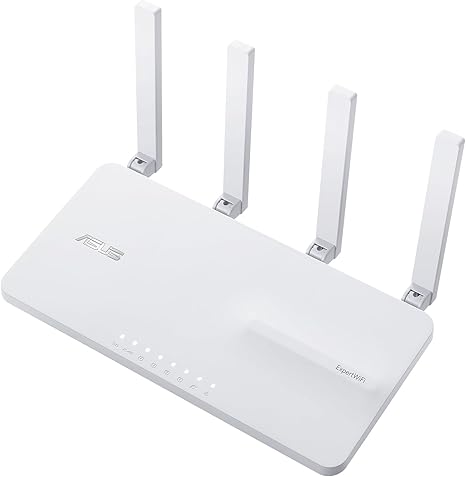
The ASUS ExpertWiFi EBR63 is built to provide fast, reliable Wi-Fi connections, ideal for small to medium-sized business environments. This Wi-Fi 6 router offers speeds up to 3000 mega bits per second across its tri-band network, utilizing both the 2.4GHz and 5GHz bands for optimal performance. With the ability to support up to five separate SSIDs, this router allows businesses to create dedicated networks for different departments, devices, or purposes, keeping traffic and security neatly separated.
A standout feature of the EBR63 is its customizable guest portal. You can modify everything from the SSID name to the branding and templates, creating a seamless and professional experience for visitors to your business network. And speaking of connectivity, the router offers a backup WAN option via its USB port. Simply connect it to a mobile phone with a hotspot to maintain a reliable internet connection in case of primary network failure—an essential feature for businesses that can’t afford downtime.
For security, the EBR63 comes with a free subscription to ASUS AiProtection Pro, which offers commercial-grade network protection for your Wi-Fi environment. AiProtection Pro includes safe browsing features, intrusion prevention, and even parental controls, ensuring your network stays secure from potential threats. Plus, the router is compatible with ASUS ExpertWiFi’s AIMesh system, allowing you to scale your network as your business grows without compromising performance.
Now, I put this router through its paces to see how it performs in real-world scenarios. First, setup was incredibly easy, thanks to the ASUS ExpertWiFi app. I simply followed the prompts, and within minutes, the network was up and running. The router’s configuration options are straightforward, and I appreciated the flexibility it offers in managing network settings, such as adjusting bandwidth allocation or creating virtual LANs.
I tested the router’s performance by streaming high-definition video, running video conferences, and transferring large files across different devices. The AX3000 Wi-Fi 6 speeds delivered strong, consistent performance, even with multiple devices connected at once. The ability to segment devices into different SSIDs is a huge bonus for businesses that need to separate traffic—for example, keeping point-of-sale systems isolated from employee devices or providing a dedicated guest network that doesn’t interfere with core business operations.
However, there are a couple of areas where the router could improve. While the backup WAN feature is fantastic for maintaining connectivity, the process of switching between primary and backup networks isn’t always seamless. There were a couple of moments where I noticed slight drops in connectivity before the router fully switched over to the backup connection. Also, while the router’s design is functional, it could be more compact—if you’re tight on space, it may feel a little bulky compared to some of the more streamlined options on the market.
In terms of value for money, the ASUS ExpertWiFi EBR63 is positioned as a business-grade router, and it delivers on that promise. The inclusion of free commercial-grade security, remote management features, and the backup WAN capability make it a solid choice for business owners who need a reliable, secure network. However, if you’re a home user, this router might be overkill for your needs, and you could likely find a more affordable option without sacrificing too much in terms of performance.
When compared to other business routers in the same price range, the ASUS ExpertWiFi EBR63 holds its ground well. For instance, the Netgear Nighthawk Pro Gaming XR500 offers similar speeds and features but lacks the level of customizable network management and commercial-grade security that ASUS includes. On the other hand, if you’re looking for something simpler, the TP-Link Omada ER605 offers great value with a lower price tag but with fewer advanced features, like the custom guest portal or full-scale security protections.
Looking at build quality, the ASUS ExpertWiFi EBR63 feels solid. The materials used in the construction are sturdy, and the router doesn’t feel flimsy at all. While I don’t have long-term data on its durability, ASUS has a good track record of producing reliable, long-lasting networking gear. With proper care, I expect this router to hold up well over time.
As for customer support, my interactions with ASUS were positive. The company offers a robust support system through live chat, email, and a comprehensive knowledge base. Response times were quick, and the troubleshooting assistance I received was helpful and professional.
In terms of firmware updates, the router automatically updates its software, and since it’s a business-grade device, this feature ensures that you always have the latest security patches and performance improvements. However, the update process is generally unobtrusive, running smoothly without requiring much attention from the user.
Summing up the ASUS ExpertWiFi EBR63 AX3000 WiFi 6 Business Router, this is a feature-packed device that offers robust security, reliable performance, and useful scalability for growing businesses. While there are minor areas that could be refined, such as seamless failover to the backup WAN and its overall size, it does a lot right, especially for business owners who need a secure, customizable, and high-performance networking solution.
If you’re looking for a way to streamline your business’s network, improve security, and ensure a consistent online experience, the EBR63 is certainly worth considering. But if you’re simply after a home router or don’t need the advanced features it offers, there are more affordable options available.
Thank you for watching! If you’ve used the ASUS ExpertWiFi EBR63 or have any thoughts on the product, feel free to drop your comments below. And if you’re interested in checking it out for yourself, the link to purchase is in the comments box.
Goodbye for now, and don’t forget to stay connected with Reviews inside tv!
Available to buy here:


