

Available to buy here:
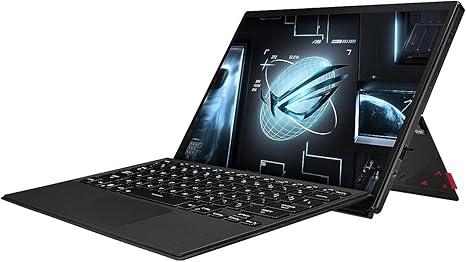
Welcome to Reviews inside tv! Today, we’re checking out the ASUS ROG Flow Z13, a gaming laptop tablet that promises the best of both worlds: raw power in a compact, flexible form factor. Whether you’re a gamer on the go or a creator looking for versatility, this device looks to do it all. But does it really? Let’s break down the specs, performance, and everything else to see if it lives up to the hype.
Starting with the basics, the Z13 is packing some serious muscle. Powered by the Intel Core i9-13900H, this is no ordinary CPU. With 14 cores and 20 threads, it’s built for heavy multitasking and demanding tasks like video editing, 3D rendering, and, of course, gaming. Coupled with the NVIDIA GeForce RTX 4050 GPU, it promises a smooth, high-performance experience, whether you’re gaming or creating content. The GPU is clocked at a 65W TGP, which is a bit lower than desktop-class cards, but still impressive for a compact, portable device like this.
You’ve got 16GB of LPDDR5 RAM, which should be plenty for most users, especially when paired with the fast 1TB PCIe 4.0 SSD. This combination offers snappy performance across the board, whether you’re loading up large files, switching between apps, or launching high-demand games. PCIe 4.0 SSDs are much faster than the older SATA-based drives, meaning faster boot times and quick access to all your content.
Now, let’s talk about the display. The Z13 features a 13.4-inch QHD Nebula touchscreen with a 165Hz refresh rate, which is fantastic for gaming and media consumption. The display supports 100% DCI-P3 color, meaning you’ll get vibrant, accurate colors, making it a great choice for content creators. It’s Pantone validated, so if you’re a designer or video editor, you can rely on it for color-critical work. And with 500 nits of brightness, it’s bright enough for outdoor use or in well-lit rooms, though it’s worth noting that the 16:10 aspect ratio may take a little getting used to for those accustomed to the traditional 16:9.
When it comes to real-world performance, the Z13 shines in a variety of scenarios. For office productivity, it’s more than capable of handling web browsing, email, document editing, and video calls without a hitch. The combination of the i9 processor and 16GB of RAM makes light work of multitasking, so you can have dozens of tabs open and still expect a smooth experience. Media consumption, whether it’s streaming 4K content or gaming, is where the Z13 truly excels. The 165Hz display and RTX 4050 GPU make it ideal for smooth, immersive gaming. Titles like Cyberpunk 2077 or Call of Duty will run well at medium to high settings, with solid FPS performance.
When it comes to content creation, whether you’re editing photos or videos, the i9 CPU and RTX 4050 handle the workload like a champ. The fast SSD also makes quick work of large file transfers, and you’ll notice shorter export times compared to systems with slower storage. But if you’re into more intensive tasks like 4K video editing or heavy 3D rendering, you may want to consider a machine with a higher-tier GPU for even faster results.
In terms of portability, the Z13 is both lightweight and slim, making it easy to toss in a backpack and take on the go. Weighing in at just 1.1kg (2.4 lbs), it’s one of the more portable gaming laptops out there, and its tablet form factor makes it incredibly versatile. You can use it as a regular laptop for productivity or detach the keyboard to use it as a tablet for drawing or note-taking, with active stylus support. Perfect for students, creators, or anyone who needs a laptop that adapts to their workflow.
One thing worth noting is the battery life. The Z13 packs a 56Wh battery, which is pretty typical for a device with this level of performance. In practice, expect around 6 to 8 hours of light office work, but gaming will drain the battery much faster. If you’re gaming on the go, be sure to bring the charger, as the battery won’t last long under heavy load. Charging is fairly quick thanks to USB-C fast charging, so you won’t be tethered to an outlet for too long.
Now, let’s talk about cooling. ASUS has taken great strides with its ROG Intelligent Cooling system. The liquid metal thermal compound on the CPU and the custom vapor chamber are designed to keep temperatures in check. In light use, the Z13 remains cool and quiet, but under heavy loads, such as gaming or video editing, the fans do kick up and can get noticeably louder. You won’t experience thermal throttling in short bursts, but extended gaming sessions or heavy workloads may lead to a bit of performance dip as the system tries to manage temperatures.
As for the keyboard and trackpad, the Z13’s keyboard offers decent key travel and feedback. It’s comfortable enough for typing out documents or responding to emails, but it’s not as good for long typing sessions as a more traditional laptop keyboard. The trackpad is large, responsive, and supports multi-touch gestures with no palm rejection issues. It feels precise, though some might prefer a more tactile response in the keys for prolonged use. The power button, which doubles as a fingerprint reader, is placed well for convenience.
In terms of connectivity, the Z13 is well-equipped for its size. You’ve got a pair of USB-A 3.2 ports, a Thunderbolt 4 port, an HDMI 2.0 port, and a microSD card reader. It supports Wi-Fi 6E and Bluetooth 5.2, making it great for wireless peripherals and fast internet speeds. There’s no Ethernet port, but given the Z13’s portability and gaming focus, that’s understandable. The RAM and SSD are soldered, so while you won’t be able to upgrade the RAM later, the 1TB SSD is more than enough for most users.
Now for the pros and cons. On the plus side, the Z13 offers exceptional performance, a stunning display, and great portability. It’s an ideal choice for gamers and content creators who need power without sacrificing flexibility. The battery life could be better, especially for gamers, and the keyboard might not be as comfortable for long typing sessions. The fans can get loud under load, but this is a common issue with high-performance laptops.
When it comes to value for money, the ASUS ROG Flow Z13 is a premium device, and it shows. At its price point, you’re getting excellent performance, a beautiful display, and the flexibility of a tablet-laptop hybrid. It’s not the cheapest option on the market, but if you’re looking for top-tier performance in a highly portable form factor, it’s a great choice. Comparatively, other high-performance 2-in-1 devices like the Microsoft Surface Book 3 or Lenovo ThinkPad X1 Tablet offer similar features, but they might not deliver the same gaming performance or GPU power.
As for build quality, the Z13 feels premium, with a sturdy, well-designed chassis. The hinge is solid, and the overall feel is a mix of sleek and durable. ASUS has put a lot of effort into ensuring that this device not only looks great but feels high-quality. With that said, the keyboard could use a little more refinement for extended typing sessions, and the lack of upgradable RAM might be a dealbreaker for some users in the long term.
In conclusion, the ASUS ROG Flow Z13 is an excellent choice for those who need a powerful, portable laptop with the added versatility of a tablet. It’s ideal for gamers, creators, and anyone looking for a laptop that does more than just sit on a desk. If you’re okay with a bit of fan noise under heavy load and the lack of upgradable RAM, it’s a great investment. But if you need something with longer battery life or a more comfortable keyboard for extended typing, this might not be the right pick for you.
Thanks for watching! Don’t forget to check out the link to grab the Z13 in the comments box below. If you’ve already used it, drop your thoughts and experiences in the comments—let’s hear from you! See you next time, and remember, your perfect laptop might just be a “Flow” away!
Available to buy here:


