
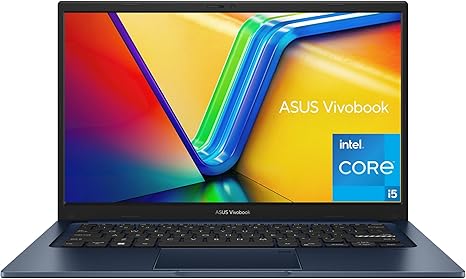

Available to buy here:
Welcome to “Reviews inside tv,” where we take a close look at the latest laptops to help you make the best choice for your needs. Today, we’re diving into the ASUS 2023 Vivobook 14, a laptop that’s designed for those who want solid performance, a smooth display, and portability without breaking the bank. Let’s see how this budget-friendly device holds up in real-world use.
The ASUS Vivobook 14 comes with an Intel Core i5-1235U processor, offering 10 cores and 12 threads for smooth multitasking. This CPU delivers reliable performance for everyday tasks, whether you’re working on documents, managing spreadsheets, or streaming videos. It pairs with Intel Iris Xᵉ Graphics, which are good for light photo editing, some casual gaming, and video playback. While it won’t run the latest AAA games on ultra settings, it’s more than capable for casual titles and content consumption. With 8GB of RAM and a 256GB SSD, you’re getting a decent balance for office work, web browsing, and light creative tasks. The SSD ensures fast boot times and quick app loading, which really boosts overall system responsiveness.
When it comes to display, the 14-inch FHD (1920 x 1080) screen is sharp enough for day-to-day use. The NanoEdge bezels give it a modern, sleek look, and the full HD resolution ensures that text, images, and videos appear crisp. While it’s not OLED or a high-refresh-rate panel, the Vivobook’s display does well for watching movies and working on documents. If you’re looking for a super-vibrant color range, it may not be the best, but for the price, it’s more than satisfactory. The battery life is another standout feature—thanks to ASUS’ fast-charge technology, you can recharge the battery up to 50% in just 30 minutes, which means less downtime and more productivity. Expect a solid 6 to 8 hours of use under regular conditions, though heavy tasks like video editing or gaming will reduce this.
One of the things that sets this laptop apart is the quiet and cool experience. Thanks to ASUS IceCool thermal technology, it stays cool under pressure, keeping the fan noise to a minimum, even when you’re pushing it with multiple applications open. The build quality is fairly durable, meeting US military-grade standards for toughness, which is impressive for a laptop at this price point. Whether you’re using it in a coffee shop or at your desk, the laptop holds up well in various environments. It’s also lightweight, weighing just 3.1 lbs, so it’s easy to carry around if you’re on the go.
Typing on the Vivobook 14 is comfortable, thanks to its ErgoSense keyboard. The keys have a nice amount of travel, and the layout is well-spaced, reducing strain on your hands and wrists during long typing sessions. The trackpad is smooth and responsive, supporting multi-touch gestures without any lag. As for connectivity, this laptop covers all the essentials. You get USB-A and USB-C ports, an HDMI port, and a fast USB-C port for external drives or monitors. Wi-Fi 6E and Bluetooth 5 provide excellent connectivity for stable internet speeds and seamless pairing with accessories.
On the performance side, the ASUS Vivobook 14 is great for most office tasks, web browsing, and media consumption. It can handle video calls with ease, and thanks to the AI Noise-Canceling Technology, your voice comes through clearly, even in noisy environments. However, for heavier creative workloads like 4K video editing or high-end gaming, you’ll notice some limitations. It’s not a powerhouse, but it’s perfectly suited for students, office workers, and casual creators who need a reliable and affordable option.
Now, let’s talk thermals and noise. Under light use, like web browsing and document editing, the Vivobook stays cool and quiet. However, during more demanding tasks, like running multiple apps or watching high-resolution videos, you might notice a slight increase in fan noise, though it’s nothing that would be disruptive. The keyboard deck and underside stay relatively cool, so you don’t have to worry about it overheating during long sessions.
In terms of value for money, the ASUS Vivobook 14 offers solid performance, a sleek design, and a well-rounded feature set for the price. It’s a great deal for those looking for a reliable laptop for school, work, or casual media consumption. Compared to other laptops in this price range, like the Lenovo IdeaPad 3 or Acer Aspire 5, it stands out with its build quality, fast charging, and AI noise-canceling technology, though those models may offer slightly better performance in some areas.
For those who need a more premium experience or better gaming performance, you might want to look at something like the ASUS ROG Zephyrus G14, but be prepared to pay more. On the other hand, if you’re simply looking for a laptop that delivers dependable performance, the Vivobook 14 is a strong choice.
The laptop feels durable, the screen is more than adequate, and it’s comfortable to use for long periods. Plus, it charges fast and stays cool, even under load. The downside is that it’s not the best for heavy gaming or intensive creative tasks, but for everyday use, it’s a reliable option that punches well above its weight. The key takeaway here is that the ASUS Vivobook 14 is a great value for its price, offering solid performance, a reliable display, and decent battery life for users who need a no-fuss laptop that gets the job done.
Thanks for watching! If you’re interested in the ASUS Vivobook 14, the link to get it is in the comments box below. Don’t forget to like, subscribe, and hit the bell icon so you don’t miss any of our reviews. If you already own this laptop, drop a comment and let us know how it’s been working for you. Until next time, happy computing!
Available to buy here:


