

Available to buy here:
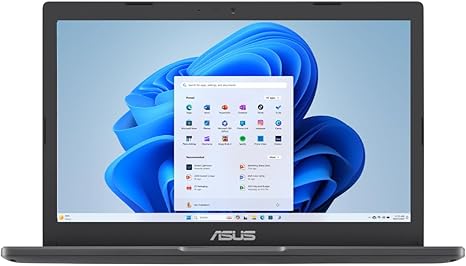
Welcome back to “Reviews inside tv.” Today, we’re taking a closer look at the ASUS Vivobook Go 11.6” HD Slim Laptop. Aimed at students, light office users, or anyone in need of a simple and affordable portable device, this laptop promises a balance of performance, practicality, and value. But does it truly deliver? Let’s find out.
The ASUS Vivobook Go 11.6” is powered by the Intel Celeron N4500 processor, a dual-core chip that’s designed for basic computing tasks. Now, if you’re wondering what that means in real-world terms, the N4500 isn’t going to blow through demanding workloads like video editing or high-end gaming. But for things like web browsing, working on documents, light spreadsheets, and video calls, it holds up well. Paired with 4GB of DDR4 RAM and Intel’s integrated graphics, this laptop handles basic multitasking and everyday tasks without much hiccup. However, don’t expect smooth performance with too many apps or heavy-duty programs running at the same time.
The storage is a 128GB SSD, which is decent for an entry-level laptop. You won’t be storing a massive media library or a ton of high-resolution photos, but it’s enough for your essential apps, documents, and web browsing history. Plus, the SSD provides faster boot times and quicker file transfers than older, traditional hard drives, so it’s a nice touch for the price.
Now, let’s talk about the display. With an 11.6” HD screen at 1366 x 768 resolution, this isn’t the sharpest display out there, but it gets the job done. The 200 nits peak brightness is on the lower end, meaning it’s fine for indoor use, but it may struggle in brighter environments. Color accuracy and sharpness aren’t impressive either, but for the price, it’s serviceable for watching videos, browsing the web, or working on documents.
In terms of battery life, the Vivobook Go packs a decent punch. Expect around 6-8 hours of use on a single charge under typical conditions, like office work or media consumption. That’s not bad for a laptop in this category, and it’s a good amount of time if you’re taking it to class or working from a coffee shop.
When it comes to build quality, the Vivobook Go is lightweight and slim, making it easy to carry around. Weighing in at just under 2.5 pounds, it’s portable enough for students and professionals on the go. The plastic build feels a bit flimsy, but that’s to be expected with a budget laptop. The black chassis does look sleek, though, with a minimalist design that doesn’t scream cheap.
As for the keyboard and trackpad, they’re pretty basic. The key travel is shallow, but the keys are reasonably responsive, so you can still get some decent typing done for emails or assignments. The trackpad, however, is a bit small and lacks the precision you’ll find on higher-end models. It works, but it’s not the most comfortable experience for extended use. There’s also no backlighting on the keyboard, which is a small but noticeable drawback in low-light conditions.
The laptop offers decent connectivity for its class. You’ll find one USB 3.2 Type-A port, two USB 2.0 ports, a microSD card reader, and a headphone jack. For wireless connectivity, there’s Wi-Fi 5 and Bluetooth 4.2, which should be fine for most users, though it’s not the latest tech. There’s no USB-C or HDMI, so if you plan to hook it up to an external monitor, you’ll need to use one of the older USB ports.
In terms of performance under load, the Vivobook Go does okay for light tasks but does start to show its limitations if you push it too hard. It’s not meant for gaming or intensive applications, and you’ll notice some slowdowns when multitasking beyond a few apps. The Intel Graphics aren’t meant for anything beyond casual games at low settings—titles like “Minecraft” or “Stardew Valley” should run fine, but more demanding games like “Fortnite” or “Call of Duty” will struggle. The fan noise is minimal, though, so for most basic tasks, it’s relatively quiet. However, under load, the laptop can heat up slightly, especially around the keyboard deck, but it’s not to the point where it becomes uncomfortable to use.
When it comes to the overall value for money, this laptop does a solid job for anyone on a budget. It’s great for students who need a simple device for schoolwork or light entertainment. The low resolution and limited storage might be drawbacks for more demanding users, but for the price, it’s tough to find a better deal for basic computing tasks.
So, who is this laptop for? If you’re just looking for something to browse the web, watch some Netflix, and handle basic office tasks, the ASUS Vivobook Go 11.6” will do the job just fine. It’s not going to win any awards for speed, screen quality, or multitasking, but for the budget-conscious buyer, it’s a solid choice. However, if you’re after a machine for more demanding tasks, this probably isn’t the one for you.
Now, if you found this review helpful, don’t forget to like, subscribe, and hit that bell icon so you can stay updated with more reviews from “Reviews inside tv.” Also, feel free to drop a comment below if you have any questions or thoughts—especially if you’ve used this laptop yourself. We’d love to hear your take on it. Thanks for watching, and we’ll catch you next time with another review!
Available to buy here:


