

Available to buy here:
Welcome to Reviews inside tv! Today, we’re taking a close look at the ASUS 15.6” Vivobook Go, a budget-friendly laptop designed with everyday tasks in mind. Whether you’re a student, office worker, or someone just looking for a no-fuss, reliable laptop, the Vivobook Go might catch your attention. But does it deliver? Let’s find out.
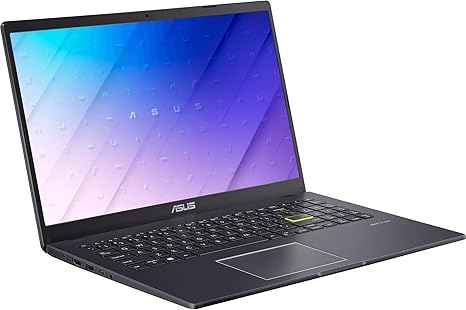
The ASUS Vivobook Go comes with an Intel Quad-Core processor, paired with Intel HD graphics. With 4GB of RAM and 64GB of SSD storage, it’s clear that this laptop is aimed at users who need basic performance for tasks like web browsing, office work, and media consumption. The 15.6-inch full HD display offers a solid experience for everyday viewing, although it may not be as vibrant as more premium panels like OLED or mini-LED. With a 42Wh battery, ASUS claims it will keep you going through light work and media sessions. It also comes with a 720p HD camera, complete with a shutter for privacy, and is powered by Windows 11 in S Mode, which is designed to keep things running smoothly by only allowing apps from the Microsoft Store.
In terms of ports and connectivity, this laptop keeps it simple with Wi-Fi 5 and Bluetooth 5.1. If you’re looking for more advanced connections like USB-C or Thunderbolt, you won’t find them here, but it does offer USB-A, HDMI, and an SD card reader, which should cover the essentials for most users. The 720p camera will work for video calls, but don’t expect the best clarity or performance in low light, as it’s basic by today’s standards.
In real-world use, the Vivobook Go is geared more for light productivity. Whether you’re working on documents, spreadsheets, or just browsing the web with a few tabs open, the Intel Quad-Core processor does its job, though it won’t handle heavy multitasking or demanding apps like photo or video editing very well. The 4GB of RAM might start to feel limiting if you push it too hard, but for basic office work, it’s sufficient. The 64GB SSD is an upgrade over traditional hard drives, offering faster boot times and snappier response, but it’s on the smaller side, and you’ll need to rely on cloud storage or external drives for larger files.
For media consumption, this laptop does okay. The 15.6-inch display isn’t the brightest or most color-accurate, but it will work fine for streaming video or watching movies. Just don’t expect an immersive experience; the colors and contrast are on the modest side, and the refresh rate is typical for a laptop in this price range, so gaming won’t be its strong suit. In fact, this laptop isn’t designed for gaming, and while casual games might run, graphically demanding titles like those in the AAA category won’t perform well. The Intel HD graphics are fine for light gaming, but anything beyond that will result in lower frame rates or a laggy experience.
Thermals are generally decent under light workloads. The laptop stays relatively cool during everyday tasks, but under heavier load, like during prolonged web browsing or video streaming, you might notice it warming up a bit. The fan noise isn’t overpowering, but it can become noticeable during more intense tasks. For something that’s geared for basic use, the thermal design does the job without too much fuss.
The 42Wh battery offers up to 5-7 hours of light use, depending on what you’re doing. This could be just enough for a few hours of work at a coffee shop or watching videos. However, if you plan to use this for more demanding tasks, like gaming or heavy multitasking, expect the battery life to drop significantly. Charging speeds aren’t the quickest, and since the charger is relatively compact, it should be easy to take with you if you’re on the go.
The keyboard and trackpad are simple but functional. The keyboard features decent key travel and feedback for typing, though it won’t be as comfortable for long sessions as more premium models. The trackpad, on the other hand, is responsive with solid palm rejection, making navigation a breeze for daily tasks.
In terms of value, the ASUS Vivobook Go stands out if you’re looking for a budget-friendly laptop that handles the basics well. For students or light office users, it could be a great choice for simple work and media consumption. The 64GB SSD and 4GB of RAM might be a limiting factor for more intensive tasks, but if you’re not asking for much more than a basic laptop experience, this could be all you need.
In comparison to some of its competitors, like the Lenovo IdeaPad or HP’s budget models, the Vivobook Go stands its ground. It may not have the most powerful specs or the flashiest design, but it’s a solid option for those who don’t want to break the bank. However, if you’re a creator or gamer, this laptop likely won’t meet your needs, and you might want to look into something with more power.
Build quality-wise, the Vivobook Go feels fairly sturdy for its price range. It’s made of plastic, so it doesn’t have the premium feel of higher-end models, but it’s not flimsy either. At 3.3 pounds, it’s relatively lightweight for a 15.6-inch laptop, making it portable enough for most users.
In terms of customer support, ASUS generally offers good service, though it can vary depending on your location. They have a decent warranty policy, and getting support for this model should be straightforward if any issues arise.
To wrap it up, the ASUS Vivobook Go is best suited for those who need a simple, no-frills laptop for everyday tasks like browsing, office work, and light media consumption. It’s not going to win any performance awards, but it gets the job done for users on a budget. If you need more power for creative work, gaming, or heavy multitasking, this probably isn’t the right choice. But for students or casual users looking for a budget-friendly option, it’s worth considering.
Thanks for watching! If you have any questions or experiences with this laptop, feel free to drop them in the comments. Don’t forget to like, subscribe, and hit that bell icon to stay updated with our latest reviews. See you in the next one!
Available to buy here:


