

Available to buy here:
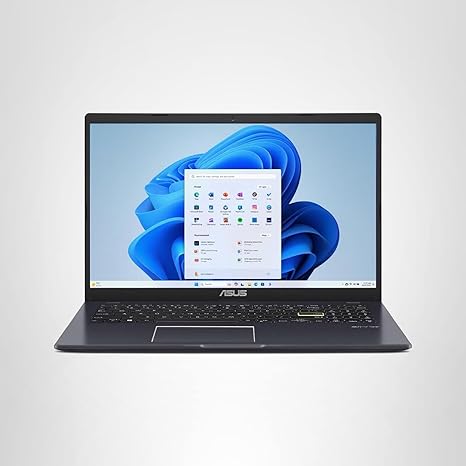
Welcome back to Reviews inside tv! Today, we’re taking a close look at the ASUS 15.6” Vivobook Go Slim Laptop, a budget-friendly option tailored for students or anyone in need of a reliable, portable machine for basic computing. With its sleek design and features like an Intel Celeron processor, 4GB of RAM, and a 128GB SSD, it promises a smooth, no-frills experience. But does it hold up to the demands of everyday use? Let’s find out.
First off, let’s break down the specs. This laptop packs a 15.6-inch Full HD display with a 1920 x 1080 resolution and a 60Hz refresh rate. For a budget laptop, the screen looks decent enough for general tasks. The 220 nits peak brightness is typical for its class, offering enough visibility for indoor use, but it might fall short in very bright environments. If you plan on using this outside in direct sunlight, you might find it a little hard to see clearly, but for typical indoor study or work sessions, it should be more than adequate.
Under the hood, the Intel Celeron N4500 processor powers the Vivobook Go. This is a dual-core chip built for light tasks. You’re not going to be editing videos or gaming on this machine, but for web browsing, office productivity like word processing and spreadsheets, and video calls, it gets the job done. The 4GB of DDR4 RAM is on the lower end for multitasking, but it’s enough to handle a few tabs in your browser and basic applications. However, keep in mind that if you’re a heavy multitasker, you might start to feel some lag with too many apps running at once.
Storage is handled by a 128GB eMMC drive. While eMMC isn’t as fast as an SSD, it does offer solid-state storage speeds, which are much faster than traditional HDDs. It should be fine for storing your documents, media, and a few apps, but you’ll want to offload larger files or apps that require more space. The 128GB can fill up quickly, especially with Windows 11 taking up a decent chunk of that. If you need more storage, consider using an external hard drive or cloud storage options.
In terms of graphics, the Intel HD Graphics integrated into the Celeron N4500 will handle light tasks like watching videos, browsing, or playing casual games with low settings. If you’re thinking of playing graphically demanding titles, you’ll definitely need to look elsewhere. But for the casual user or student, this GPU will serve basic needs. The integrated graphics will also help with energy efficiency, keeping the battery life reasonable for most users.
Speaking of battery life, the ASUS Vivobook Go is equipped with a 42Wh battery. This should give you around 6 to 8 hours of use, depending on what you’re doing. For light office work and streaming, you can expect it to last a full day of studying or classes. And when it’s time to charge, ASUS has included Fast-Charge technology, getting you to 60% in just 49 minutes. That’s a great feature for students or anyone on the go, as it minimizes downtime. However, if you’re doing heavier tasks like streaming or running multiple apps, the battery may drain faster, and you might need to keep the charger handy.
Now, let’s talk about the keyboard and trackpad. The Vivobook Go comes with an ErgoSense backlit chiclet keyboard. The key travel is decent, and while it’s not as cushy as a premium laptop, it should be comfortable enough for typing long papers or taking notes in class. The backlighting is a nice touch, especially if you’re working in dimly lit environments. The trackpad is responsive, though on the smaller side. It supports multi-touch gestures, so you won’t have issues navigating the interface, but don’t expect the same precision you’d get from more expensive models.
Connectivity is solid with Wi-Fi 5 (802.11ac) and Bluetooth 5.1. While Wi-Fi 6 would have been a nice bonus, Wi-Fi 5 is still sufficient for most users who are simply browsing the web, attending video calls, or streaming. The laptop also features a full set of ports including USB-A, USB-C, HDMI, and a headphone jack, so you can easily hook up external displays or other peripherals. However, it’s worth noting that the storage and RAM are not upgradeable, so what you see is what you get in terms of future-proofing.
As for thermals and noise, the Vivobook Go does a pretty good job in terms of staying cool under light workloads. The fan is generally quiet, and you won’t notice much heat unless you’re pushing the laptop harder than intended. But remember, this is not a machine built for gaming or intensive workloads, so if you push it too hard, the system may throttle its performance to avoid overheating, and you may start to hear the fans kicking in.
So, who’s this laptop for? Well, the ASUS Vivobook Go is best suited for students or anyone in need of a compact, affordable device for basic tasks. If you’re just browsing the web, writing papers, attending virtual classes, or streaming some Netflix, this laptop will serve you well. However, if you need more power for tasks like photo/video editing or gaming, you’ll want to look for something with a more powerful processor and dedicated graphics.
As for value, the Vivobook Go offers a solid balance between performance and price. At its current price point, it’s a good deal for the user who needs a reliable laptop for basic tasks without spending too much. You’re not going to get the fastest performance or the sharpest display, but for what it’s built for, it provides a solid experience at an affordable price.
To wrap it up, the ASUS 15.6” Vivobook Go Slim Laptop is a great option for students or casual users who need an affordable laptop for basic tasks. It’s portable, has decent battery life, and gets the job done without breaking the bank. If you’re after a laptop for more intensive tasks, you may want to consider something with a more powerful CPU and dedicated graphics. But for light workloads, this is a strong contender in its category.
Thank you for watching! You can find the link to purchase the Vivobook Go in the comments box. Let me know if you have any questions or if you already own this laptop—I’d love to hear your thoughts! Until next time, keep on reviewing.
Available to buy here:


