

Available to buy here:
Welcome to Reviews Inside TV! Today, we’re checking out the Corsair EX400U 1TB USB4 Portable External SSD. Whether you’re a content creator, gamer, or someone who needs fast and reliable storage on the go, this product promises to deliver top-tier performance in a small, portable package. But does it live up to the hype? Let’s find out.
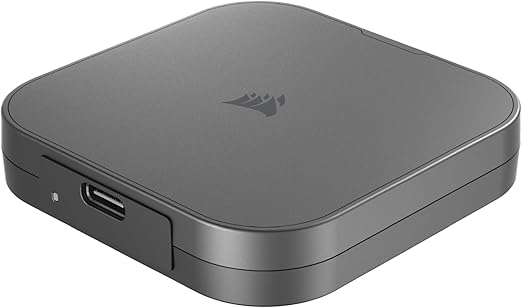
The Corsair EX400U 1TB is an external SSD that leverages USB4 technology to offer impressive speeds for anyone looking to transfer large files quickly. Designed for those who require fast and reliable storage, it supports sequential read speeds of up to 4,000MB per second and write speeds up to 3,500MB per second. The device is compatible with USB Type-C, and also works with Thunderbolt 4 and higher, ensuring that you can use it with a wide range of devices. The 1TB version offers ample space for storing large video files, photos, and other data-heavy content. It’s available in a sleek gray color, with a compact form factor that makes it easy to carry around. The plug-and-play setup means that, right out of the box, you simply plug it in, and you’re good to go on both Windows and macOS systems.
Now, after putting it to the test, I’ll walk you through how it holds up in real-world usage. Setting it up was incredibly straightforward. With its plug-and-play functionality, I was able to get started in seconds. I tried transferring a few large files, including 4K videos and raw image files, and the speed was nothing short of impressive. I didn’t experience any noticeable lag, and everything transferred smoothly. In practical terms, this means that whether you’re a professional working with high-resolution media or a casual user simply moving large folders, this SSD is going to make the process a breeze.
But, no product is without its flaws. While the Corsair EX400U delivers fantastic performance, it does come with some limitations. For instance, the drive’s maximum performance requires a USB4 connection, and on systems that only have USB Type-C or Thunderbolt 3, you’ll see a decrease in speed. That said, the drive still performs well in these cases, but if you’re looking for those blistering speeds, you’ll need the latest tech. Another minor con is the compact design—it’s great for portability, but it does mean that it could be easier to misplace or lose compared to bulkier models. Also, some users may find that while it’s compatible with many devices, it’s not universally supported by all older devices, so it’s something to keep in mind before purchase.
On the flip side, the pros are easy to see. The build quality of the EX400U is solid, with a durable feel that inspires confidence. It’s also extremely lightweight, making it the ideal companion for anyone who needs to take high-speed storage on the go. As someone who often works on multiple devices, I appreciate how easily it switched between my Windows laptop and MacBook without any hiccups. Plus, the high-speed transfer rates mean you’re not wasting time waiting for files to copy, which is a huge bonus in both professional and personal use.
As for value for money, the EX400U offers a great balance between performance and price. While it’s not the cheapest option on the market, the speed and ease of use it offers justify the investment for anyone who needs top-tier performance. Compared to similar products, like the Samsung T7 or Western Digital My Passport SSD, Corsair’s EX400U stands out because of its USB4 support, providing faster data transfer speeds. However, if you’re using an older device that doesn’t support USB4, you might want to consider alternatives unless the faster speeds are a key requirement.
When comparing the EX400U with other external SSDs, like the Samsung T7 Touch or SanDisk Extreme Pro, you’ll notice that Corsair’s drive has the edge in terms of speed, particularly for those who have USB4 or Thunderbolt 4-enabled devices. The T7, while still very fast, doesn’t quite reach the same sequential read and write speeds, making the EX400U a superior choice for performance-heavy tasks. On the other hand, if you don’t need that extra performance boost and are more concerned about security features like built-in encryption, the T7 might be worth considering.
In terms of build quality, the EX400U feels robust. It’s made of high-quality materials that don’t feel flimsy. While I haven’t had it long enough to assess its long-term durability, Corsair is a reputable brand known for producing reliable storage solutions, so I’d expect this SSD to perform well over time, especially given its sturdy design. It’s also backed by a solid warranty, offering some peace of mind if anything goes wrong.
Customer support wasn’t something I had to test during my use of the EX400U, but Corsair has a well-established reputation for providing helpful service when needed. If past experiences with their customer support are anything to go by, you can expect them to be responsive and supportive if you run into any issues with the product.
As for updates, since this is a storage device, there’s no real need for frequent firmware updates like you might see with gaming consoles or smart devices. Corsair doesn’t typically require updates for this kind of hardware, and the product’s performance is stable right out of the box.
To wrap things up, the Corsair EX400U 1TB USB4 Portable External SSD is a solid performer that checks off the boxes for speed, portability, and ease of use. While it’s not the cheapest on the market, it certainly delivers where it counts. If you’re someone who needs fast transfer speeds, a compact form factor, and plug-and-play functionality, this product is worth considering. However, if you’re working with older devices or don’t need the cutting-edge speed, there are other options available at a lower price point.
If you found this review helpful, don’t forget to give it a thumbs up, subscribe, and hit the bell icon to stay updated on our latest reviews. Do you already own the Corsair EX400U, or have any questions? Drop them in the comments below—I’d love to hear your thoughts!
Thanks for watching, and until next time—keep your storage fast and your data safe with Reviews Inside TV!
Available to buy here:


