

Available to buy here:
Welcome back to “Reviews Inside TV,” the place where we bring you honest, in-depth reviews of all things tech, gaming, and beyond. Today, we’re talking about a keyboard that claims to offer the perfect balance of performance, style, and customization. Introducing the Corsair K65 Plus Wireless 75% RGB Mechanical Gaming Keyboard. With a compact 75% layout, a hot-swappable design, and the promise of a tactile typing experience, it’s built to cater to both gamers and typists alike. But does it live up to the hype? Let’s find out.
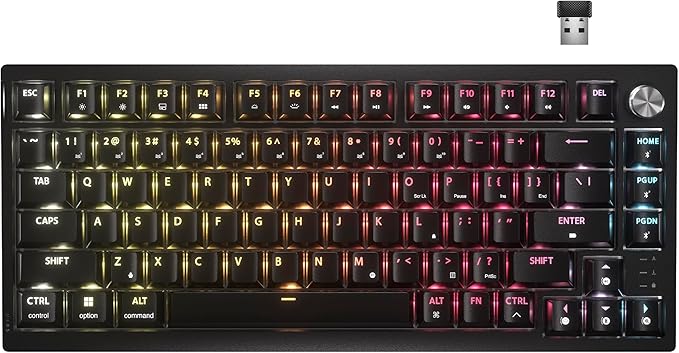
The Corsair K65 Plus is all about providing the best of both worlds—space efficiency and immersive performance. The 75% layout is a standout feature, allowing for more room for your mouse, which is especially valuable in fast-paced gaming. The smaller form factor doesn’t skimp on key functionality either. The K65 Plus retains all the essential keys you’d need, with a more compact and streamlined design. It’s designed for those who want a cleaner, more open setup but don’t want to sacrifice the key count.
Under the hood, the K65 Plus features Corsair’s MLX Fusion tactile switches. These are pre-lubricated for a smooth and satisfying keystroke that aims to reduce friction for a more fluid typing experience. This is a big plus for those who spend long hours typing or gaming, as it promises less fatigue. The switches are tactile, giving a noticeable feedback on each key press, making it great for both gaming and typing. But the customization doesn’t stop there. The K65 Plus offers hot-swappable switches, which means you can easily swap out the default switches for your preferred style, allowing for a truly personalized feel. For users who like to fine-tune their setup, this feature is a game-changer.
The keycaps are made from durable PBT plastic, known for its ability to resist wear and fading over time. The double-shot molding process ensures that the legends on each key won’t fade, no matter how much you use them. This is especially important for those who spend countless hours gaming or typing, as cheaper keycaps can quickly start to wear down, making the legends illegible.
On the connectivity front, the K65 Plus doesn’t disappoint. It supports three different modes—2.4GHz wireless, Bluetooth, and wired USB. The 2.4GHz wireless connection offers low latency, which is essential for competitive gaming, ensuring that every keystroke is registered in real time without noticeable delay. The Bluetooth option allows for a more flexible, clutter-free setup, and the USB mode provides a stable wired connection when needed. Additionally, the keyboard features AES encryption, which adds an extra layer of security, particularly when gaming or working in shared environments.
Now, let’s talk about how the K65 Plus performs in real-world scenarios. Setting it up is a breeze—whether you’re using the wireless 2.4GHz connection, Bluetooth, or wired mode, the keyboard connects without hassle. The wireless performance is reliable, with no noticeable lag in my testing, even during intense gaming sessions. For gamers, this is a big win. The tactile feedback of the MLX Fusion switches is immediately noticeable and feels satisfying to type on. It’s not overly loud, so it won’t disturb those around you, but the tactile bump provides just enough feedback to let you know that a key has been pressed.
When it comes to gaming, the K65 Plus handles fast-paced action with ease. I tested it across several titles, including fast shooters and strategy games, and found that the keys were responsive and reliable throughout. The 75% layout offers a comfortable typing experience, but depending on your hand size, the compact nature of the board might take some getting used to. While it’s great for saving desk space, some users may miss the extra row of keys that come with a full-sized board, especially if you’re used to having dedicated function keys or a number pad.
The RGB lighting on the K65 Plus is another area where Corsair shines. The per-key RGB is vibrant, and the lighting shines through the double-shot PBT keycaps beautifully. Customization is a breeze with Corsair’s iCUE software, allowing you to set up profiles, lighting effects, and even macros. For those who love tweaking their setups, this adds a whole new level of customization.
Of course, no product is without its downsides. One area where the K65 Plus could improve is its price. At the time of writing, it’s positioned at a premium price point, especially when you consider the compact 75% layout. While the build quality and features are excellent, some may feel that the lack of a dedicated number pad or extra function keys could be a deal-breaker for users who rely heavily on those features for work or other tasks.
The hot-swappable feature is certainly a nice touch, but it may not be of value to everyone, especially if you’re not into keyboard modding. Some might argue that the inclusion of Bluetooth connectivity, while convenient, isn’t necessary for a high-performance gaming keyboard, especially when the 2.4GHz wireless option works so well. But again, if you’re someone who values flexibility, it’s a welcome addition.
When comparing the K65 Plus to similar products on the market, one direct competitor is the Logitech G Pro X. The G Pro X also features hot-swappable switches and a compact layout, but it lacks the same robust RGB lighting and premium keycaps that the K65 Plus offers. Another competitor could be the Razer Huntsman Mini, which is also a 60-65% layout keyboard with a focus on speed and performance, but lacks the same level of customization in terms of hot-swappable switches. If you’re willing to spend a little extra, the K65 Plus might offer better build quality and more customization options, but if you’re looking for a cheaper, no-frills keyboard, the G Pro X might be the way to go.
The build quality of the K65 Plus is solid, with a sturdy frame that feels premium to the touch. The PBT keycaps feel durable and should last for years with proper care. As for longevity, Corsair’s reputation for producing high-quality, long-lasting products bodes well for the K65 Plus. While I haven’t had the keyboard long enough to test its long-term durability, it’s clear from the materials used and Corsair’s track record that this is a product built to last.
Customer support is something I haven’t had to test, as the keyboard hasn’t had any issues in my time using it. That said, Corsair has a reputation for offering excellent customer service, with fast response times and helpful support staff, should you need assistance. Corsair’s warranty also backs this product, providing peace of mind for users who want to ensure they’re covered in case of any manufacturing defects.
In conclusion, the Corsair K65 Plus Wireless 75% RGB Mechanical Gaming Keyboard is a solid choice for gamers and typists who want a compact, customizable, and high-performance keyboard. While it may not be for everyone due to the lack of a number pad and premium price, it excels in areas like performance, build quality, and customization. If you value hot-swappable switches, premium keycaps, and strong wireless performance, the K65 Plus offers a satisfying experience. But if you’re on the hunt for something more affordable or prefer a full-size layout, you may want to explore other options.
Thanks for tuning in to “Reviews Inside TV.” Be sure to hit that like button, subscribe, and ring the bell for more honest reviews. If you have any thoughts or questions, drop them in the comments below. And if you’ve tried the Corsair K65 Plus, I’d love to hear your experience. Goodbye until next time, where we’ll continue bringing you the best in tech reviews—only at Reviews Inside TV!
Available to buy here:


