

Available to buy here:
Welcome to “Reviews inside tv,” your go-to source for in-depth product reviews. Today, we’re taking a closer look at the CyberpowerPC Skorpion K2 RGB Mechanical Gaming Keyboard. If you’re someone who spends hours gaming or typing away at your computer, chances are, you’ve considered upgrading to a mechanical keyboard for that premium feel. But does the CyberpowerPC Skorpion K2 truly stand out, or is it just another option in a crowded market? Let’s see.
The CyberpowerPC Skorpion K2 is a mechanical keyboard that targets gamers and professionals alike, boasting some impressive features right out of the box. First, let’s talk about those key switches. The Skorpion K2 comes equipped with Kontact™ Red (Linear) mechanical switches, which offer a smooth, silent keystroke with an actuation distance of just 2.0 mm and a total travel of 4 mm. This should provide you with an incredibly responsive and fast typing experience, whether you’re gaming, coding, or typing documents.
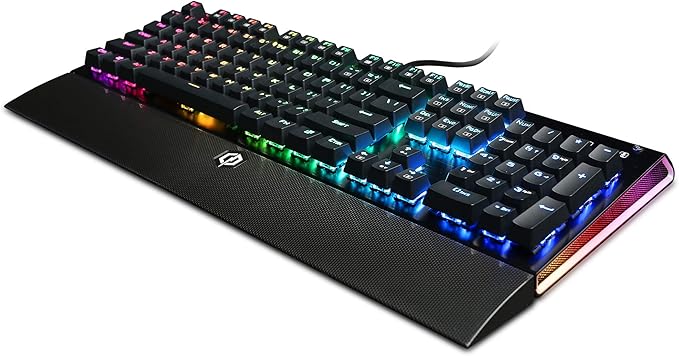
The keyboard also features a full RGB LED lighting system with customizable settings. You can easily adjust the color scheme to your liking, whether you want a single color or a rainbow of hues flashing across the keys. For those who love customization, this is a solid offering, especially considering it’s compatible with many lighting profiles and modes that can be adjusted via CyberpowerPC’s software.
Durability is another key aspect of the Skorpion K2. The keyboard is built with bicolor-molded keycaps, ensuring that the legends on the keys won’t fade over time. And with 100% anti-ghosting and 12 fully programmable keys, including a macro recording key, this keyboard is designed to perform under pressure—whether you’re deep into a game or working through a long list of tasks.
Now, let’s talk about real-world usage. I’ve spent several weeks using the Skorpion K2 for gaming and typing, and overall, it has held up quite well. The key switches are definitely smooth, providing that satisfying “clack” sound that’s characteristic of mechanical keyboards but without being too loud. If you’re the type of gamer or worker who needs to get those quick keystrokes in, you’ll appreciate how responsive the switches are. Whether I was playing fast-paced FPS games or writing up scripts, the K2’s quick actuation didn’t let me down.
Setting it up was also easy—just plug it in via the USB-A cable, and you’re ready to go. The keyboard is compatible with all versions of Windows from XP to Windows 10, so you shouldn’t have any issues with compatibility. For those who prefer a tidy desk, the K2’s braided, durable cable helps prevent tangling, keeping everything neat.
One feature that stood out was the inclusion of the removable EZ Key Remover. This little tool makes it incredibly easy to clean your keyboard or swap out keycaps if you want to customize your setup even further. It’s a small touch but shows that CyberpowerPC thought about the practical needs of gamers and professionals who might use this keyboard for extended periods.
Now, let’s get into the pros and cons of this keyboard. On the positive side, the Kontact™ Red switches are excellent for both gaming and typing. They offer a light and smooth feel, which is great for those looking to execute rapid key presses without the extra noise or resistance. The RGB lighting is vibrant and customizable, adding a touch of flair to your desk setup. The build quality is solid, with durable keycaps and an anti-ghosting system that ensures every key press registers, no matter how fast you type or game.
On the flip side, the keyboard could be a bit too simple for some. While it has the essentials, it doesn’t come with extra features like dedicated media controls or a wrist rest, which might make it feel basic compared to some of its competitors. The RGB lighting is fun, but it’s not as advanced as some higher-end models that offer per-key lighting profiles or more intricate customization options. Additionally, if you’re used to a quieter mechanical keyboard, the Skorpion K2’s linear switches may still have a slight noise, which could be a consideration if you’re in a shared or quiet space.
In terms of value for money, the CyberpowerPC Skorpion K2 is priced reasonably for a mechanical gaming keyboard. It’s not the most expensive option out there, but it offers solid performance with the RGB lighting, the linear switches, and all the extra features like macro keys and key removal tools. When you compare it to competitors in the same price range, such as the Redragon K552 or the Razer Cynosa, the K2 holds its ground. You’re getting a well-built keyboard with responsive keys and solid customization without breaking the bank. It’s a good pick for anyone looking for performance without paying a premium for extra features they might not need.
When it comes to build quality, the Skorpion K2 doesn’t disappoint. The keyboard feels sturdy and durable, and the keycaps are designed to last for years, even with heavy use. Although I haven’t had it long enough to comment on long-term durability, based on CyberpowerPC’s reputation for building solid products, I have no doubts that this keyboard will continue to perform well over time.
Customer support, though not something I had to personally interact with, has a solid reputation in the industry. CyberpowerPC is known for having a decent support team that’s responsive and helpful when needed. If anything does go wrong, you can rest assured they’ll be there to assist you.
Wrapping things up, the CyberpowerPC Skorpion K2 RGB Mechanical Gaming Keyboard is a solid choice for those looking for a reliable, responsive keyboard for both gaming and general use. While it might lack some of the premium features of higher-end keyboards, it delivers great performance at a reasonable price. Its linear switches, solid build, and vibrant RGB lighting make it a great option for gamers and professionals alike who want a no-nonsense, high-performing keyboard.
If you’re after something with more customization options or extra features, you might want to look elsewhere, but if all you need is something that works well, feels great, and doesn’t empty your wallet, the Skorpion K2 is worth considering.
Thanks for tuning in today. If you have any thoughts or questions about the Skorpion K2, feel free to leave them in the comments below. If you’re considering picking it up, check out the link in the comments box. Don’t forget to like, subscribe, and press the bell icon for more reviews inside. Good bye till next time, and remember, there’s always a review waiting for you right here on Reviews inside tv!
Available to buy here:


