

Available to buy here:
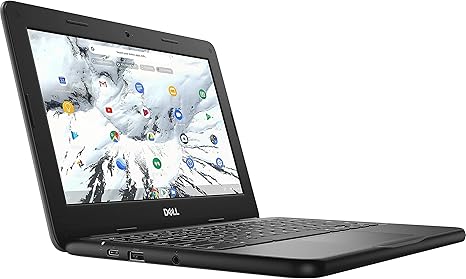
Welcome to Reviews inside tv! Today, we’re looking at the Dell Chromebook 3100, a compact yet capable laptop designed primarily for students or anyone who needs a reliable, no-frills device for everyday tasks. It features an Intel Celeron N4000 processor, 4GB of RAM, and a 32GB eMMC storage drive, all packed into an 11.6-inch chassis. While this device may not be intended for power users, it promises solid performance for more basic workloads.
The Dell Chromebook 3100 comes with a dual-core Intel Celeron N4000 processor running at 2.6 GHz with a 4M cache. It’s a low-power chip, designed for efficiency rather than raw performance, which makes it great for light tasks such as web browsing, document editing, and streaming. The 4GB of LPDDR4 RAM, clocked at 2400MHz, is enough for handling moderate multitasking, but if you tend to keep dozens of tabs open or run more memory-intensive apps, you may feel the pinch. This laptop does not come with much in terms of storage, offering only 32GB of eMMC storage, which is fine for cloud-based workflows but will likely require an external drive or cloud storage for anything beyond basic files.
The 11.6-inch HD touchscreen is certainly not going to knock anyone’s socks off, with its 1366 x 768 resolution, but for everyday use like reading articles, watching YouTube, or browsing social media, it gets the job done. The screen quality is decent for its size, but don’t expect vibrant colors or crisp detail like you’d get with higher-end laptops or displays with full HD or better resolution. The touch functionality adds a nice convenience for navigating through apps or browsing the web, though it’s a bit more basic compared to premium touchscreens.
When it comes to connectivity, the Chromebook 3100 is equipped with two USB Type-C ports and two USB 3.1 ports, giving you some flexibility for external devices and peripherals. You also get an SD card reader, which can be handy for expanding storage or transferring photos and videos. The inclusion of Intel Dual Band Wireless AC 9560 (802.11AC) plus Bluetooth 5.0 ensures solid Wi-Fi performance and quick device pairing for wireless accessories. For those who rely heavily on video calls or media consumption, the built-in camera and microphone provide decent quality, though don’t expect professional-grade results.
Battery life is a standout feature here. With its relatively low-power CPU and compact design, the Dell Chromebook 3100 can easily handle 8 to 10 hours of light work. Whether you’re using it for note-taking, light browsing, or media streaming, the laptop’s battery will carry you through most of a day’s work or study sessions without needing a charge. Of course, more intensive tasks will drain the battery faster, but overall, the laptop performs well when it comes to longevity.
In terms of comfort and usability, the keyboard and trackpad offer a satisfactory experience. While the key travel is short, the feedback is still usable for typing essays or answering emails. The trackpad is responsive, though it can feel a bit small given the compact size of the laptop, making precision tracking a little trickier than on larger devices. If you’re the type to type or scroll for extended periods, the layout and feel may not be as comfortable as a larger laptop, but for short, daily sessions, it does the job.
As for performance, this laptop isn’t a powerhouse, but it excels in simplicity and functionality for light tasks. The Intel Celeron processor is adequate for standard productivity tasks, web browsing, and media consumption, though don’t expect much when it comes to gaming or demanding workloads. The real-world experience will feel smooth as long as you’re sticking to basic tasks. If you need to run heavier applications, you might run into slowdowns or longer load times.
Now, let’s talk about thermals. Under normal usage, the Dell Chromebook 3100 stays relatively cool. There’s no noticeable heat buildup on the keyboard or underside, even after several hours of use. Fan noise is virtually nonexistent, so if you’re working in a quiet environment, this laptop won’t distract you with a buzzing or whirring sound.
In terms of portability, the Dell Chromebook 3100 is lightweight and easy to carry around. Weighing just around 2.6 pounds, it’s light enough to slip into a backpack without feeling like a burden, making it a solid option for students or anyone who needs a machine to take with them throughout the day.
The 32GB of eMMC storage might feel limiting, especially if you plan on storing a lot of large files, but for the majority of users who store most of their data in the cloud or use streaming services for media, it should suffice. If you need more storage, external options like microSD cards or USB drives can help expand your capacity.
Now, a quick mid-review reminder: don’t forget to like, subscribe, and hit the bell icon to stay updated with all our latest reviews. Your support means a lot to us, and we’re always excited to bring you more detailed, unbiased tech breakdowns.
When it comes to the competition, the Dell Chromebook 3100 finds itself in a crowded market of budget Chromebooks. Its performance is solid for the price, and its long battery life is a major selling point. However, if you’re after a larger display or more performance for tasks like photo or video editing, you might want to look at a model with a more powerful processor or a higher-resolution screen.
For those on a budget, especially students or anyone who needs a basic device for web browsing, document work, and media consumption, the Dell Chromebook 3100 is a solid option. It’s lightweight, offers good battery life, and performs well for everyday tasks. However, if you need a laptop for gaming or heavy multitasking, or you prefer a more vibrant display, you’ll need to look elsewhere.
In conclusion, the Dell Chromebook 3100 is a great option for anyone looking for an affordable, reliable, and portable device for everyday tasks. It’s not the most powerful laptop on the market, but it delivers solid performance where it counts, and it’s built for long-term comfort and convenience. If you’re on a tight budget and need a laptop that won’t let you down for schoolwork, light office tasks, or casual media consumption, this Chromebook might just be your perfect fit.
Thank you so much for watching! If you’re interested, the link to grab this Chromebook is in the comments box below. Feel free to ask any questions or share your experience if you already own one of these laptops. See you next time!
Available to buy here:


