

Available to buy here:
Welcome back to “Reviews inside tv!” Today, we’re taking a closer look at the Dell Inspiron 15 3530—a laptop designed for those who need a reliable machine for both work and play. Whether you’re a student, a professional, or someone who just needs a solid daily driver, this laptop might just have what you need. Let’s jump into the details to see how it holds up.
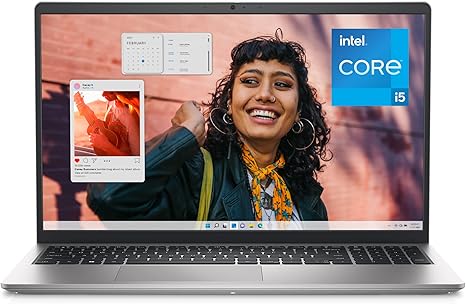
The Dell Inspiron 15 3530 is built to tackle everyday tasks with ease, and it starts with a solid foundation of specs. At its core, we’ve got the Intel Core i5-1335U, a 10-core processor that offers solid performance for multitasking and light creative work. Paired with Intel’s Iris Xe Graphics, it’s more than capable of handling media consumption, office tasks, and even some light gaming or photo editing without skipping a beat. The 16GB of DDR4 RAM ensures smooth multitasking, whether you’re juggling browser tabs, running office apps, or streaming content. And with a 512GB SSD, boot times are quick, and loading apps is virtually instant, giving you plenty of space for your files and programs.
Now, let’s talk about the display. The 15.6-inch Full HD screen boasts a 120Hz refresh rate, which is a nice touch at this price point. While it’s not an OLED or mini-LED display, the colors look solid, and the 120Hz refresh rate offers smoother visuals, especially if you’re watching fast-moving videos or gaming. It’s a step up from standard 60Hz screens, and while it won’t compete with high-end displays, it’s definitely a win for everyday use and media viewing.
In terms of design, the Inspiron 15 3530 is fairly light, weighing in at just around 1.75 kg, making it portable enough to toss in a bag without feeling like you’re carrying a brick. The chassis is sturdy enough to handle some knocks, and the silver finish gives it a clean, professional look. As for battery life, the 4-cell, 41Wh battery gets you through a full day of light tasks, and Dell’s adaptive thermal design helps ensure it doesn’t overheat even when the workload ramps up. Expect around 6-8 hours of use with web browsing, document work, and light media, though you might get less with heavier tasks.
When it comes to typing, the Inspiron 15 3530 doesn’t disappoint. The keyboard layout is spacious with a separate numeric keypad, which is a huge plus for anyone who works with numbers or does a lot of typing. The key travel feels comfortable, and the lift hinge helps to angle the keyboard at a more ergonomic tilt, reducing wrist strain during longer typing sessions. The trackpad, while not the largest, is responsive and offers smooth scrolling and accurate clicks.
For connectivity, this laptop has a nice variety of ports. You’ll find USB-A ports, a USB-C port, an HDMI output for external monitors, and an SD card reader—perfect for photographers or anyone who needs to quickly transfer files from a camera. There’s also Wi-Fi 6 support, which ensures fast and reliable internet speeds, and Bluetooth 5.1 for connecting wireless peripherals. If you’re someone who needs to connect to a variety of devices, this laptop has you covered.
Let’s talk about the thermals and fan noise. While this laptop doesn’t scream “gaming powerhouse,” the adaptive thermal system does a great job of adjusting fan speeds based on your workload. Under light use, it’s relatively quiet, but during more demanding tasks, the fans can get a bit noticeable. Still, it’s not overly loud, and it doesn’t seem to suffer from thermal throttling, even under heavier loads like video editing or gaming.
Now, for real-world performance, this laptop shines for office and productivity work. You can easily manage web browsing with multiple tabs, office documents, video calls, and email without any noticeable lag. It handles media consumption like streaming videos and music smoothly, and for light content creation, photo editing, or even video editing, it performs decently. Gaming-wise, it’s not built for AAA titles at max settings, but you can still enjoy less demanding games like Fortnite or League of Legends on medium settings, especially with that 120Hz screen for a smoother experience.
In terms of portability, the Inspiron 15 3530’s relatively light weight and slim profile make it an excellent choice for students or professionals who need to take it on the go. It fits easily in most backpacks, and the battery life should get you through a few classes or a full day of work without scrambling for an outlet.
When we look at the value for money, it’s hard to argue against this laptop at its price point. It offers a solid balance of power, portability, and features for the price. If you’re someone who just needs a laptop for office work, media consumption, or light creative work, it’s a great option. The 120Hz display is a nice bonus, and the 16GB of RAM ensures you won’t be bogged down by multitasking.
As far as competition goes, you could look at the Lenovo IdeaPad 3 or the HP Pavilion 15 as direct competitors in this price range. The Inspiron 15 3530 holds its own with that 120Hz display, a larger SSD, and strong performance for everyday tasks, though those other models might offer more powerful CPUs if you’re looking to do more demanding work like video rendering or 3D modeling.
Build quality-wise, Dell has done a good job here. It’s not the most premium-feeling laptop, but it’s solid, and the keyboard and hinge are both well-built. As for long-term reliability, Dell is known for producing durable machines, so you can expect this one to hold up over time as long as you’re not too rough with it.
In terms of customer support, Dell offers premium support, which means priority access to experts and the ability to get help wherever you are. It’s a nice perk for anyone who needs peace of mind with their purchase, especially if you’re traveling internationally.
To wrap it up, the Dell Inspiron 15 3530 is a great all-around laptop for anyone who needs something reliable for work, school, or light entertainment. It’s got a solid display, decent performance, and good portability, all while offering a nice variety of connectivity options. It’s not the powerhouse for hardcore gaming or heavy creative work, but it does everything most people need with ease. If you’re after an affordable, dependable laptop, this one’s definitely worth considering.
Thanks for watching, and if you’re interested in picking up this laptop, you can find the link in the comments box. Let us know your thoughts or if you’ve already got one—what’s been your experience? Until next time, take care, and stay tuned for more reviews here at “Reviews inside tv.”
Available to buy here:


