

Available to buy here:
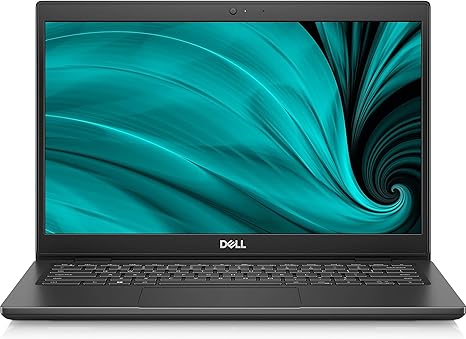
Welcome back to Reviews inside tv! Today, we’re taking a closer look at the Dell Latitude 3000 3420, a 14-inch notebook that promises solid performance for everyday tasks, thanks to its Intel Core i5 11th Gen processor. If you’re in the market for a reliable, budget-friendly laptop, stay tuned to see if this model fits the bill.
Right out of the gate, the Dell Latitude 3420 comes equipped with an Intel Core i5-1135G7 processor, a quad-core chip that boosts up to 2.40 GHz. For office work, web browsing, and media consumption, this processor is up to the task. You’ll be able to switch between apps with ease, run multiple browser tabs, and dive into spreadsheets or documents without noticeable slowdowns. But, let’s not forget, the i5 is an entry-level processor—so it’s not going to break records in demanding tasks like video editing or heavy gaming.
Paired with 8 GB of RAM, the Latitude offers enough memory for multitasking. While 8 GB is decent for light productivity and browsing, it may struggle with more resource-heavy applications or too many tabs open at once. If you’re the kind of person who has 20 tabs open with a few Excel sheets running, you might see some lag, especially when it comes to larger files or more complex tasks.
For storage, the Dell Latitude sports a 256 GB SSD. This is the sweet spot for most users and a definite upgrade over older hard drives. Boot times are quick, and loading up apps is snappy. However, if you plan on storing a large media library or working with high-end creative files, you might find the storage a little limiting. Thankfully, SSDs offer the benefits of faster file transfers, which means less waiting and a smoother overall experience when working with documents or multimedia files.
The 14-inch display offers a resolution of 1366 x 768, which, while not the sharpest by today’s standards, will get the job done for standard office tasks and light media consumption. Watching movies or shows on this screen won’t be a cinematic experience, but it will serve just fine for general use. However, with the relatively low resolution, things can look a bit pixelated compared to the Full HD and higher resolutions found on many modern laptops. It’s a decent screen for the price, but don’t expect it to deliver the same level of crispness you’d get on a premium laptop or one with a higher resolution panel.
When it comes to battery life, the Dell Latitude 3420 is fitted with a battery that should last a good few hours for light tasks like browsing, checking email, and watching videos. Expect somewhere between 6 to 8 hours of use, depending on how heavy your workload is. It’s not the longest battery life on the market, but for a laptop in this category, it does well. Charging is pretty standard and will top up the battery relatively quickly, but you’ll need to keep the charger handy if you plan to work longer hours.
Weighing in at 1.4 kg, this laptop is relatively light and easy to carry around, making it a good option for students or office workers who need something portable. It’s not the slimmest, but it strikes a decent balance between portability and practicality. As for build quality, the Latitude feels sturdy but is mostly made from plastic. While it doesn’t have the premium feel of higher-end models, it doesn’t feel cheap either. The hinge is solid, and the keyboard has a nice, firm feel to it, making it comfortable for typing sessions, even if they last for a few hours.
Speaking of the keyboard, it’s got decent travel and tactile feedback. If you’re a touch typist, you’ll appreciate the solid keypresses. The trackpad, though not huge, gets the job done with smooth responsiveness, and palm rejection works well enough during regular use. The layout, including the size of the arrow keys, is also practical. No major complaints here, though it’s worth noting the absence of a number pad, which could be a dealbreaker for users who frequently input numerical data.
As far as ports go, the Latitude offers the basics: a USB-A port, a USB-C port, HDMI for external displays, and an SD card reader, which is a nice touch for photographers or users who work with media. However, there’s no Thunderbolt here, so if you need to connect to ultra-fast storage or high-resolution external displays, you might be out of luck. You also get Wi-Fi 6 support, which is a nice touch for future-proofing, and Bluetooth 5.0 for connecting your wireless peripherals.
Now, let’s talk about thermals and noise. In light tasks, the Latitude is whisper-quiet. The fan barely kicks in, even when running a few browser tabs. Under heavier loads, like video streaming or running office applications with more intensive tasks, the fan noise becomes a little more noticeable, but it doesn’t get annoying. You won’t find the laptop heating up to uncomfortable levels either, so long-term use doesn’t result in uncomfortable temperatures.
For real-world performance, the Dell Latitude handles everyday office tasks just fine. You can browse the web with multiple tabs, stream videos, and handle documents or spreadsheets without running into any issues. However, if you’re planning on more demanding tasks like photo editing or light video work, the 8 GB of RAM and 11th Gen i5 may hold you back. For casual gaming, forget it—this laptop doesn’t have the horsepower for modern titles, but older, less demanding games might run fine at lower settings.
If you’re in the market for a laptop with a solid balance of performance, portability, and reliability, the Dell Latitude 3420 is a good choice for students or office workers who need a no-frills machine. It’s not the most exciting option out there, but it gets the basics right. For those who want a more powerful machine or better display quality for media work, you might want to look elsewhere.
Battery life is respectable, but not exceptional. The 1366 x 768 display will serve most tasks but might be disappointing for those who need sharper visuals. The performance, though competent, isn’t going to blow anyone away with gaming or creative work, and the design feels practical rather than premium. On the plus side, the Latitude is affordable and lightweight, making it a solid, budget-friendly option for everyday use.
If you’ve been looking for a basic laptop to handle your workday tasks without breaking the bank, the Dell Latitude 3420 could be a great choice. However, if you need more power, a sharper screen, or longer battery life, there are other models out there that might be worth considering.
Thanks for watching, and don’t forget to like, subscribe, and hit the bell icon to stay up to date on all our latest reviews. If you have any questions or experiences with the Dell Latitude 3420, feel free to share them in the comments below. The link to get this laptop can be found in the comments box. Until next time, take care and happy computing!
Available to buy here:


