

Available to buy here:
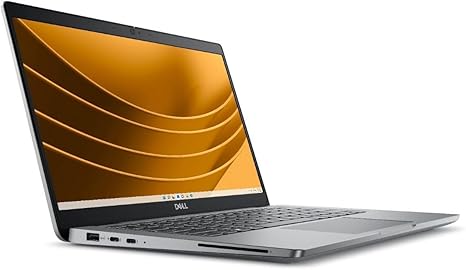
Welcome back to “Reviews inside tv,” your go-to spot for all things tech. Today, we’re looking at the Dell Latitude 5000 5350, a 13.3-inch notebook that packs some serious power for both work and play. If you’re in the market for a business ultraportable or something that can handle your everyday computing needs with ease, this might just be your next laptop.
The Dell Latitude 5350 comes equipped with Intel’s Core Ultra 5 135U processor. This chip is part of Intel’s latest lineup, designed to offer a great balance between efficiency and performance, especially for tasks like web browsing, document editing, and light multitasking. The 135U boasts four cores and eight threads, which means it handles multiple apps and browser tabs without breaking a sweat. While it’s not a powerhouse for gaming or high-end content creation, it’s perfect for those who need solid everyday performance without draining your battery.
Speaking of which, the Latitude 5350 is loaded with 16 GB of RAM. That’s a generous amount for a laptop in this range, allowing you to keep many applications open at once, run virtual machines, or handle bigger spreadsheets without a hitch. Whether you’re a student juggling assignments, a professional managing projects, or someone who needs to stay productive on the go, 16 GB is more than enough for most tasks.
In terms of storage, you’ve got a 512 GB SSD. For most users, that’s plenty of space to store documents, presentations, movies, music, and pictures. The SSD ensures fast boot times, quicker file transfers, and smooth operation in everyday use. The fact that it’s an SSD instead of an HDD means you’re not dealing with the slowdowns and noise that often come with traditional hard drives. And for those who like to keep everything on their laptop, this capacity strikes a good balance between performance and storage.
The 13.3-inch display offers a full HD resolution of 1920 x 1080, which makes for a crisp, clear image. Whether you’re watching videos, editing documents, or just browsing the web, the screen looks sharp and provides a decent viewing experience. The brightness is solid for indoor use, though it might struggle a bit in direct sunlight. The screen is fine for watching movies, but if you’re a content creator looking for color accuracy, this display won’t be quite up to the mark of higher-end models. It’s good, but not spectacular, especially for those working with photos or video editing on a professional level.
When it comes to battery life, the Latitude 5350 is decent. While exact figures can vary based on use, expect around 7 to 9 hours of use with typical office tasks. This is great for a full day’s work or study session without needing to plug in. If you’re doing heavier tasks like streaming videos or web browsing with many tabs open, you might see the battery drain a bit faster. Charging is fairly quick, but it’s not as fast as some newer models that feature super-fast charging technology. Still, you’ll get a solid day’s worth of power for most needs.
Let’s talk about how this laptop actually feels to use. The keyboard has a good amount of key travel, providing a comfortable typing experience. It’s responsive, with a pleasant click, so long typing sessions shouldn’t leave you fatigued. The trackpad is smooth and accurate, though not as large as you might find on premium models. It’s certainly functional for navigating, but if you’re a fan of extra-wide trackpads, you might feel a little cramped.
As for performance, you’re not going to be running the latest AAA games or pushing this laptop to its limits with high-end content creation software. But for day-to-day tasks like web browsing, email, and streaming, the Latitude 5350 does a great job. The fan noise is minimal during light tasks but may become audible when the CPU is pushed. It’s not loud by any means, but you will notice it during more intensive work.
In terms of ports and connectivity, the Latitude 5350 has a good selection for its size. You get a couple of USB-A ports, a USB-C port, HDMI for an external monitor, and an SD card reader. It also supports Wi-Fi 6, which means fast, reliable wireless connections for everything from video calls to file transfers. Bluetooth is also included, making it easy to connect peripherals like headphones, mice, or speakers.
The build quality of the Latitude 5350 is solid, but it’s clear that it’s aimed at the business user. The chassis is made from a durable plastic, which keeps the weight down, but it doesn’t feel as premium as some aluminum-clad laptops. It’s not particularly thin, but at just over 1.3 kg (around 2.9 lbs), it’s still quite portable for a 13.3-inch laptop, making it easy to carry around in a bag all day.
Now, no laptop is without its trade-offs. One of the biggest limitations here is the display’s color accuracy and brightness. While it’s fine for general use and media consumption, creators who rely on precise color reproduction will want to look elsewhere. The lack of a higher refresh rate or a more vibrant display might also make this less appealing for gamers or those who want a premium visual experience.
So, who’s this laptop for? The Dell Latitude 5350 is perfect for students, office workers, or anyone looking for a reliable, no-frills laptop that can handle everyday tasks with ease. It’s lightweight, portable, and offers excellent multitasking capabilities. However, if you’re a gamer or a content creator, you might find the display and performance a bit limiting for your needs.
For those who need a compact, efficient device for everyday productivity, this laptop is a solid choice. The price is fair for the performance and build quality, but if you’re looking for something with a bit more power or a higher-end screen, you might want to explore other options in this price range.
As always, thanks for tuning into “Reviews inside tv.” If you liked this review, don’t forget to like, subscribe, and hit the bell icon to stay updated on all our latest reviews. Let us know in the comments if you’ve already used this laptop or if you have any questions about it. See you in the next one, and happy computing!
Available to buy here:


