

Available to buy here:
Welcome to Reviews inside tv, where we dive into the details of the latest tech to help you make the best buying decisions. Today, we’re taking a look at the HP Chromebook 14 inch Laptop, model 14a-nf0019nr. If you’re in the market for a budget-friendly, efficient, and portable laptop, this one might have caught your eye. But is it the right choice for your needs? Let’s break it down and see how it performs in real-world scenarios.
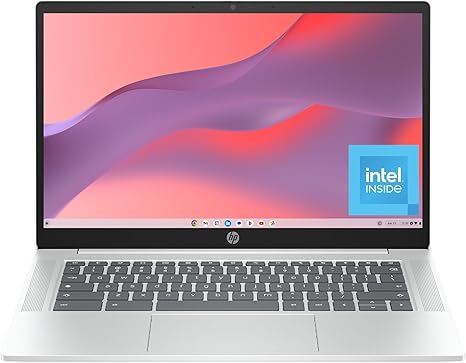
The HP Chromebook 14 sports a 14-inch HD display with a micro-edge design, delivering a crisp 1 million pixels. The anti-glare coating ensures that you can comfortably use it outdoors, making it ideal for casual browsing or work in various lighting conditions. Powered by the Intel Processor N100, this Chromebook aims to offer solid performance without breaking the bank. Pairing this with Intel UHD Graphics means you can stream content in 4K and tackle light gaming with reasonable expectations.
Let’s talk specs. This Chromebook features 4 GB of LPDDR5 RAM, which offers a balance between power efficiency and responsiveness. For storage, it offers 64 GB of eMMC flash storage. While that might seem on the smaller side, it’s more than adequate for the intended use case of light browsing, media consumption, and web-based productivity apps. eMMC storage is slower than an SSD but still provides faster boot-up times and better power efficiency compared to traditional hard drives. As for the operating system, Chrome OS is designed to be lightweight, secure, and super efficient, keeping everything updated automatically and running smoothly.
In terms of real-world performance, the HP Chromebook 14 is tailored more for light office tasks, browsing, and streaming media rather than heavy workloads. The Intel N100 processor isn’t built for demanding applications, but it excels in everyday tasks like checking emails, web browsing with multiple tabs, and working on Google Docs or Sheets. Streaming your favorite shows in 4K is seamless, and with Intel UHD Graphics, you won’t experience any lag or stuttering during playback. It’s also great for students or anyone needing a device for basic work tasks and light media consumption.
However, when it comes to content creation or gaming, don’t expect miracles. This Chromebook isn’t built for video editing or intensive photo manipulation, and its limited 4GB of RAM means multitasking with several apps or large files could feel sluggish. The 64 GB eMMC storage is fine for storing documents, media, and a few apps, but don’t expect to install large programs or have a vast local library of files. Fortunately, Chrome OS excels at cloud storage integration, so with Google Drive and other cloud-based apps, you won’t be left in the lurch.
Now, let’s discuss the keyboard and trackpad. The keyboard is comfortable for short typing sessions, but for longer sessions, you might find the key travel a bit shallow. If you’re someone who does a lot of typing or writing, you might prefer a laptop with a more tactile keyboard feel. As for the trackpad, it’s responsive and works well with the Chrome OS interface. It offers smooth navigation, and the palm rejection works as expected. The overall layout is simple and functional, with a full-size set of keys including the usual number pad and function keys. The lack of a backlit keyboard is a minor drawback, but at this price point, it’s understandable.
Let’s talk about the battery. The HP Chromebook 14 offers solid battery life for casual use, lasting around 8 to 10 hours under normal conditions, like web browsing, streaming, or light office work. While it’s not going to last you through an entire day of demanding workloads, it should easily get you through a day of classes, meetings, or casual browsing. The Chromebook is also relatively lightweight, weighing in at just under 3 pounds, making it easy to carry around in a backpack or bag without adding much bulk. It’s also fairly thin, so portability is a key selling point.
When it comes to connectivity, the HP Chromebook 14 includes a decent selection of ports, including two USB Type-C ports, two USB-A ports, a microSD card slot, and a headphone jack. The USB-C ports support fast charging and data transfer, which is a nice touch. You also get Wi-Fi 5 and Bluetooth 5.0, which offer good performance for web browsing, streaming, and light work. However, if you’re expecting Thunderbolt support or an Ethernet port, you’ll need to look elsewhere. It’s also important to note that the RAM and storage are soldered, which means no upgrades in the future. So if you’re someone who tends to need more memory or storage, this might limit the long-term usability of the Chromebook.
Thermal performance is a standout feature here. The HP Chromebook 14 doesn’t get particularly hot even when working on web-based apps or streaming video for extended periods. Its passive cooling system ensures the system remains quiet and comfortable, even during light workloads. You won’t hear noisy fans revving up during normal use, which makes it a great option for quiet environments like libraries or cafes.
When it comes to the overall build quality, the HP Chromebook 14 feels solid for its price range. The chassis is made of plastic, but it doesn’t feel cheap. The hinge is sturdy, and the screen doesn’t wobble excessively when you tap the display. It’s not a premium ultrabook, but it doesn’t feel like a budget device either. The Glacier Silver finish adds a touch of sleekness, and the overall design is clean and minimalist.
As for value, the HP Chromebook 14 offers a lot for its price. It’s an affordable solution for basic tasks, streaming, and light work. However, you’re making some trade-offs with the lower storage and memory. If you’re someone who needs to run more demanding apps or multitask with multiple windows, you may want to consider a laptop with more powerful specs. Still, at this price point, the Chromebook 14 offers excellent value for students, casual users, and those looking for a device that’s easy to carry around, simple to use, and efficient for everyday tasks.
When comparing the HP Chromebook 14 to other laptops in this price range, it’s clear that it shines in portability and battery life. It might not have the power of higher-end laptops, but for light users, it holds its own against competitors like the Acer Chromebook 14 or the Lenovo IdeaPad Flex 3. These competitors may offer slightly different features, but the HP Chromebook 14 is arguably one of the most balanced options in its class.
To sum up, the HP Chromebook 14 is best suited for students, casual users, or anyone looking for an affordable, lightweight device for basic tasks, streaming, and web-based work. If you’re after a powerhouse for gaming, video editing, or heavy multitasking, this probably isn’t the laptop for you. But if you’re after an easy-to-use, portable device that excels at the basics, it’s hard to beat this one for the price.
Thank you for watching. Don’t forget, the link to get the HP Chromebook 14 is in the comments box below. Feel free to leave a comment and let us know what you think or ask any questions if you already own one. Until next time, keep it real, keep it simple, and keep reviewing with Reviews inside tv.
Available to buy here:


