

Available to buy here:
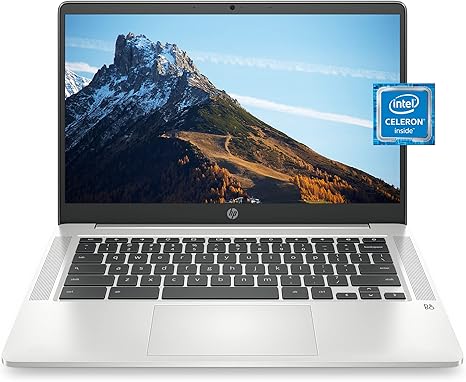
Welcome to “Reviews inside tv”! If you’re on the lookout for a Chromebook that can handle work, school, or casual entertainment with ease, then you’re in the right place. Today, we’re taking a deep dive into the HP Chromebook 14, model 14a-na0160nr. This sleek, budget-friendly Chromebook is designed to keep up with your day-to-day tasks without breaking the bank. But does it truly deliver on its promises? Let’s break it down.
First off, let’s talk about the core specs. The HP Chromebook 14 is powered by an Intel Celeron processor, which, while not the powerhouse of the laptop world, is more than adequate for basic tasks like web browsing, office work, and media consumption. Coupled with 4GB of RAM and 32GB of eMMC storage, the performance is smooth for light everyday tasks. But let’s be clear—this isn’t the machine for heavy multitasking or content creation. For typical school or office tasks, it should hold up well, though, when you’re juggling several browser tabs or apps, the system may show a little hesitation.
Now, onto the display. The Chromebook sports a 14-inch Full HD (1920 x 1080) anti-glare screen, which is impressive for the price. Whether you’re working on documents or enjoying a Netflix binge, the image quality is bright, vibrant, and clear. The micro-edge design also provides a modern, clean look with minimal bezel, which is always a nice touch. However, don’t expect ultra-wide color gamuts or the deep blacks of OLED screens; this display is functional and sharp enough for everyday use, but it’s not going to blow you away if you’re into high-end visuals.
The battery life is one of this laptop’s standout features. HP claims up to 12 hours and 30 minutes of use with mixed activities, which is pretty impressive for a budget Chromebook. In real-world testing, you can expect to get through a full workday of browsing, streaming, and light productivity without needing to plug in. This is a huge plus for anyone who needs a reliable, all-day device. And the best part? It charges fairly quickly, so you won’t be tethered to the wall for long when it does need a boost.
When it comes to the keyboard and trackpad, the HP Chromebook 14 offers a solid, if unremarkable, experience. The keyboard has decent key travel and tactile feedback, so it’s comfortable enough for typing out assignments or emails, though it’s not as snappy as more premium options. The trackpad is responsive, with accurate tracking, but again, don’t expect the silky smoothness you might find on higher-end devices. It’s serviceable, and for most casual users, it should do the job just fine.
For connectivity, the Chromebook is equipped with Wi-Fi 5 (2×2) and Bluetooth 5.0, ensuring stable and fast internet connections for remote work or streaming. As for ports, you’re getting two USB 3.1 Type-A ports, one USB Type-C port, an HDMI port, and a microSD card reader. This is perfectly adequate for basic tasks and external devices. However, if you’re hoping for Thunderbolt or more high-speed connections, you’ll be disappointed—this is a Chromebook aimed at simplicity and value, not power users.
Thermals are another area where this device performs decently for its class. With light use, the HP Chromebook 14 remains relatively cool, and the fan noise is minimal. When pushed harder, such as streaming or running a few apps, you may notice the laptop getting warmer, but it rarely reaches uncomfortable levels. There’s no significant thermal throttling, so your performance won’t dip dramatically during long sessions, though it’s important to remember that this is a budget device and won’t keep up with more demanding tasks like gaming or high-end content creation.
Speaking of performance, let’s talk about real-world usage. For office work and school tasks, like working in Google Docs, PowerPoint, or Excel, this Chromebook handles it without much issue. Web browsing is smooth, although as mentioned earlier, the limited 4GB of RAM can start to show its limitations if you keep too many tabs open or multitask heavily. For media consumption, whether it’s YouTube videos, streaming Netflix, or listening to music, the HP Chromebook 14 does a great job. The audio quality from the integrated dual-array digital microphones and speakers is more than adequate for video calls or casual entertainment. If you’re planning to use this for anything like photo or video editing, though, this is not the machine for you.
Now, let’s address performance for gaming. This laptop is not a gaming machine by any means. With its Intel UHD Graphics 600, you won’t be able to run graphically demanding games at high settings. You can expect very low FPS on titles like Cyberpunk 2077 or Call of Duty: Warzone, but it should be fine for light indie games or casual browser-based gaming. Just don’t expect to game at anything resembling high performance here.
In terms of portability, the HP Chromebook 14 is lightweight and compact, weighing just over 3 pounds. It’s easy to carry around in a bag all day, making it an excellent option for students or remote workers who need a laptop that won’t weigh them down. The build quality, while not premium, feels solid for the price. The plastic chassis is durable enough for everyday use, and the lid feels sturdy with no noticeable flex.
When it comes to value for money, the HP Chromebook 14 offers a solid package for its price. The combination of a responsive Intel Celeron processor, a decent display, long battery life, and solid build quality makes this a good choice for casual users, students, and those who need a simple, no-frills laptop for work, school, or entertainment. If you’re looking for something with more horsepower for gaming or content creation, though, you’ll want to look elsewhere.
In comparison to other budget Chromebooks in 2025, the HP 14 stands up well against rivals like the Lenovo Chromebook Flex 5 or the Acer Chromebook 314. While the Flex 5 offers better performance with an Intel Core i3, the HP 14 beats it on battery life and display quality. If you don’t need a more powerful CPU or fancy features, the HP Chromebook 14 is a great option.
To wrap things up, the HP Chromebook 14 is a reliable, budget-friendly choice that delivers exactly what it promises. Its solid battery life, simple but functional design, and dependable performance for everyday tasks make it a great option for students, casual users, or anyone looking for a laptop to get work done without any fuss. However, if you need more power for gaming or professional-level creative work, you might want to consider a higher-end model.
Thanks for watching! If you have any questions or want to share your thoughts on the HP Chromebook 14, drop a comment below. The link to grab one is in the comments box, so check that out if you’re interested. Don’t forget to like, subscribe, and hit the bell icon for more honest reviews from “Reviews inside tv.” See you next time, and remember—life’s too short to settle for a slow laptop!
Available to buy here:


