

Available to buy here:
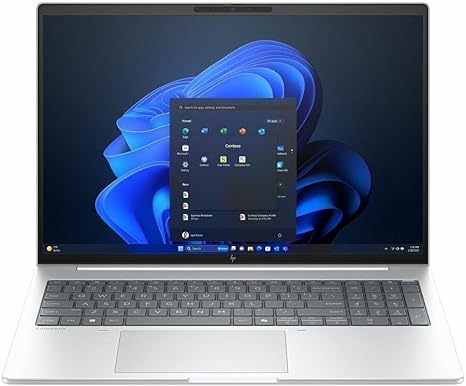
Welcome to “Reviews inside tv,” where we bring you all the details you need before making your next tech purchase. Today, we’re diving into the HP EliteBook 8 G1i 16″ Notebook, a business-oriented powerhouse packed with an Intel Core Ultra 7 processor, 32 GB of RAM, and a 1 TB SSD. It’s designed for the serious professional, but is it more than just a pretty face? Let’s break it down.
The HP EliteBook 8 G1i comes equipped with Intel’s latest Core Ultra 7 255U chip, featuring 12 cores in total, which means you’re getting more than enough performance for both office work and demanding creative tasks. Whether you’re running multiple virtual machines, crunching data in spreadsheets, or video conferencing while keeping a few dozen tabs open, this processor can handle it all without slowing down. But how does it perform when the workload gets heavier, like during photo or video editing? You’ll see impressive multitasking speeds, thanks to its advanced architecture, but it might still hit its limits with extremely high-end creative work.
Pair that with 32 GB of RAM, and this notebook becomes a productivity beast. This much RAM is especially beneficial if you frequently use resource-heavy applications or handle large files. Whether you’re editing photos in Photoshop or running simulations, you’ll notice fewer slowdowns and more efficient multitasking. The 1 TB SSD also ensures fast boot times, quick file access, and reliable performance across day-to-day use. If you’re used to dealing with laggy storage, this is a welcome upgrade.
Moving onto the display, the 16-inch WUXGA screen at 1920 x 1200 resolution uses IPS technology. This means you’re getting better color accuracy and wider viewing angles, which is perfect for presentations or collaborative work. Whether you’re crunching numbers, reviewing documents, or watching videos during your lunch break, the screen looks sharp and vibrant. The downside here? It’s not a 4K or OLED display, so while it’s sharp and practical, you won’t get the absolute best for creative tasks like color grading. For most office work and media consumption, though, it’s a solid performer.
As for real-world usage, this laptop does its job well, and that’s where its strength really lies. You can easily switch between multiple office applications, browse the web, or handle video calls, all while running several processes in the background. Media consumption is a breeze too. The display is bright enough for watching movies in most lighting conditions, and the speakers produce clear, if not booming, sound. Now, for creative professionals, things are still solid, but you won’t get the buttery smooth performance you’d find in high-end, creative-oriented laptops. For gaming? Not ideal—though if you like to dabble in casual games, this will do just fine at lower settings.
Now, let’s talk about thermals and fan noise. The HP EliteBook 8 G1i is built with a focus on efficiency rather than raw cooling power. Under typical office work, you’re not likely to hear much fan noise, and the keyboard deck stays cool. However, during heavy tasks, like video rendering or playing more demanding games, the laptop does get warm—though it never becomes uncomfortable to use on your lap. Fan noise is a factor, but it’s more of a gentle hum than a loud whir, making it tolerable for work environments where peace is necessary.
Battery life is a solid feature here, with a battery size that promises longevity throughout a full workday of office tasks, web browsing, and media streaming. You can expect between 8 to 10 hours on a single charge, depending on your usage. It’s good for professionals who need a reliable, all-day machine that doesn’t need to be tethered to a power outlet. Charging is relatively quick, too, which is nice if you’re always on the move. At about 1.75 kilograms, it’s portable enough for carrying in a bag all day without feeling weighed down, though it’s not the lightest 16-inch laptop out there.
The keyboard and trackpad provide a solid typing experience. The keys are well-spaced, with decent key travel, which makes long typing sessions comfortable. The trackpad is responsive, and palm rejection works well, so you won’t accidentally move the cursor during typing. If you’re typing out reports or doing research for hours, the HP EliteBook 8 G1i doesn’t let you down. There’s no touchscreen or stylus support, which is fine for a business laptop, though that may be a con for some creators or designers.
When it comes to connectivity, the EliteBook has your back. With a mix of USB-A, USB-C, and HDMI ports, as well as Wi-Fi 6 support, you’re set for docking, connecting external monitors, and using peripherals. There’s no Thunderbolt, which would have been nice for ultra-fast data transfer, but for most office users, the available ports will suffice. If you’re someone who regularly works with external storage, printers, or projectors, you’ll appreciate the variety of options. The RAM and SSD are soldered, meaning no easy upgrades, so make sure you’re happy with the configuration you choose.
Now, let’s go over the pros and cons. On the plus side, the HP EliteBook 8 G1i offers great performance for office work and moderate creative tasks. The 12-core processor, ample RAM, and fast SSD make for a smooth experience across most use cases. The display is solid for work and media consumption, and the battery life is enough to last you through a busy day. On the downside, the cooling system could use some improvement under heavy loads, and the display, while good, doesn’t quite have the vividness or detail required for high-end content creation. Also, while it’s portable, it’s not as light as some of the other ultrabooks out there.
When it comes to value, the HP EliteBook 8 G1i is priced higher than some similar competitors, but the performance, screen quality, and build make it a good choice for professionals who need a reliable, all-in-one laptop. In comparison to other business laptops like the Lenovo ThinkPad X1 Carbon or Dell XPS 15, it holds its own, though you may find more premium options if you’re willing to spend a bit more.
As for build quality, HP has done a great job with the EliteBook’s overall design. It’s sturdy, made from premium materials, and has a solid feel to it. The hinge is strong, and the overall rigidity speaks to the longevity of this laptop. It doesn’t feel fragile, and it should hold up well over time, especially in the hands of professionals who value durability.
If you’re wondering about customer support, HP generally has a solid reputation in this area. With good warranty options and decent on-site repair services, the HP EliteBook 8 G1i should be covered should anything go wrong. That said, their support isn’t always as fast as you might hope, but it’s more reliable than some of the other brands in the market.
To wrap it up, the HP EliteBook 8 G1i is a great choice for business professionals who need a powerful, reliable, and portable laptop. It delivers solid performance, especially for office work, media consumption, and light creative tasks, with a solid battery life and great build quality. However, it may not be the best choice for hardcore content creators or gamers. If you’re looking for something that blends performance with portability and reliability, it’s worth considering.
Thanks for watching! The link to get this laptop is in the comments box below, so feel free to check it out. Don’t forget to leave a comment if you have any questions or already own the EliteBook 8 G1i. Thanks again for tuning in to “Reviews inside tv,” and remember: the right laptop is out there for you—just make sure to choose wisely!
Available to buy here:


