

Available to buy here:
Welcome back to Reviews inside tv. Today I’m looking at the HP EliteBook 840 G11 — a compact 14‑inch business notebook built around Intel’s latest Core Ultra platform. If you’re shopping for a sleek, portable machine for work, travel, or everyday tasks, this one makes a strong first impression — but there are a few trade‑offs worth knowing before you click “buy.”
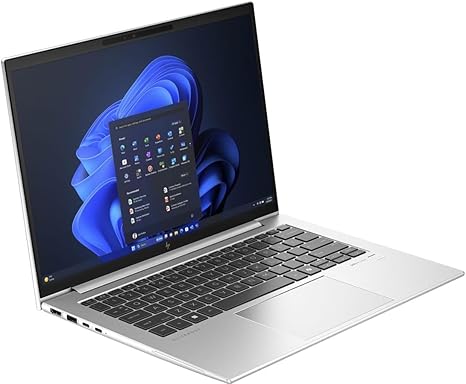
The variant I’m reviewing packs an Intel Core Ultra 5 135U processor — a deca‑core (10‑core, 14‑thread) CPU with base frequency around 1.6 GHz and boost up to 4.4 GHz. It’s paired with 16 GB DDR5 RAM and a 512 GB PCIe Gen4 NVMe SSD. The display is a 14‑inch IPS panel at 1920 × 1200 (WUXGA), anti‑glare, in a 16:10 aspect ratio. Connectivity includes Thunderbolt 4 via two USB-C ports, USB-A ports, HDMI, gigabit Ethernet, Wi‑Fi 6E and Bluetooth 5.x, and there’s a fingerprint reader for security. The chassis uses a lightweight aluminum build, and the laptop weighs around 1.4 kg — pleasantly portable.
In everyday productivity — web browsing with many tabs open, editing documents, spreadsheets, managing email, video calls — the Core Ultra 5 135U delivers smooth performance. That deca‑core chip is efficient yet responsive, so switching between tasks or running multiple apps concurrently feels snappy. The fast NVMe SSD ensures quick boot times and minimal lag when launching applications or opening large files. For writing, office work or remote‑work needs, the responsiveness is more than adequate.
Media consumption and general use are comfortable too. The 14″ IPS panel offers a sharp image with decent brightness and anti‑glare coating, making streaming videos or working under varied lighting reasonable. For creators doing light photo editing, simple design work or video editing, the display does the job — though it’s not designed for colour‑critical tasks.
Because this model uses integrated Intel graphics rather than a discrete GPU, it’s not aimed at heavy gaming. The GPU handles basic graphics tasks well — presentations, casual games or older titles at low settings — but don’t expect AAA‑title performance or high‑fps gaming. For a business‑class laptop, that’s fine, but it’s a limitation if you want gaming or demanding creative workloads.
Thermals and comfort are generally solid. Under moderate or typical office loads, the laptop stays cool and quiet, which is a big plus for lap use or long typing sessions. The keyboard typing feel impresses: keys are well‑spaced, travel feels balanced, and the backlit layout preserves comfort in low light. The trackpad is smooth and responsive, with consistent palm rejection and accurate cursor control — a relief for long typing or navigating without a mouse.
On portability and battery life, this EliteBook hits a sweet spot. With its 56 Wh battery, real‑world use under light to moderate workloads (typing, browsing, video calls) can stretch through most of a workday — roughly 6–8 hours, sometimes more if you lean on power‑saving settings. Fast charging support also helps: a quick 30‑minute top‑up gets you back to usable levels fast. The sub‑1.5 kg weight makes it easy to carry around in a backpack or work bag without strain.
Ports and connectivity are generous given the slim form factor: dual Thunderbolt 4 (useful for docking or external displays), USB-A for legacy peripherals, HDMI for an external monitor, headphone jack — a nice all‑around connectivity kit. For wired networking, the Ethernet port is a solid bonus in offices or places with spotty Wi‑Fi. RAM and SSD are upgradeable thanks to SODIMM slots and an M.2 slot — that’s good for future‑proofing.
On the downside: colour‑critical work (pro photo or video editing) is limited because the display, while crisp and fine for office tasks, doesn’t aim for wide colour gamut — it prioritises practicality over cinematic quality. And for graphic‑intensive workloads or gaming, integrated graphics mean compromises. If you push the CPU hard for extended periods (rendering, heavy compiling, etc.), the cooling solution may eventually throttle slightly, though day‑to‑day office use remains cool and quiet. Also, because this is a business‑class machine, audio and webcam are serviceable — fine for calls and presentations — but not exceptional for creative media work.
Taken overall, the EliteBook 840 G11 stands out for what it sets out to do: deliver a reliable, portable, efficient, business‑ready laptop that balances performance, battery life, build, and connectivity. For students, office workers, professionals on the go, writers, remote‑workers or travellers, this makes a compelling choice. If you’re doing heavy creative work, high‑end video editing or gaming, it might feel limiting.
If you’re after a dependable, light, work‑day laptop that just gets things done without fuss — EliteBook 840 G11 earns its place. Let me know if you want a comparison with a few competitor laptops in the same price/performance range.
Available to buy here:


