

Available to buy here:
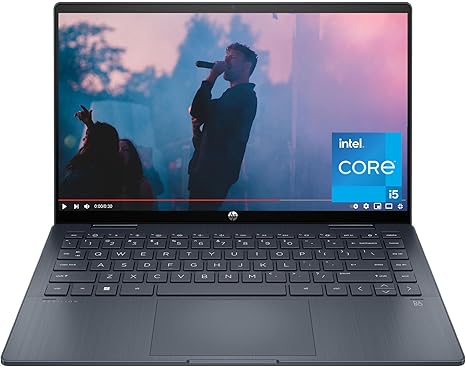
Welcome to “Reviews inside tv,” where we take a close look at the latest and greatest in tech. Today, we’ve got a versatile machine on our hands that promises both power and portability—the HP Pavilion x360 14-inch laptop. Aimed at the mid-range market, this 2-in-1 laptop is designed for users who need something flexible for work, creativity, or entertainment. But does it deliver on that promise? Let’s find out.
This HP Pavilion x360 is powered by the 13th generation Intel Core i5-1335U processor, which balances performance and power efficiency. With its 10 cores, this CPU is great for handling everyday tasks like web browsing, office work, and light multitasking. You won’t find it winning any awards for gaming or video editing heavyweights, but for most productivity scenarios, it’s solid and responsive. Pair that with the integrated Intel Iris Xe Graphics, and you’ve got a machine that can handle light creative work and casual gaming. Graphics-intensive apps will run fine at lower settings, though you’ll want to manage expectations for anything too demanding.
The 8 GB of DDR4 RAM is a reasonable configuration for this kind of laptop, offering enough memory for multitasking—say, working with a few dozen browser tabs, running Office apps, and maybe editing photos or watching high-definition videos. If you’re the type of user who pushes their system with a lot of heavy apps at once, though, this might feel a little limiting, and you might want to look for a laptop with more memory. Thankfully, this laptop does come with a fast 512 GB PCIe NVMe SSD, which is a significant upgrade over older SATA drives. This means faster boot times, quicker file transfers, and overall snappier performance, especially when launching larger apps or accessing files.
The Pavilion x360’s 14-inch FHD touchscreen display is another highlight. With 1920 x 1080 resolution and IPS technology, it delivers vivid colors and wide viewing angles—perfect for streaming videos or collaborating with others. The 178-degree viewing angle is ideal for sharing your screen with someone next to you. It’s not an OLED or mini-LED panel, so you won’t get the deepest blacks or the highest contrast, but for its price point, the display offers sharp visuals and good color accuracy, which is a nice touch for casual content creators or anyone who needs a reliable screen for daily tasks.
Battery life is always a big question for any laptop, and here, the Pavilion x360 delivers a reasonable performance. The 3-cell, 51 Wh battery gives you a decent amount of runtime, depending on what you’re doing. For light tasks like browsing the web or word processing, you can expect around 7 to 9 hours of use. If you’re streaming movies or handling more intensive tasks, that will drop, but it’s still decent for a laptop of this size. It also charges quickly enough, and since it’s a thin and light laptop, portability isn’t an issue. At around 3.3 pounds, it’s easy to carry in a backpack or tote, which makes it a good option for students or professionals on the go.
When it comes to the keyboard and trackpad, the Pavilion x360 offers a comfortable typing experience. The keys provide a decent amount of travel and feedback, so you won’t feel cramped during long typing sessions. The trackpad is responsive and accurate, with good palm rejection and a satisfying click feel. It’s nothing fancy, but it gets the job done well. As a bonus, it also supports Windows 11’s touch-based features, so you can switch to tablet mode and interact with the screen directly if that’s your style.
Now, onto connectivity. The Pavilion x360 comes with a decent selection of ports, including a USB-C, USB-A, HDMI, and a microSD card reader. While you don’t get Thunderbolt 4 or any high-end ports, this configuration is sufficient for most everyday users who need to hook up to monitors, transfer files from cameras, or plug in external peripherals. It also supports Wi-Fi 6, which ensures fast and stable internet speeds, and Bluetooth 5.3 for wireless accessories.
In terms of performance, how does this laptop hold up when the going gets tough? We know you want to hear about gaming and creative tasks. The Intel Iris Xe Graphics are solid for light gaming, handling older or less demanding games like “Fortnite” or “Minecraft” at 1080p with medium settings quite well. More graphically intense games, like “Cyberpunk 2077,” will struggle to run smoothly unless you dial down the resolution and settings significantly. But for casual gamers or those who just want to play on the side, this is more than enough.
Thermally, the Pavilion x360 does a decent job at keeping things cool. The laptop doesn’t get excessively hot under normal usage, but it can warm up a bit when running heavier tasks like video editing or gaming for extended periods. The fan is typically quiet under light workloads, but you will hear it spin up when the system is under load. The laptop doesn’t seem to throttle much, though, so it maintains performance even during longer sessions, which is a plus for those who need reliability over hours of use.
Now, let’s talk about the value. At its current price, the HP Pavilion x360 competes well with similarly-priced 2-in-1 laptops, offering decent performance and an excellent display. However, you will find other options in the same price range that offer either slightly better performance or more premium features, like longer battery life or higher-end displays. If you need a flexible 2-in-1 with a good screen and reliable performance for everyday tasks, it’s a solid choice. If you’re after something with more horsepower for heavy creative work or high-end gaming, though, you might want to look elsewhere.
The build quality here is all plastic, but it’s sturdy and well-designed for the most part. The hinge feels solid and allows the screen to flip easily, which is great for using this in tablet mode. It doesn’t feel cheap, but it doesn’t have that premium metal feel either. The overall design is clean and minimalistic, which should appeal to most users.
So, who is this laptop best suited for? If you’re a student or office worker who needs something that can handle everyday tasks like web browsing, word processing, and media consumption, the Pavilion x360 is a great option. It’s also perfect for those who want the flexibility of a 2-in-1 for casual content creation or light gaming. However, if you’re into high-end gaming or intensive creative work like video editing or 3D modeling, you may want to look for something with more power under the hood.
Thanks for watching! If you’re interested in the HP Pavilion x360, check out the link in the comments below. Let us know if you already own one or if you have any questions about it—we’d love to hear your thoughts. Don’t forget to like, subscribe, and hit the bell icon so you don’t miss out on more in-depth reviews like this one. Until next time, keep your tech smart and your reviews inside!
Available to buy here:


