

Available to buy here:
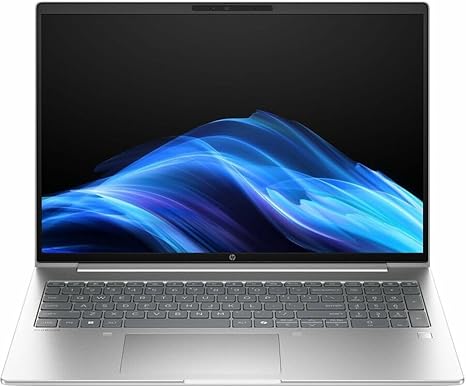
Welcome to “Reviews inside tv”! Today, we’re checking out the HP ProBook 4 G1a, a 16-inch touchscreen notebook designed to balance performance and portability for professionals and students alike. With a powerful AMD Ryzen 5 230 processor, 16GB of RAM, and a solid 512GB SSD, this machine promises to deliver solid performance in a range of productivity tasks. But does it live up to expectations in real-world use? Let’s find out.
First, let’s break down the specs of the HP ProBook 4 G1a. It’s powered by the AMD Ryzen 5 230, a hexa-core processor designed to handle multitasking with ease. This 6-core CPU is built for those who need solid performance without breaking the bank, whether you’re juggling spreadsheets, working on documents, or browsing the web with multiple tabs open. Pair that with 16GB of RAM, which should be more than sufficient for everyday office tasks and even more demanding workloads like light photo editing or video conferencing. The RAM is fast enough to ensure smooth performance, even with a few applications running at once.
The 512GB SSD storage is a solid choice for quick boot times and fast access to your files. When compared to traditional SATA hard drives, SSDs make a noticeable difference in loading speeds, reducing lag when opening programs and moving files around. It’s a nice touch for anyone who needs a machine that boots up quickly and runs smoothly throughout the day.
Now, let’s talk about the display. The HP ProBook 4 G1a features a 16-inch WUXGA screen with a resolution of 1920 x 1200 pixels. It’s not the sharpest display out there, but it’s still a significant step up from standard HD. The extra vertical resolution makes it a bit easier to work on documents and spreadsheets, offering a bit more screen real estate for productivity. Keep in mind, though, this display doesn’t have the same color depth or sharpness as higher-end options like OLED or 4K panels, so it might not be the best choice for creators who need precise color accuracy. However, for daily tasks, video calls, and casual media consumption, it does the job just fine.
In terms of performance, this laptop handles office work with ease. You won’t experience lag when using Word, Excel, or navigating through multiple browser tabs. It also performs well for streaming videos or watching content, with good contrast and decent brightness. However, for media creators—especially those working with high-resolution images or video—the lack of a more color-accurate display might feel limiting.
Gaming isn’t exactly the target audience for the HP ProBook 4 G1a, but it does come with AMD Radeon 760M graphics. These integrated graphics will handle older or less demanding games with ease at lower settings, but if you’re expecting to play modern titles at high settings, this isn’t the laptop for you. It’s best suited for casual gaming, like something on the level of lighter strategy games or older titles, where you won’t notice the limitations as much.
Speaking of performance, we need to touch on thermals. Under normal use, the ProBook stays relatively cool and quiet, which is great for long hours of work or study. The fan noise is minimal, and the chassis stays at a comfortable temperature even during extended use. However, when it comes to heavier workloads, like streaming high-definition content or running multiple apps simultaneously, you might notice the fan kicking in. It’s not intrusive, but it’s definitely something to keep in mind if you’re sensitive to noise. The laptop doesn’t suffer from significant thermal throttling, which is a plus for keeping the performance stable.
Battery life is another key factor. With a 6-cell battery, the HP ProBook 4 G1a should offer around 8 to 10 hours of use, depending on what you’re doing. For office work or browsing, expect the higher end of that range. If you’re watching videos or running heavier apps, expect to see a bit less. For most people, this should be more than enough to get through a full workday or a few hours of study without needing a charge. Plus, it charges fairly quickly, so if you’re in a pinch, you can get a decent amount of power in a short time.
Now, let’s talk about the keyboard and trackpad. The keyboard on the HP ProBook 4 G1a is comfortable for long typing sessions. The key travel is nice, and you get solid feedback with each press, which is ideal for productivity. The layout is straightforward, with a standard function row, and the arrow keys are positioned in a way that makes them easy to use. The trackpad is responsive, with good palm rejection, so you won’t accidentally click while typing. However, it’s not as large as some premium models, which might feel a bit cramped if you’re used to bigger trackpads.
As for connectivity, the HP ProBook 4 G1a offers a decent selection of ports. You get multiple USB-A ports for older peripherals, USB-C for faster data transfer, HDMI for connecting external displays, and even an SD card reader—ideal for anyone working with cameras. Wi-Fi and Bluetooth are included, and while this model doesn’t feature the latest Wi-Fi 6 standards, it still provides stable and fast connections for most home and office setups. The only thing missing here is Ethernet, so if you need a wired connection, you’ll have to rely on an adapter.
When it comes to portability, this laptop is relatively light, weighing in at around 4 pounds. It’s not the lightest in its category, but it’s still manageable for carrying around in a bag for long days at school or work. It’s also slim enough to slide into a backpack without much trouble.
As for the build, the HP ProBook 4 G1a is made from durable plastic with a decent finish. While it might not feel as premium as an aluminum or magnesium chassis, it’s still solid enough to withstand everyday use. The hinge feels sturdy, and there’s minimal flexing in the keyboard deck. This isn’t a flashy laptop, but it’s built to handle the demands of everyday work without feeling fragile.
So, let’s sum up the pros and cons. On the plus side, the HP ProBook 4 G1a offers solid performance for office tasks, a responsive keyboard, a decent display for productivity, and good battery life. It’s also got a range of useful ports and a comfortable overall design. However, its display may not be sharp enough for creators who need color accuracy, and the lack of high-end gaming performance will disappoint gamers looking for a powerful machine for modern titles.
Now, considering its price, the HP ProBook 4 G1a represents decent value for anyone who needs a reliable workhorse for office tasks, light media consumption, or light gaming. It won’t break the bank, and it delivers solid performance for the price. If you’re comparing it to similar laptops in the same range, you might find some with better displays or faster processors, but none of them will offer the same balance of price and productivity.
In terms of competition, there are some direct alternatives that you might consider. The Dell Inspiron 15 5000 or the Lenovo ThinkPad series may come with similar specs, but the HP ProBook does hold its own with its solid build quality and balanced feature set.
Final verdict: The HP ProBook 4 G1a is a great option for students, office users, or anyone who needs a reliable, affordable laptop for everyday tasks. It’s not a powerhouse for gaming or creative work, but if you’re looking for something to get work done, this laptop is more than up to the task. It offers good performance, solid battery life, and a decent design—all without breaking the bank. If you’re someone who doesn’t need high-end specs and is looking for a dependable all-rounder, this one’s definitely worth considering.
Thanks for watching! If you want to check out this laptop, the link is in the comments below. Have you already tried the HP ProBook 4 G1a? Let us know your thoughts in the comments. See you in the next review, and don’t forget to hit that like and subscribe button. Stay tuned for more!
Available to buy here:


