

Available to buy here:
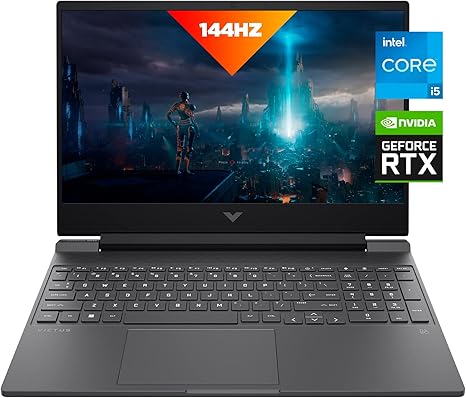
Welcome to “Reviews inside tv”! Today, we’re checking out the HP Victus 15 laptop, a device that promises to deliver high-performance gaming and smooth multitasking in a sleek, stylish package. With its powerful 13th Gen Intel Core i5-13500H, dedicated NVIDIA GeForce RTX 4050 GPU, and a 144Hz FHD display, this laptop is set to handle everything from gaming to everyday tasks. But does it live up to the hype? Let’s find out.
Let’s start with the basics: The HP Victus 15 comes with the 13th Generation Intel Core i5-13500H processor. This chip offers solid performance for both everyday tasks and gaming. With 12 cores and a boost clock that can reach up to 4.6GHz, it’s built to handle multitasking, moderate creative workloads, and even some light video editing. Combined with the NVIDIA GeForce RTX 4050 GPU, you’re getting a serious gaming boost. The 6GB of GDDR6 VRAM will push out smooth, lifelike graphics at high frame rates, so whether you’re diving into AAA titles or enjoying high-end streaming, you should expect a solid experience.
For memory, this model comes with 16GB of DDR4 RAM running at 3200 MHz. It’s a solid amount for most users, allowing for smooth multitasking, gaming, and even some light content creation. The best part? You’ve got room to upgrade. There are two accessible RAM slots, so if you feel the need to expand, it’s as easy as popping in another stick of RAM.
Storage comes in the form of a 512GB PCIe Gen4 NVMe M.2 SSD. This is much faster than a traditional SATA SSD and means faster boot times, quicker load times for your games and software, and overall snappier performance. In real-world use, the speed difference is noticeable, especially in loading large files and applications. However, if you’re a gamer with a large library, you may need to consider an external storage solution, as 512GB can fill up quickly with modern games.
Now, let’s talk about the display. The Victus 15 sports a 15.6-inch Full HD IPS panel with a 144Hz refresh rate and a 9ms response time. For gaming, this is fantastic. A 144Hz refresh rate means smoother visuals during fast-paced action, and the low 9ms response time helps reduce motion blur, making your gameplay more responsive. If you’re gaming or watching movies, the colors are vibrant, and the viewing angles are solid. However, the contrast and black levels might not be as rich as you’d find in higher-end OLED or mini-LED displays. But for this price point, the screen performs admirably.
Speaking of gaming, let’s get into some real-world performance. When you’re playing titles like Cyberpunk 2077, Call of Duty: Warzone, or The Witcher 3, the HP Victus 15 handles itself well. You can expect to play these demanding titles at 1080p on high settings, with average FPS hovering around 60-70. For competitive gamers, this won’t be top-tier, but for most, it’s a solid experience. The RTX 4050 GPU isn’t as powerful as the RTX 4070 or 4080, but it’s a significant step up from integrated graphics and delivers a solid 1080p gaming experience with smooth frame rates. It also supports ray tracing, so you get some next-gen graphics fidelity, though you’ll need to dial back settings for demanding titles if you want consistent performance.
In terms of thermals and noise, HP’s updated thermal design keeps things relatively cool. During light tasks like browsing the web or working in Office apps, the laptop remains quiet and cool to the touch. However, when you start pushing the GPU, like during gaming or video editing, the fans do ramp up. The noise is noticeable but not overwhelming. The underside can get warm under load, but the keyboard area remains relatively comfortable, even during extended gaming sessions.
Battery life is another important factor. With a 52.5Wh battery, the HP Victus 15 will last around 6 to 8 hours for light office work or streaming video. If you’re gaming or doing more demanding tasks, expect it to last closer to 2.5 to 3 hours. While it’s not a laptop that’s built to last all day without charging, the charging speed is quick, so you can top it up during breaks. The included charger is compact, which is nice for portability.
The keyboard and trackpad on the Victus 15 are well-suited for gaming and productivity. The keys have decent travel and a responsive feel, making long typing sessions comfortable. The trackpad is spacious and accurate, with good palm rejection and click feedback. There’s no dedicated number pad, but that’s standard for a 15-inch laptop. If you’re a heavy number cruncher, you might miss it, but for most users, the layout works just fine.
Port-wise, the HP Victus 15 offers a solid range. You get a couple of USB-A 3.2 ports, a USB-C port with Power Delivery and DisplayPort 1.4, an HDMI 2.1 output for external displays, an SD card reader, and an Ethernet jack. The USB-C port supports Thunderbolt 4, which is great for high-speed data transfer and external monitor connections. Wi-Fi 6 and Bluetooth 5.2 provide reliable wireless connectivity, making it a great choice for streaming, gaming, and using external peripherals.
When it comes to build quality, the HP Victus 15 doesn’t scream premium, but it’s solid for the price. The chassis is made of plastic, but it feels sturdy and well-constructed. The silver color and sleek design give it a modern look, and at 5.4 pounds, it’s portable for a gaming laptop, though it’s not the lightest in its class.
As for customer support, HP has a solid reputation. You get a one-year limited warranty, and if you have any issues, HP offers support via phone, chat, and forums. The laptop comes with some pre-installed software, but it’s mostly free of bloatware, which is always a plus.
Now, let’s briefly compare it to some of its direct competitors. The ASUS TUF Gaming F15 and the Lenovo Legion 5 are two laptops that compete in the same price range. While both offer solid gaming performance, the Victus 15 has a slight edge in terms of its display with the 144Hz refresh rate, making it smoother for fast-paced games. On the other hand, the Legion 5 and TUF F15 tend to have better thermal management and slightly more premium build quality. So, it really comes down to what you prioritize – smoother visuals or better long-term thermal stability.
So, who is the HP Victus 15 for? It’s a solid pick for gamers who want a 1080p experience with decent frame rates, creators who need good all-around performance for content creation, and anyone who values a sleek, portable design. If you’re a casual user, you’ll enjoy the laptop’s smooth performance for everyday tasks, but if you’re looking for more power or better display quality for professional-level work, you may want to consider stepping up to a higher-end model.
Thanks for watching today’s review! If you’re interested in picking up the HP Victus 15, you’ll find the link in the comments box below. And if you already own one, leave a comment and let us know your experience. Don’t forget to like, subscribe, and hit that bell icon so you don’t miss any of our upcoming reviews. Take care and happy gaming!
Available to buy here:


