

Available to buy here:
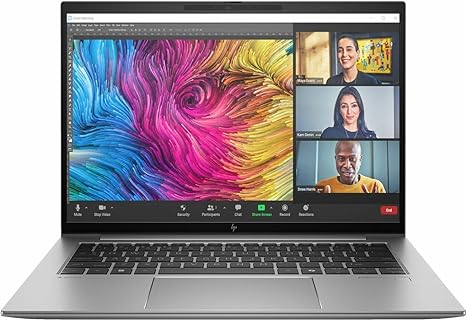
Welcome back to “Reviews inside tv”! Today, we’re taking a look at the HP ZBook Firefly G11 14″ Mobile Workstation. If you’re in the market for a workstation that offers solid performance for both creative professionals and business users, this might be the one to watch. Let’s explore what this mobile workstation has to offer and whether it lives up to the promises of performance, portability, and power.
The HP ZBook Firefly G11 is a versatile mobile workstation designed to balance high-end performance with portability. Packed with Intel’s latest Core Ultra 7 165U processor, this 10-core powerhouse can turbo boost up to 4.90 GHz, giving you the muscle to handle heavy workloads like 3D rendering, video editing, and multitasking with ease. Combined with 32 GB of RAM, which is more than enough to keep up with demanding tasks and large datasets, this workstation is well-equipped for both professionals and power users alike.
Storage is handled by a 1 TB SSD, which is not just ample in capacity but also incredibly fast. You’ll notice the difference in everything from boot times to file transfers. The SSD uses NVMe technology, offering faster read and write speeds compared to the traditional SATA drives, so you won’t be waiting long for your projects to load. And if you’re worried about running out of space, 1 TB should be more than enough for most users, especially with external drive options available for larger file storage.
When it comes to the display, this workstation sports a 14-inch WUXGA screen with a resolution of 1920 x 1200. It’s a nice middle ground between Full HD and 4K, giving you sharp visuals for everyday work, multimedia, and even detailed design work without overkill. While not an OLED or mini-LED panel, the WUXGA resolution offers good color accuracy and decent brightness for indoor use, though it’s not the brightest screen on the market. That said, it’s more than capable for day-to-day tasks like document editing, spreadsheets, and media consumption.
Now, what about real-world usage? For office work, the ZBook Firefly G11 excels. It can handle web browsing with many tabs open, running productivity apps like Microsoft Office, video calls, and even some light photo editing. The 32 GB of RAM ensures you won’t hit any performance snags, even with multiple apps running simultaneously. Whether you’re crunching numbers or managing client files, this laptop won’t slow down easily.
In terms of media consumption, the WUXGA display provides a decent experience for streaming video and casual movie watching. While it’s not the most vibrant screen out there, it gets the job done for most users who aren’t looking for ultra-immersive viewing experiences. If you’re a creator, though, you may find that the screen isn’t quite as accurate as more expensive models with higher-end panels. Still, for most professional work, the ZBook Firefly G11’s display should meet expectations.
For content creators, this laptop does offer some impressive power, especially with its deca-core Intel processor and 32 GB of RAM. Whether you’re editing photos, videos, or working with 3D models, this machine has the chops to handle creative tasks. Video editing workflows should feel smooth, and while export times might be a bit longer than on a workstation with a dedicated GPU, this laptop’s CPU can still get the job done.
In terms of gaming, this laptop isn’t going to be your first choice. It doesn’t come with a dedicated GPU, so while it can handle some light gaming, you’ll need to adjust settings to get decent frame rates in modern AAA titles. However, if you’re more focused on work than play, that won’t be a concern for you.
As far as thermal performance goes, the HP ZBook Firefly G11 remains relatively cool during light workloads. However, under heavier tasks like video editing or data processing, it can heat up a bit, especially around the keyboard and underside. Fan noise is present but not overly loud. It’s a reasonable tradeoff considering the power under the hood, though for those who require complete silence, this could be a point of consideration.
Battery life is a strong suit for this laptop, especially for a workstation. With its 14-inch form factor, the 51 Wh battery provides solid endurance. You can expect around 7-9 hours of use for office tasks like document work, web browsing, and video calls. When you push the system harder with media editing or complex tasks, that number drops, but it still performs well compared to similar laptops in its class.
At 3.3 pounds, the ZBook Firefly G11 is light for a mobile workstation, making it relatively easy to carry around, especially for frequent travelers or those working on the go. The build quality is sturdy, featuring a durable design that can withstand the demands of day-to-day use without feeling bulky.
The keyboard and trackpad are both comfortable for long typing sessions, with decent key travel and responsive feedback. The trackpad is smooth and accurate, offering palm rejection and multi-touch gestures. This is important for those who rely on touch inputs for tasks like navigation and quick editing.
When it comes to connectivity, the ZBook Firefly G11 has you covered. You get a good range of ports, including two USB-A ports, two USB-C ports, HDMI for external monitors, and an Ethernet port for wired connections. The inclusion of Thunderbolt 4 would have been a nice touch for faster data transfers and expanded connectivity, but the available ports are still versatile enough for most users. Wi-Fi 6 support ensures fast, stable connections, and Bluetooth is included for pairing with accessories.
One key factor to note is the upgradeability of the laptop. The RAM and SSD are soldered to the motherboard, which limits future upgrades. While the 32 GB of RAM should be more than enough for most professional workloads, if you need more storage down the line, you’ll have to rely on external drives or cloud storage.
So, who is this laptop best suited for? If you’re a business professional, frequent traveler, or creative working with light to moderate workloads, the HP ZBook Firefly G11 offers a solid balance of power, portability, and battery life. It’s also an excellent choice for students in need of a reliable machine for both office tasks and creative projects. If you need more graphics power for gaming or high-end creative work, however, this isn’t the laptop for you.
Now, if you’re considering alternatives, the Lenovo ThinkPad P Series and the Dell Precision line come to mind as direct competitors. Both offer better graphics options, but they come at a higher price point and aren’t as portable as the ZBook Firefly G11.
At its current price, the HP ZBook Firefly G11 offers good value, particularly for professionals who need solid performance and portability without breaking the bank. It may not be the best for hardcore gaming or ultra-demanding creative tasks, but for most everyday professional users, it strikes a nice balance.
Thanks for watching, and if you’re interested in the HP ZBook Firefly G11, you’ll find the link to get it in the comments box. Don’t forget to like, subscribe, and hit the bell icon to stay updated with all our reviews. If you’ve used this laptop, drop your thoughts in the comments below – we’d love to hear your experience. Until next time, keep your reviews inside and your expectations high!
Available to buy here:


