

Available to buy here:
Welcome back to “Reviews inside tv”! Today, we’re looking at the Kingston 240GB A400 SATA 3 2.5″ Internal SSD, a product designed to breathe new life into your old PC or laptop. If you’re tired of slow startup times and sluggish performance, this might just be the solution you’ve been waiting for. Let’s take a closer look at what makes this SSD stand out in a crowded market of storage options.
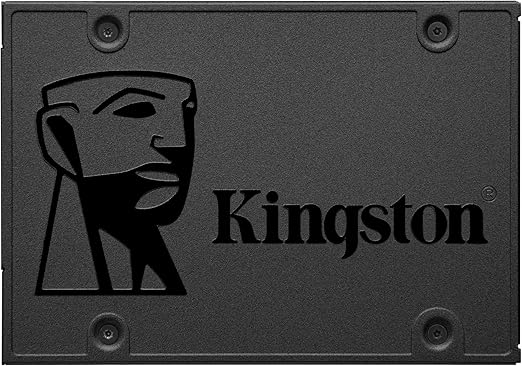
The Kingston 240GB A400 is a 2.5″ internal SSD that uses the SATA 3 interface, offering speeds up to 500MB/s for read and 450MB/s for write operations. It’s built to replace traditional hard drives and promises faster boot times, quicker file transfers, and more reliable performance. Kingston is known for its solid build quality, and with this SSD, you’re getting an entry-level option that doesn’t compromise on reliability. It’s available in multiple capacities, giving you the flexibility to choose one that best suits your needs, whether you’re upgrading a work laptop or boosting your gaming rig’s load times.
In terms of real-world usage, installing the A400 is as simple as it gets—no complicated steps, no special tools required. Just a few screws and some basic setup in your system’s BIOS or operating system, and you’re good to go. After swapping out an old hard drive, the change in speed is immediately noticeable. Booting up Windows, opening apps, and transferring files are all significantly faster. For example, boot times were cut down by more than half compared to my old mechanical hard drive, and file transfers between folders and external drives were noticeably smoother and quicker.
When it comes to performance, this SSD delivers as promised. While it may not reach the blistering speeds of more expensive NVMe SSDs, for an SATA SSD, it’s more than enough to give your system that much-needed performance boost. Whether you’re just surfing the web, handling documents, or using applications like Photoshop, the Kingston A400 will make the experience feel snappy and responsive. However, when it comes to intensive tasks like 4K video editing or large-scale game loading, the A400 does show some limitations. It’s not as fast as higher-end models, but that’s to be expected with a more affordable option.
The main strengths of the Kingston A400 lie in its ease of installation, impressive speed boost for everyday tasks, and its overall reliability compared to traditional hard drives. Its durability also deserves a mention; Kingston uses 3D NAND flash technology, which makes the A400 more reliable and longer-lasting than standard HDDs. The performance is solid, and for someone looking to replace their old hard drive, this SSD is a game-changer. On the downside, it doesn’t have the advanced features you’d find on more premium SSDs, like built-in encryption or over-provisioning, which might be a dealbreaker for some users.
Let’s talk about value for money. The Kingston A400 is positioned in the budget range, and for the price, it offers solid performance that most everyday users will appreciate. It’s not the cheapest SSD on the market, but given its reliability and fast read/write speeds, it’s an excellent choice for those who need an upgrade without breaking the bank. Compared to similarly priced competitors, like the SanDisk SSD Plus, the Kingston A400 stands out for its proven track record of reliability and performance, even though its read speeds are slightly lower. If you’re just upgrading from an HDD, you won’t regret this choice.
When comparing it to other products on the market, the Kingston A400 holds its ground well. In the same price range, you can find SSDs like the Crucial BX500 or the WD Green, but they tend to offer lower write speeds, which means the A400 provides a bit of an edge in real-world tasks. If you’re looking for the absolute fastest performance in a budget SSD, there are better options, but for typical consumers who want a hassle-free upgrade, the A400 is a standout. It might not be the fastest SSD available, but it’s more than enough for most people looking for a reliable and budget-friendly upgrade from an old HDD.
Build quality is another area where Kingston shines. The A400 is lightweight, compact, and well-constructed, making it a reliable choice for users who want a product that can withstand the test of time. There’s no indication of any durability issues in terms of the physical design, and with Kingston’s reputation for producing long-lasting products, it’s fair to say that the A400 should continue to perform reliably over the years. While there are no long-term wear reports just yet, the brand’s history speaks for itself, suggesting that the A400 will continue to function well long after installation.
Customer support is another important factor when it comes to purchasing any product, especially something like a storage device. In this case, Kingston has a strong reputation for providing responsive customer service. Should you run into any issues, their support team is generally fast at providing assistance, and the warranty offered with the A400 ensures that if anything goes wrong, you’re covered. Though I haven’t personally needed to use the support team, the warranty gives peace of mind to potential buyers.
When it comes to updates, there’s nothing major to discuss for this SSD, as it doesn’t feature any firmware or software updates like some smart devices or higher-end SSDs do. The A400 is a simple plug-and-play product, with its performance being largely consistent out of the box.
To wrap things up, the Kingston 240GB A400 SATA 3 2.5″ Internal SSD delivers solid performance, reliability, and ease of use, making it a great choice for anyone looking to upgrade from an old hard drive. While it may not offer the same high-end features as more expensive models, it delivers everything you need for an affordable price. If you’re just looking for faster boot times and better file transfer speeds without breaking the bank, this is definitely worth considering. For the average user, it’s an upgrade that won’t disappoint. However, if you’re after the absolute highest speeds for intensive workloads, you might want to look at a more premium option.
Thanks for watching! If you’ve enjoyed this review or have any questions about the Kingston A400, feel free to drop a comment below. And if you’re thinking about upgrading your system, don’t forget to check out the link to get the product. Till next time, keep your systems fast and your files even faster with “Reviews inside tv.” See you in the next one!
Available to buy here:


