

Available to buy here:
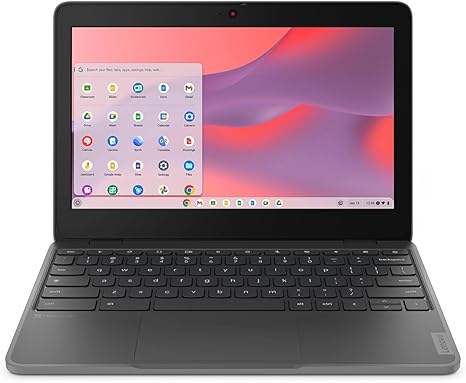
The Lenovo 100e Chromebook Gen 4 83G80000US is designed with simplicity and portability in mind, targeting students, casual users, or anyone looking for an affordable and reliable Chromebook for everyday tasks. With a compact 11.6-inch touchscreen display and powered by Intel’s N-Series N100 processor, this model positions itself as a no-frills solution for basic computing needs. Whether you’re typing up documents, attending virtual meetings, or watching your favorite shows, the 100e aims to get the job done without breaking the bank.
Under the hood, it features 4 GB of RAM, which is on the lower end of the spectrum but should suffice for light multitasking and day-to-day tasks like web browsing, document editing, and email management. While 4 GB isn’t the most powerful setup for handling demanding apps, it can keep things running smoothly when you’re juggling a handful of tabs or working on a word processor. The 32 GB of internal flash storage is modest, but for a Chromebook, it’s about what you’d expect. This storage type is quick and energy-efficient, but you’ll likely rely on cloud storage for anything beyond basic documents and media.
The 11.6-inch display comes in at a resolution of 1366 x 768, which is standard for a device in this price range. It’s not a 1080p screen, but it does the job for casual viewing, web browsing, and light media consumption. The colors are decent, though you shouldn’t expect the vibrancy and sharpness you’d find on higher-end models with IPS or OLED panels. For tasks like watching movies or browsing photos, it’s perfectly serviceable, but don’t expect the most immersive viewing experience. It’s also a touch screen, which adds some convenience for interactive use, although it’s not as fluid or responsive as premium touchscreens on more expensive devices.
Performance-wise, the Intel N100 processor, while not a powerhouse, is built for lightweight tasks. It’s a quad-core processor with a low power consumption profile, making it ideal for the kind of straightforward tasks this Chromebook is designed to handle. If you’re using it for writing, web browsing, or streaming content, it will perform decently. However, it won’t be able to handle much beyond those tasks without slowing down. For students and casual users who don’t need high processing power, this chip offers a balance of efficiency and enough grunt for typical Chromebook workloads.
Thermals are not a big concern with the Lenovo 100e, as its hardware is designed to stay cool under normal use. You won’t experience excessive heat build-up during light tasks, and the fan noise, when active, is minimal and unobtrusive. It’s a fanless design, so it won’t disturb your quiet environment. That said, if you push it to its limits with too many tabs or apps open, you may notice the device slowing down a bit due to the limitations of its hardware.
Battery life is one of the Lenovo 100e’s strongest points. With its modest components and relatively small screen, the Chromebook can comfortably last a full day of work or school with light usage. Expect anywhere from 8 to 10 hours of battery life depending on your specific usage, which is great for a device this size. It’s more than enough to get through a day of tasks without having to worry about plugging it in constantly. When you do need to recharge, the charging speed is decent, though it’s not ultra-fast.
The keyboard and trackpad on the 100e are functional but basic. The keyboard is comfortable enough for typing out long essays or emails, but it lacks the tactile feedback and key travel you’d find on premium devices. It’s a bit cramped due to the smaller size, but it’s generally serviceable. The trackpad is responsive, though it doesn’t have the precision or smoothness of higher-end models. Still, it gets the job done for everyday navigation, and the palm rejection is decent.
Connectivity on the 100e is basic but adequate. You’ll find a couple of USB-A ports, a USB-C port for charging and data transfer, and an HDMI port for connecting to external displays. It’s not loaded with ports, but it’s enough to handle basic peripherals like a mouse, external storage, or a projector for presentations. It also comes with Wi-Fi 5, which is reliable but not as fast or robust as newer standards like Wi-Fi 6. Bluetooth is included, so you can easily connect wireless peripherals like headphones or a mouse.
When it comes to build quality, the Lenovo 100e feels fairly durable, though it’s clear that it’s made to be budget-friendly. The chassis is made of plastic, and while it feels sturdy, it doesn’t have the premium feel of more expensive laptops. It’s lightweight, which is perfect for students or anyone on the go. The overall portability is great, as it won’t weigh down a backpack, and it’s compact enough to be carried around easily without feeling bulky.
In terms of value for money, the Lenovo 100e is a strong contender in the budget Chromebook market. It’s priced affordably, and while it’s not the most powerful machine, it offers reliable performance for students and casual users who need a device for basic tasks. If you’re looking for a budget-friendly Chromebook that’s easy to carry around, offers good battery life, and can handle light workloads, the 100e is a solid choice. However, if you need more power for content creation or more demanding multitasking, you may want to look elsewhere.
In conclusion, the Lenovo 100e Chromebook is best suited for students, office workers, and anyone looking for a basic laptop that excels in portability, battery life, and ease of use. It doesn’t have the power or performance for heavy multitasking, gaming, or content creation, but it delivers exactly what it promises: a reliable, budget-friendly Chromebook for everyday tasks. If you don’t mind the limitations of the 4 GB RAM and modest display, this could be a great option for the price.
Available to buy here:


