

Available to buy here:
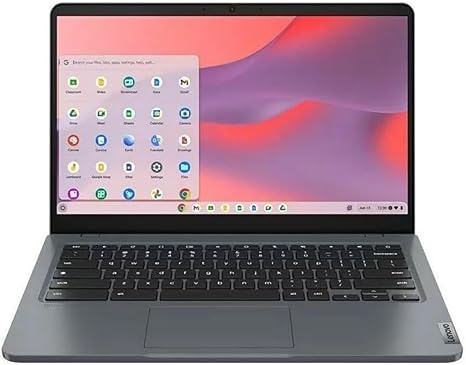
Welcome to “Reviews inside tv,” where today, we’re diving into a Chromebook that promises smooth performance for the essentials: the Lenovo 14e Chromebook Gen 3. With a 14-inch display, Intel N100 processor, and solid battery life, it’s a sleek, budget-friendly option. But does it deliver on its promise? Let’s break it down.
First, let’s talk specs. This Chromebook features an Intel N100 Quad-core processor, paired with 4GB of RAM and 32GB of flash storage. It’s a basic setup, ideal for users who need something for light tasks like browsing, document editing, and streaming. The screen comes in at 1366 x 768 resolution, offering a decent visual experience for movies or web content but not quite the sharpness you’d get from higher-resolution displays like Full HD or 4K. The compact 14-inch screen size should be comfortable for those on the go, and it’s certainly portable at just 3.09 pounds, making it easy to slip into a bag for commuting or travel.
Now, how does this Chromebook actually feel in everyday use? In terms of performance, the Intel N100 processor can handle basic web browsing, office apps, and video streaming with ease. However, when you start pushing it with more tabs or demanding tasks like video editing, you’ll notice the limitations of 4GB of RAM and the relatively small 32GB storage. For light multitasking, this setup works well, but if you’re hoping to juggle more heavy-duty workloads, this might feel a bit sluggish.
The real standout here is battery life. With a 14-hour runtime, this Chromebook could easily get you through a full workday or a day of classes without needing a recharge, which is impressive for a budget machine. It’s perfect for those who need something to get through long hours away from a power outlet, though you should keep in mind that battery performance can vary based on usage habits.
Let’s talk display. The 1366 x 768 resolution might seem a bit outdated in 2025, especially if you’re used to higher resolutions. It’s not bad for everyday tasks like browsing and watching videos, but don’t expect sharp text or vibrant colors that you’d find on Full HD or better screens. Color accuracy and brightness are sufficient for indoor use, but this might not be the screen for creators or anyone looking for precise visuals.
The keyboard and trackpad here are straightforward. The keyboard layout is typical of a Chromebook, with decent key travel and a responsive feel for typing. If you’re planning to do a lot of typing, it should be fine for shorter tasks. The trackpad is smooth and responsive, making navigation through apps and the web a breeze. However, keep in mind that this is a budget device, so while it’s good for quick tasks, it doesn’t quite match up to the premium feel you might get on higher-end models.
In terms of connectivity, you’re getting two USB Type-C ports, one USB-A, an HDMI output, and a headphone jack. The inclusion of USB-C is a nice touch, allowing for quick data transfer and charging, though don’t expect Thunderbolt support here. Wi-Fi 6 isn’t present, but the standard Wi-Fi 5 should suffice for most home or office tasks, and Bluetooth 4.2 is included for connecting peripherals.
One area where this Chromebook doesn’t shine is thermals. While it doesn’t get overwhelmingly hot, there can be some noticeable warmth under heavier workloads, particularly when multiple apps are open or you’re streaming for extended periods. The fan is relatively quiet, but it might kick in more frequently during those heavier tasks. For most users, this shouldn’t be a major issue, but it’s something to be aware of if you’re using it in your lap for long periods.
As for the ports and expandability, the laptop comes with the basics—USB-A, USB-C, HDMI—giving you the flexibility to hook up external monitors or accessories. However, the storage and RAM are both soldered, meaning you won’t be able to upgrade them, limiting its future-proofing. That’s something to consider if you plan to use the laptop for more demanding tasks down the road.
Now, let’s talk about value. At its current price point, the Lenovo 14e Chromebook Gen 3 is a solid choice for users who need something lightweight, portable, and capable of handling day-to-day web tasks and office work. It’s not going to be a powerhouse, but for students or casual users, the value proposition is clear. With its 14-hour battery life, it stands out in the budget category, especially compared to other Chromebooks in this price range.
But how does it compare to other options? If you’re looking for something with more power for multitasking or content creation, you might consider stepping up to a Chromebook with more RAM and storage, like the Lenovo Flex series or even something from HP’s Chromebook lineup. They will offer more robust performance, especially for those who need extra power for editing or streaming in higher resolutions.
The build quality of this Chromebook feels sturdy, and while it’s not made of premium materials like aluminum, it still feels solid enough for everyday use. The plastic chassis is lightweight, but it doesn’t feel flimsy. As for reliability, Lenovo generally has a good reputation, though long-term issues with this model are still too early to determine.
When it comes to customer support, Lenovo tends to be fairly responsive, though you should be aware that service options may vary depending on your region. If you’re buying this for a school or business environment, it’s worth checking their warranty and support terms to ensure you have coverage if something goes wrong.
So, who should buy this laptop? The Lenovo 14e Chromebook Gen 3 is best suited for students, casual users, or anyone needing a lightweight machine for basic productivity and media consumption. If you don’t mind the lower resolution screen and don’t need high-end specs, this could be an excellent budget option. However, if you’re someone who needs more power for creative work or gaming, you’ll probably want to look elsewhere.
To wrap up, the Lenovo 14e Chromebook Gen 3 holds its own in the budget Chromebook category. With excellent battery life, a solid build, and enough performance for most basic tasks, it delivers good value for those who don’t need the bells and whistles. However, for those looking to do more demanding tasks or for anyone who needs a higher-res screen, you may want to consider stepping up to something more powerful.
If you’ve got any questions about this Chromebook, feel free to drop them in the comments below. Don’t forget to like, subscribe, and hit that bell for more honest, in-depth reviews. Thanks for watching, and until next time, stay tuned for more tech reviews here at “Reviews inside tv!”
Available to buy here:


