
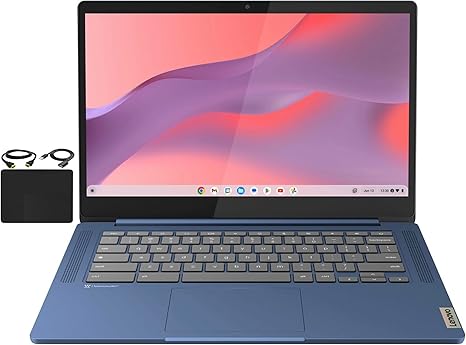

Available to buy here:
Welcome to “Reviews inside tv”! Today, we’re taking a closer look at the Lenovo Flagship Chromebook, a sleek 14-inch laptop designed with students, professionals, and anyone looking for a reliable, everyday Chromebook experience. Is it the right fit for you? Let’s dive in and see how this device performs across real-world tasks.
The Lenovo Flagship Chromebook features a 14-inch Full HD touchscreen, perfect for smooth navigation with your fingers. Its 1920×1080 resolution brings clarity and vibrant colors, while the IPS display ensures wide viewing angles. The energy-efficient LED backlight makes it great for long hours of use without draining your battery too quickly. If you’re working on online classes, using Google Classroom, or jumping into a Zoom meeting, this display gives you a clear, crisp view every time.
Under the hood, this Chromebook is powered by the MediaTek Kompanio 520 processor. This octa-core CPU includes four A73 cores running at 2.0 GHz and four A53 cores at 2.0 GHz. While the Kompanio 520 isn’t the powerhouse you’d find in higher-end models, it’s designed for solid, everyday performance—handling online tasks like browsing, video conferencing, and document work with ease. If you’re working in a browser with multiple tabs open or streaming video, it’s smooth enough for most tasks. But for more demanding apps or intensive workloads, you’ll hit the limits of what this CPU can handle. Still, for its price point, it offers decent performance for the basics.
The Chromebook is equipped with 4GB of RAM, which is adequate for lighter multitasking. It can handle a few browser tabs and lightweight apps without stuttering, but if you’re a heavy multitasker or need to run memory-intensive applications, you might find the 4GB limit a bit restrictive. Combined with the 64GB of eMMC storage, it’s fast enough for basic tasks and quick boot-ups, but don’t expect much in terms of speed when handling large files or demanding software. For most users, the storage is fine for saving documents, videos, and light media, but you’ll need cloud storage for anything beyond that.
Running on Chrome OS, this laptop is designed to be fast, secure, and simple, with automatic updates and built-in protection. The OS offers access to a wide variety of apps, particularly those that integrate with Google’s ecosystem. For those familiar with Android, the transition to Chrome OS is seamless. If your tasks involve browsing, word processing, or education-based applications, you’ll appreciate the simple, fast interface that Chrome OS provides.
When it comes to performance in the real world, this Chromebook shines in office productivity. Handling web browsing, email, spreadsheets, and video calls is a breeze. You won’t notice much lag or stuttering when jumping between tasks, making it a solid choice for students, business users, or casual web surfers. For media consumption, the 14-inch touchscreen makes streaming video a pleasant experience, offering decent color reproduction and good contrast, although the speakers, while functional, won’t blow you away.
For content creators, this laptop isn’t the go-to option. You won’t be running heavy photo editing software or rendering videos with this CPU, RAM, and storage configuration. If you’re into light editing or quick social media posts, it’ll work for you, but keep your expectations realistic.
Gaming is pretty much out of the question on this Chromebook. While light Android games or browser-based games will run just fine, this device won’t handle modern AAA titles. If you’re looking for a Chromebook to game on, this is not the one for you.
Now, let’s talk thermals and comfort. In terms of heat, this laptop stays cool during light tasks like browsing and document work. However, under heavier loads, like streaming video or multiple apps running at once, you might feel a slight warmth developing on the keyboard deck and bottom. It’s not unbearable, but it’s something to note for those longer work sessions. As for fan noise, it’s very minimal. You won’t hear the fans rev up often, and when they do, it’s not intrusive.
Battery life is one of the standout features here. With the MediaTek Kompanio 520 and the energy-efficient display, this Chromebook offers up to 10 hours of use on a single charge, depending on your tasks. Streaming video or light office work will see it last comfortably through a full day, but more demanding workloads will drain the battery faster. In terms of charging, it’s a standard affair: expect around 2-3 hours of charge from a 30-minute plug-in, which is typical for Chromebooks at this level.
When it comes to portability, the Lenovo Flagship Chromebook does not disappoint. Weighing in at just 2.86 pounds, it’s light enough to carry around in a backpack all day. At only 0.73 inches thick, it fits easily into most bags without taking up too much space. The slim design makes it a great option for students or anyone on the go.
The keyboard on this laptop is surprisingly good for typing. It has decent key travel, so typing feels comfortable, and it’s quiet enough not to disturb your surroundings. The trackpad is responsive, with smooth gestures and good palm rejection, though it might feel cramped if you’re used to larger models. It lacks a number pad, which is something to keep in mind if you often use that for data entry.
For ports and connectivity, this Chromebook is fairly well-equipped for its size. It has one USB-A 3.2 port, one USB-C 3.2 port, and a microSD card reader, which are all useful for adding peripherals or expanding storage. You also get a headphone/microphone combo jack, which is essential for online calls. It supports Wi-Fi 6 for faster, more reliable wireless connections, and Bluetooth 5.1 is included for wireless peripherals.
As far as upgradability goes, don’t expect much here. The RAM and storage are soldered onto the motherboard, meaning you won’t be able to upgrade them later. This isn’t uncommon for Chromebooks at this price range, but it does mean that you’re locked into the hardware you buy. If you’re looking for a machine that can grow with you, this might not be the best option.
In terms of build quality, this Chromebook feels solid. The Abyss Blue color is sleek and attractive, and while the materials are mainly plastic, it doesn’t feel flimsy. The hinge holds the screen in place well, and the overall design feels premium for the price.
So, what’s the verdict? The Lenovo Flagship Chromebook is a great budget option for those who need a portable laptop for basic tasks like web browsing, streaming, online classes, and light office work. It’s not going to blow you away with performance, but it gets the job done efficiently and with a solid, comfortable build. However, if you’re a power user or someone who needs higher specs for gaming, content creation, or heavy multitasking, you may want to consider looking elsewhere.
If you’re after a simple, reliable Chromebook that offers excellent battery life, a clear display, and solid build quality, this is definitely worth considering. It’s not the laptop for everyone, but if it matches your needs, it’s a great choice for the price.
Thanks for watching, and don’t forget to check the comments for the link to this Chromebook. Let us know if you’ve tried it out or if you have any questions. Until next time, keep those reviews inside!
Available to buy here:


