

Available to buy here:
Welcome to Reviews inside tv! Today, we’re taking a close look at the Lenovo IdeaPad Slim 3i Chromebook Plus, a laptop that promises to balance work and play with power, portability, and style. This Chromebook aims to be a solid choice for anyone looking for a lightweight, efficient machine for everyday tasks. Let’s see if it lives up to the hype.
The Lenovo IdeaPad Slim 3i is equipped with an Intel Core i3-N305 processor, which is a part of Intel’s more energy-efficient lineup, designed to handle light office work, web browsing, video streaming, and other everyday tasks. While it may not be a powerhouse for intensive tasks like video editing or heavy gaming, it should serve users well for tasks like email, browsing, and content consumption. Paired with 8GB of RAM and 256GB of storage, this setup should be responsive enough for light multitasking. The storage is an SSD, which will ensure faster load times and overall quicker responsiveness than older SATA-based options. The combination of this processor and storage should make for a smooth experience for most day-to-day activities, even with several tabs open or a couple of applications running.
One of the standout features is the 14-inch FHD IPS display. With a resolution of 1920×1080, this screen offers decent sharpness for everyday tasks and media consumption. IPS technology ensures good color accuracy and viewing angles, which is important if you’re working with photos or watching videos. It’s not going to blow you away with contrast like an OLED display, but for the price, it’s perfectly adequate. The 14-inch size strikes a good balance between portability and usable screen space. As for brightness, it’s designed to handle typical indoor environments well, though direct sunlight might pose a challenge in certain conditions.
The battery life here is another impressive factor. With up to 11 hours of battery life, this Chromebook is built to keep you going throughout the day without scrambling for an outlet. Whether you’re in class, at a coffee shop, or working from the couch at home, this laptop should stay charged and functional for a full day of productivity or entertainment. When it does need a charge, the Type-C charging port will power it up quickly, and it can also be used for data transfer and connecting to external displays.
Speaking of connectivity, the IdeaPad Slim 3i covers all the bases with its array of ports. You’ve got a Type-C port, which is becoming essential for modern devices as it allows for fast charging, data transfer, and video output. There’s also a traditional USB-A port, a full-sized HDMI port, and an SD card reader. The inclusion of these ports makes it a versatile device for a range of accessories and peripherals. For those looking for wireless performance, the laptop supports Wi-Fi 6, which should give you faster and more reliable connections if you’re in a busy environment or on a crowded network. Bluetooth is also included, so connecting wireless devices like headphones or a mouse is a breeze.
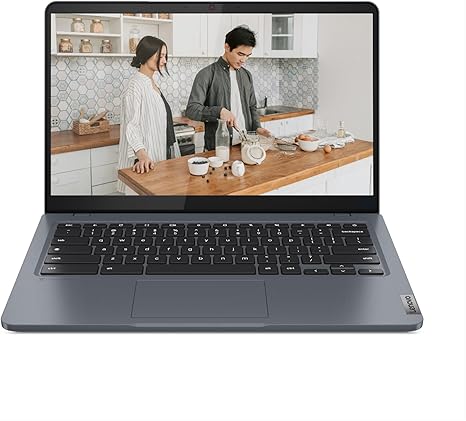
In terms of portability, the Lenovo IdeaPad Slim 3i doesn’t disappoint. Weighing just 3.3lbs, it’s light enough to carry around all day without feeling weighed down. The storm grey finish gives it a sleek, modern appearance that won’t draw too much attention. It’s the kind of laptop that you can easily slip into a backpack or tote bag without feeling like you’re lugging around a heavy load. It’s also slim enough to fit in tighter spaces, which is a bonus when traveling.
Now, how does it perform in day-to-day tasks? For office work, the IdeaPad Slim 3i shines with its responsive keyboard and decent trackpad. The keys have a comfortable amount of travel, which should help prevent fatigue during long typing sessions. The trackpad, while not the largest, is accurate and responsive, making it easy to navigate through tasks and documents. The speakers, tuned by Waves MaxxAudio, deliver clear sound that should suffice for casual video watching or conference calls, though you might want to use external speakers or headphones for a more immersive experience.
The camera features a privacy shutter, which is an excellent addition for anyone concerned with their privacy during video calls. It’s a simple but thoughtful inclusion that adds an extra layer of security. This laptop also has a mute key, which is perfect for quickly silencing the microphone when you’re not speaking.
When it comes to gaming or more demanding tasks, don’t expect the Lenovo IdeaPad Slim 3i to handle AAA titles or heavy-duty workloads. Its Intel Core i3-N305 processor and integrated graphics are not built for those kinds of tasks. However, for casual gaming, you could expect to play lighter titles like “Stardew Valley” or “Minecraft” at low settings, but anything more demanding will likely see frame drops or graphical issues.
One area where this laptop truly shines is its thermals. The design keeps the laptop relatively cool even during longer usage sessions. Under normal use, it remains mostly silent, with no noticeable fan noise, which is great for those working in quiet environments. However, when pushed with a more intensive workload, you might hear the fans kick in, but they shouldn’t be overly disruptive.
As for battery life, the 11-hour estimate holds up well in typical office tasks like browsing the web, watching videos, and word processing. When you’re pushing it harder with media streaming or light gaming, you might see a bit of a drop, but it still holds its own in terms of longevity for its category.
In terms of build quality, the IdeaPad Slim 3i is a plastic laptop, but it feels solid and well-constructed. The hinge is sturdy and smooth, and the overall build quality gives it a premium feel considering its affordable price point. The chassis feels rigid, and while it’s not entirely devoid of flex, it feels more premium than many other laptops in this price range.
Let’s quickly talk about how it stacks up against some competitors. If you’re considering alternatives in this price range, the Acer Chromebook 314 and HP Chromebook 14 are worth looking at. They’re both in a similar price range, but the Lenovo’s combination of ports, display quality, and performance gives it a slight edge for everyday users who want a bit more flexibility.
So, who should consider the Lenovo IdeaPad Slim 3i Chromebook Plus? If you’re a student, casual user, or office worker looking for a lightweight, affordable laptop that can handle basic productivity and media consumption, this is a solid option. It’s also great for those who prioritize battery life, portability, and a clean, modern design. If you’re looking for a powerhouse machine for creative work or gaming, however, you’ll want to look elsewhere.
Overall, the Lenovo IdeaPad Slim 3i delivers good value for its price. It offers solid performance for everyday tasks, long battery life, and a good display, all in a lightweight and portable package. While it has some limitations, particularly in gaming and more demanding workloads, it excels in areas that matter most for students, casual users, and office workers.
Thanks for watching! Don’t forget to like, subscribe, and hit the bell icon to stay up-to-date with all of our latest reviews. You’ll find the link to get your own Lenovo IdeaPad Slim 3i in the comments box below. Feel free to drop any questions or share your experience with us if you already own this laptop. Until next time, happy computing!
Available to buy here:


