

Available to buy here:
Welcome to Reviews inside tv! Today, we’re looking at the Lenovo ThinkPad E14 Gen 5, a laptop that promises to deliver solid performance and a crisp display for both work and leisure. But does it live up to the expectations? Let’s take a deeper dive into the specs, performance, and overall experience this machine has to offer.
At the heart of the ThinkPad E14 Gen 5 is the Intel Core i7-1355U, a 13th-gen, deca-core processor clocking in at 1.70 GHz. This processor is designed to handle both everyday tasks and more demanding workloads with ease. It offers plenty of power for multitasking, web browsing with multiple tabs, and even some light media editing or gaming. The performance is backed by 16 GB of DDR4 SDRAM, with 8 GB soldered onto the board and another 8 GB in a removable slot. This makes it an ideal choice for users who need to keep a lot of apps open at once without experiencing any lag. However, you might feel some limitations if you push it with highly demanding software like video editing programs or virtual machines.
When it comes to storage, the ThinkPad comes equipped with a 512 GB SSD. This is a solid size for general users, offering plenty of room for documents, media, and software. The SSD’s speed, combined with the 16 GB RAM, makes this system fast to boot and quick when loading large files. It’s a nice balance of capacity and speed, but if you’re someone who works with large video files or a huge media library, you might want to look for a laptop with a larger SSD or consider external storage solutions.
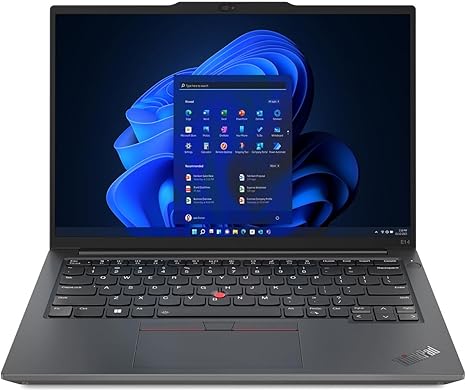
The 14-inch display offers a WUXGA resolution (1920 x 1200), which provides a little extra vertical real estate compared to standard Full HD displays. This is great for productivity tasks, allowing you to view more of your documents or web pages at once. The touchscreen adds another level of versatility, making it easy to interact directly with your work, media, or even games. While it’s not an OLED or mini-LED display, the colors are vibrant and the 16:10 aspect ratio gives you a bit more screen space for productivity without feeling cramped.
In terms of real-world usage, this laptop shines for office tasks like word processing, spreadsheets, and video calls. The combination of the fast CPU, ample RAM, and snappy SSD ensures that you can juggle multiple programs without any slowdowns. Streaming movies or TV shows is a pleasant experience on this display, and you’ll appreciate the higher resolution when watching content. However, for more demanding media tasks like video editing or rendering, the i7-1355U and integrated graphics will show their limits. You can expect some lag in real-time playback or long export times, especially when compared to laptops with discrete GPUs.
Gaming? It’s definitely not a gaming machine, but light, casual gaming is possible on titles that don’t require a lot of graphical power. Games like Fortnite or League of Legends will run fine on lower settings, but heavier games like Cyberpunk 2077 or the latest AAA titles won’t fare well here. For a smoother gaming experience, you’d need something with a dedicated GPU.
Now let’s talk about the keyboard and trackpad. Lenovo’s ThinkPads are known for their solid typing experience, and the E14 is no exception. The keys have decent travel and feedback, making it a comfortable choice for long typing sessions. The layout is standard with a full set of function keys and a dedicated number pad. The trackpad is smooth, responsive, and accurate, with no issues in everyday use, and the palm rejection works well. The larger-than-average trackpad is great for multi-finger gestures and swiping, which is perfect for productivity tasks.
When it comes to connectivity, the E14 doesn’t leave you hanging. You get a good selection of ports, including USB-A and USB-C (with Power Delivery support), HDMI, and an SD card reader. There’s no Thunderbolt here, but for most users, this is more than sufficient for connecting to external displays, storage, or docks. The laptop also supports Wi-Fi 6 and Bluetooth 5.2, ensuring fast wireless performance for streaming, downloads, and connecting peripherals. However, if you’re looking for future-proofing, note that the RAM is not easily upgradable past 16 GB, so you’re a bit limited if you ever need more in the future.
Thermals and noise are important aspects to consider, especially in a business laptop that might be used for extended periods. During regular tasks, the ThinkPad stays relatively cool, but under heavier loads, you’ll notice the fans kicking in. They’re not too loud, but they do become noticeable when pushing the laptop hard. The chassis gets a bit warm under load, especially around the keyboard and the underside, but nothing that’s unbearable for lap use.
Battery life is decent, with the 50 Wh battery providing around 6 to 8 hours of use, depending on your workload. Light tasks like browsing and office work will push it towards the upper end of that range, while heavier tasks like streaming or working with large files will deplete it faster. The laptop supports rapid charging, and in about an hour, you’ll get a significant boost in battery life, which is great if you’re constantly on the go. At 1.6 kg, the laptop is not the lightest in its category, but it’s still fairly portable and won’t weigh you down when carrying it around in a bag.
Now, let’s get into the real-world performance. When we look at the thermal performance, the laptop holds its own in terms of cooling, but after sustained workloads, you might see some slight throttling to keep temperatures in check. While gaming and intensive tasks might push it to its limits, the CPU and cooling system are competent for light to moderate use. The display is certainly capable of handling casual media consumption and productivity, but if you’re a creative professional looking for a true color-accurate display, you may want to look at a higher-tier model.
So, what are the pros and cons of this device? On the plus side, the ThinkPad E14 Gen 5 offers excellent value for anyone looking for a productivity-focused laptop. The CPU and RAM make multitasking a breeze, the display is sharp and bright enough for daily use, and the build quality is solid with a professional feel. On the downside, it’s not the best choice for gaming or heavy creative workloads, and the battery life, while decent, could be better for those who need a full day of work away from a charger.
In terms of value for money, the ThinkPad E14 Gen 5 is a solid option for professionals and students. If you’re looking for something that can handle office tasks, media consumption, and light creative work with a great keyboard and reliable performance, this is a strong contender. However, if you’re into gaming or heavy video editing, you might want to consider something with a dedicated GPU and better thermal management.
For those comparing alternatives, you might look at models like the HP ProBook 445 or the Dell Latitude 5000 series. While the ThinkPad excels in portability, keyboard quality, and build, these alternatives might offer better performance or more power for the same price range.
When it comes to build quality, Lenovo has once again delivered a solid, dependable machine. The body is made of durable materials, and the hinge feels sturdy. While it’s not as premium as some high-end ThinkPads, it has a quality feel that’s perfect for business use.
Before we wrap up, don’t forget to like, subscribe, and hit the bell icon so you never miss a review on Reviews inside tv. If you have any questions about this laptop or if you already own one, feel free to leave a comment down below. Thanks for watching, and remember—if you can’t handle the heat, don’t get into gaming laptops! Catch you in the next one!
Available to buy here:


