

Available to buy here:
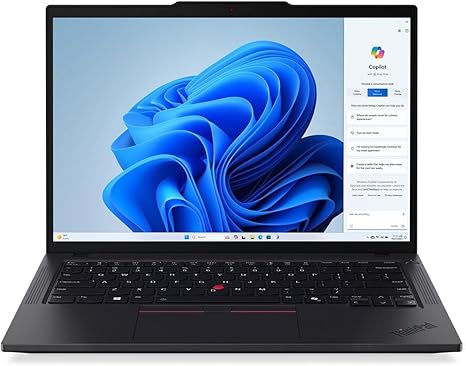
Welcome back to “Reviews inside tv.” Today I’m looking at the Lenovo ThinkPad T14 Gen 5 21ML008NUS — a 14‑inch touchscreen notebook that promises strong productivity, good portability, and the classic ThinkPad workhorse feel. Let’s explore what this machine brings to the table, where it shines, and where it might leave you wanting a bit more.
This ThinkPad T14 Gen 5 comes with an Intel Core Ultra 7 165U processor, a 12‑core (2 high‑performance + 8 efficient + 2 low-power cores) / 14‑thread configuration, with peak turbo up to 4.9 GHz and a 12 MB Smart Cache. RAM is a generous 32 GB DDR5‑5600 MHz (two 16 GB SO‑DIMM modules), and storage is a 512 GB PCIe 4.0 ×4 NVMe SSD. The display is a 14.0″ WUXGA (1920 × 1200) IPS touchscreen panel, anti‑glare, with roughly 400 nits brightness, 60 Hz refresh, and modest colour coverage (~45% NTSC). Graphics are handled by Intel’s integrated solution; there is no discrete GPU. Connectivity includes two USB‑C Thunderbolt 4 / USB4 ports (40 Gbps, with DisplayPort 2.1 and USB‑PD), two USB‑A 3.2 Gen 1 ports, one HDMI 2.1 for external displays (up to 4K@60Hz), a standard 3.5 mm audio combo jack, and onboard Wi‑Fi 6E and Bluetooth 5.3. The machine weighs in at about 1.38 kg (≈ 3.05 lbs), with a chassis built from PC reinforced partly with carbon‑fibre components. Battery capacity is listed at 52.5 Wh, with support for fast charging via a 65 W USB‑C adapter.
As you use this ThinkPad for everyday tasks — web browsing with many tabs open, handling documents, spreadsheets, email, video calls — that 12‑core Ultra 7 CPU paired with 32 GB RAM means the machine feels very responsive. Multitasking is smooth, switching between heavy browser loads, multiple office apps, and background syncs happens without stutter. For office-oriented users, students, or anyone juggling lots of windows, that memory bandwidth and the NVMe SSD keep things snappy and reduce latency when launching apps or searching through files.
Media consumption — streaming movies or shows, video conference calls, casual video watching — feels solid and smooth thanks to the 14″ WUXGA IPS panel with good viewing angles and anti‑glare coating. Brightness at 400 nits is adequate for indoor or moderate‑light environments, and touchscreen adds some flexibility if you like to scroll or zoom directly. That said, the panel’s limited colour gamut (45% NTSC) and 60 Hz refresh rate mean it’s not ideal for tasks needing precise colour reproduction — photo editing or video grading will show its limitations quickly. For content creators or colour‑sensitive workflows, you’ll likely want an external monitor with better gamut and calibration.
Because the laptop relies on integrated graphics, gaming or heavy graphical workloads won’t be its strong suit. This isn’t a gaming machine — you won’t get smooth 3D performance for AAA titles — and any GPU‑heavy creative work (e.g. video rendering, 3D work) will be constrained. Instead, the T14 Gen 5 feels aimed at productivity, business tasks, office‑style workflows, or day‑to-day use where GPU power isn’t critical.
Thermals and comfort are well handled for typical workloads. With the dual‑fan cooling and rear air vents Lenovo built into the chassis, under moderate use the laptop stays pleasantly cool and largely silent. For heavier sustained workloads — compiling code, long editing sessions, or multiple virtual machines — the fans do spin up, but noise remains in check and the chassis, thanks to its PC + carbon‑fibre construction, doesn’t get uncomfortably hot for desk use. Lap use for light tasks is easy; for heavy workloads, a desk is better. The weight and thickness make it portable and easy to carry, so it’s a good companion for commuting, travel, or shifting between workspaces.
The keyboard on this ThinkPad is unmistakably what long-time ThinkPad fans expect: backlit, tactile, with smooth key travel and a comfortable layout for long typing sessions — whether drafting reports, writing code, or editing documents. The enlarged trackpad gives precise control, and the inclusion of the classic TrackPoint system (for those who use it) remains a plus. Fingerprint reader integrated into the power button and the IR camera for Windows Hello offer convenience for login and security, while the privacy shutter on the webcam helps in professional settings.
Port selection is excellent — two Thunderbolt 4 ports give great flexibility, especially for docking, external display hookup, or power delivery; USB‑A ports and HDMI 2.1 add legacy and display support; headphone jack supports audio; Wi‑Fi 6E gives future‑proof wireless connectivity. The internal design uses SO‑DIMM RAM slots and a PCIe 4.0 M.2 SSD slot, so upgrades (RAM or storage) are feasible, which improves longevity and value.
Where this ThinkPad shows its limitations is in display quality (limited gamut and just 60 Hz), and graphics performance (integrated GPU only). For creators needing accurate colours or gamers wanting real graphical power, it’s simply not designed for that. Also, 52.5 Wh battery, combined with a relatively powerful CPU, means battery life under heavy loads or multitasking will be modest — good for a workday but not perfect for long days off the charger if you push the CPU hard. The touchscreen is a convenience, but for many “power users” of ThinkPads the added cost might not be worth the limited panel quality.
All considered, the ThinkPad T14 Gen 5 21ML008NUS delivers strong CPU and RAM performance, fast storage, a robust, portable chassis, excellent input devices, and plenty of ports — everything a business user, student, or frequent traveller might want. If your use is office tasks, browsing, writing, light media, perhaps light editing — this will feel like a reliable, classy daily driver that balances power, portability, and practicality. If your needs lean toward colour‑critical work, gaming, or heavy GPU tasks, the integrated graphics and limited panel will hold you back.
For the price and class, it offers very good value for business‑class users and professionals seeking a dependable, upgradeable 14‑inch workhorse. It outshines many ultrabooks in reliability, port selection, and long‑term versatility, though it sacrifices display richness and graphical horsepower. I’d recommend it to students, office workers, frequent travellers, remote workers, and anyone who values quiet performance, portability, and longevity over flashy specs or gaming bells & whistles. If you’re more into creative workflows with colour accuracy or gaming/journalism with visuals — consider stepping up to a model with a better screen or discrete GPU. Thanks for watching, check the comments for the purchase link, leave your thoughts or questions if you own this ThinkPad already, and I’ll catch you in the next one — stay sharp.
Available to buy here:


