

Available to buy here:
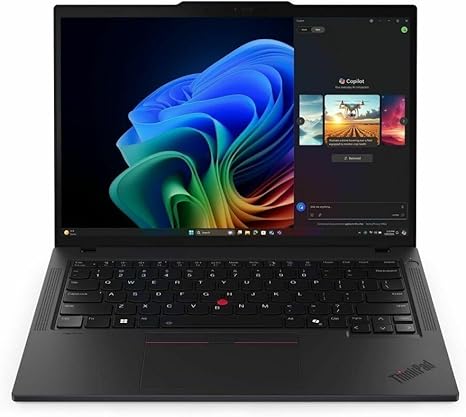
Welcome back to “Reviews inside tv.” Today, we’ve got the Lenovo ThinkPad T14 Gen 6, a 14″ touchscreen notebook designed for serious productivity. With its sleek black design and powerful specs, it’s built to handle everything from multitasking to media consumption, all while keeping you comfortable during long work sessions. But does it really live up to the ThinkPad legacy? Let’s find out.
At the heart of the T14 Gen 6 is the AMD Ryzen AI 7 PRO, a processor that combines solid power with smart optimizations. Whether you’re tackling spreadsheets, jumping between apps, or working on more demanding tasks like video editing or virtual meetings, this CPU can handle it without breaking a sweat. Paired with 32 GB of DDR5 SDRAM, multitasking becomes effortless—say goodbye to lag even when juggling a dozen tabs, large documents, or heavy applications.
Storage-wise, the 512 GB SSD provides ample space for your files, and the speed difference between this SSD and older SATA models is immediately noticeable. Whether you’re launching programs or transferring files, things load up fast, cutting down on those annoying wait times.
The 14-inch display offers a WUXGA resolution of 1920 x 1200, delivering vibrant colors and sharp resolution, perfect for everyday use. The high-quality IPS panel ensures that those vivid visuals remain crisp even when viewed from off angles, making it a good option for sharing content with others or getting some work done in a café with a variety of light sources. The touchscreen adds an extra level of versatility, especially when you need to navigate quickly or zoom in on details without grabbing your mouse.
When it comes to battery life, the T14 Gen 6 does a respectable job, offering enough juice to last through a full workday with light to moderate usage. In typical scenarios, you can expect somewhere between 7 to 9 hours depending on your workload—enough for a day of office work or streaming media. However, when you’re pushing the system hard with heavy tasks like video editing or multitasking with multiple resource-hungry apps, that number drops, but it’s still enough to make it through most work sessions without scrambling for an outlet.
Speaking of comfort, the T14’s keyboard feels right at home for long typing sessions. The key travel is satisfying, and the feedback is responsive, letting you type quickly without feeling fatigued. The layout includes a full set of keys, with the arrow keys easily accessible for navigation. The trackpad is large, smooth, and accurate, providing a comfortable experience for those who prefer trackpad navigation over the touchscreen.
Port selection is also solid, with USB-A, USB-C, HDMI, and an SD card reader all in place. This makes connecting your accessories, whether you’re docking it at a workstation or using an external monitor, a seamless experience. The T14 also supports the latest Wi-Fi 6, which enhances internet speeds and reliability, and Bluetooth 5.2 for smooth peripheral connections.
In terms of build quality, Lenovo’s ThinkPad reputation for durability holds strong. The chassis feels sturdy, made from a mix of tough plastic and magnesium, while maintaining a weight of around 3.23 pounds, which is lightweight enough for daily carrying but solid enough to resist any accidental bumps or drops. The slim profile makes it easy to slip into a bag for commuting or traveling.
Now, let’s talk about thermals. The T14 manages heat fairly well, staying relatively cool during light tasks. However, under heavier loads like video exports or gaming, the system does heat up slightly. Fan noise is moderate—mostly quiet when idling, but the fans become more noticeable during intense workloads. While you might not want to use it on your lap during these moments, the system doesn’t overheat or experience significant thermal throttling, maintaining consistent performance.
When it comes to real-world performance, this laptop handles office and productivity tasks with ease. Web browsing with many tabs, working on documents, and attending video calls all feel fluid. For media consumption, the display shines. Streaming video looks crisp, and the speakers, though not mind-blowing, are decent for casual listening. For content creators, photo editing, light video editing, and music production are all within reach, though for intense video editing or 3D rendering, you’ll want to look for a machine with a dedicated GPU.
While this model isn’t designed with gaming in mind, it can handle some light gaming. You’ll be able to play older or less demanding titles with ease, but newer AAA games like Cyberpunk 2077 or Call of Duty: Warzone will struggle, especially if you crank up the settings. For gaming, you’ll likely want to stick to medium settings at 1080p for the best experience.
Now, a bit of housekeeping—if you’re enjoying the breakdown so far, make sure to hit that like button, subscribe, and tap the bell icon so you don’t miss any of our in-depth reviews.
Let’s talk about value. At its current price, the ThinkPad T14 Gen 6 is a solid choice for anyone in need of a reliable business laptop or high-performance workhorse. It’s more expensive than some ultrabooks or budget laptops, but you’re paying for that rock-solid performance, comfortable typing experience, and Lenovo’s renowned durability. If you’re a student or business professional who needs something that can keep up with heavy multitasking and media consumption, this is a great fit. It may not be the best choice for gamers or those in need of GPU-intensive tasks, but for its target audience, it’s a reliable, capable machine.
If you’re looking at alternatives in a similar price range, the Dell Latitude 7420 or HP Elite Dragonfly come to mind, though both are a little pricier. However, if you need a more powerful GPU or better display, you may want to consider those models.
So, who is this laptop for? If you need a device for daily productivity, media consumption, and some light creative work, the ThinkPad T14 Gen 6 is a fantastic option. But if you’re someone who needs gaming power or a more robust graphics setup, you might want to look elsewhere.
Thanks for watching! If you have any questions or already own the ThinkPad T14, drop them in the comments below. And if you’re ready to grab one for yourself, the link’s waiting for you in the comments box. Until next time, keep those tech reviews inside your TV!
Available to buy here:


