

Available to buy here:
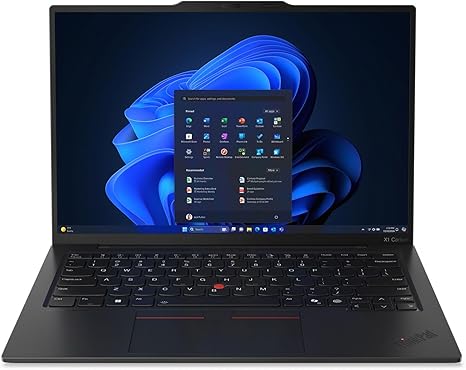
Welcome to “Reviews inside tv”! Today, we’re diving into the Lenovo ThinkPad X1 Carbon G13. This ultrabook targets professionals who need powerful performance packed into a slim, lightweight frame. It’s ideal for office users, creators, and anyone who wants the perfect mix of performance and portability. But does it live up to the hype? Let’s break it down.
The X1 Carbon G13 is built around the Intel Core Ultra 7 processor, a powerful chip designed to handle everything from multitasking to AI-accelerated tasks. This means you’re not just running your typical office apps — it’s designed for smarter workflows, with features like live transcription and AI filters, making it a solid choice for content creators. Combined with 32GB of RAM, you can forget about lag while juggling spreadsheets, documents, or even heavier creative workloads. And when it comes to storage, it’s got a 512GB PCIe SSD, which ensures that data is read and written at blazing speeds, meaning quicker boot times and faster load times for your applications.
The display is a standout with its 14-inch, 1920 x 1200 resolution. This may not be 4K, but it strikes a balance by delivering sharp visuals, vibrant colors, and great brightness levels for typical office work and media consumption. The IPS technology ensures wide viewing angles, so it’s easy to share your screen or just enjoy a good movie from different positions. With a focus on color accuracy, the screen works well for content creators who need reliable visuals but may not need the full-on color gamut offered by higher-end OLED displays.
When it comes to battery life, the X1 Carbon G13 doesn’t disappoint. While we don’t have the exact figures for every scenario, Lenovo claims it can last an entire workday with moderate usage. Expect around 8 to 10 hours of office work, though if you’re editing videos or gaming (yes, you can do some light gaming on this machine), that will be reduced. The 57Wh battery is built for long durations, but like all ultrabooks, it’s not about playing 3D-heavy games all day. On the go, it’s easy to carry around at just 2.5 pounds, making it perfect for frequent travelers or those who need a machine that fits comfortably in a bag without weighing you down.
The keyboard on the X1 Carbon is fantastic, offering excellent key travel and a satisfying click that makes long typing sessions a breeze. Whether you’re typing reports, coding, or drafting emails, it’s responsive and comfortable. The trackpad is large, accurate, and responsive — a plus for precision when navigating or making quick gestures. There’s also a fingerprint reader for added security, which can save you a few seconds when logging in.
Now, let’s talk ports and connectivity. You get a solid set of connections here. There are two Thunderbolt 4 ports, which offer incredible speeds for data transfer and allow you to hook up an external monitor or other peripherals. The addition of a USB-A port and HDMI means you can easily plug in a mouse, USB stick, or even connect the laptop to an external display without any adapters. The X1 Carbon also supports Wi-Fi 6E for faster internet speeds, plus Bluetooth 5.2 for reliable connections to wireless devices like headphones and mice. But as is common with most ultrabooks, there’s no SD card reader, which could be a dealbreaker for photographers or videographers.
When it comes to performance under load, this laptop has the power to handle demanding tasks. The Intel Core Ultra 7 processor, paired with 32GB of RAM, ensures that you can seamlessly run multiple applications, from video editing software to complex spreadsheets, with no noticeable lag. However, like many thin laptops, the cooling system isn’t perfect, and you might notice the fans kick up under heavy loads, especially when exporting videos or running benchmarks. The keyboard and underside stay relatively cool, but you might feel some heat on the top-left side after extended periods of heavy use.
In terms of real-world performance, the X1 Carbon G13 is more than capable for daily office work. Whether you’re managing documents, attending video calls, or browsing the web with a dozen tabs open, this laptop excels without breaking a sweat. For media consumption, the 14-inch display shines with vibrant colors and sharp clarity, making it perfect for watching videos or catching up on your favorite shows. As for content creators, this machine can handle photo editing, light video editing, and other creative workloads, though it’s not a dedicated workstation for tasks like 4K video rendering. Gaming is possible at lower settings and resolutions, but don’t expect to run the latest AAA titles smoothly on this machine.
In the real world, the X1 Carbon G13’s performance is solid, but its main draw is its portability and smooth workflow for everyday tasks. It has a fantastic keyboard and trackpad, solid thermals for everyday use, and all the essential ports and connections you need. The downside? The cooling system isn’t the most robust for long gaming or intensive creative sessions, and the lack of an SD card reader might be a dealbreaker for some professionals.
Now, for those of you wondering whether this machine is worth the price: If you’re looking for a powerful, portable ultrabook that’s perfect for work, media, and light creative tasks, the X1 Carbon G13 is a solid choice. It’s especially appealing for professionals who need a lightweight machine with excellent battery life, good performance, and a high-quality display. However, if you’re a gamer or a content creator who needs a bit more raw power, you may want to explore a different option.
For those wondering about alternatives, the Dell XPS 13 and HP Spectre x360 are close competitors. They also offer high-quality displays and slim profiles, but the X1 Carbon G13’s solid build quality and longer battery life give it a slight edge for frequent travelers and business professionals. On the flip side, for a bit more raw power or specialized features, you might want to consider stepping up to a more powerful workstation-style laptop.
In the end, the Lenovo ThinkPad X1 Carbon G13 is a fantastic ultrabook for anyone who needs a balance of power, portability, and professionalism. Whether you’re a student, a frequent flyer, or a content creator, this laptop is more than up to the task.
Thanks for watching! Don’t forget to check the link in the comments to grab this machine for yourself. If you’ve got any questions or already own the X1 Carbon, feel free to share your thoughts below. Until next time, take care and stay productive!
Available to buy here:


