

Available to buy here:
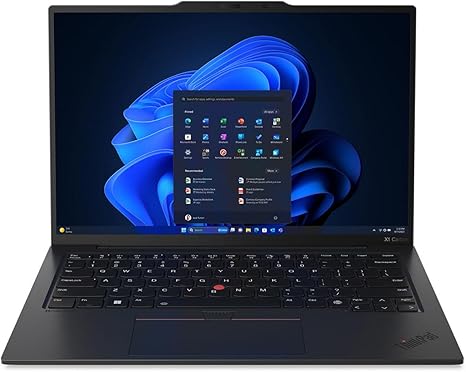
Welcome to “Reviews inside tv”! Today, we’re taking a closer look at the Lenovo ThinkPad X1 Carbon Gen 12. If you’ve been eyeing a sleek, ultra-portable business laptop, this could be your next powerhouse. With its Intel Core Ultra 5 125U processor, 16 GB of memory, and that beautiful 14-inch WUXGA display, it promises a lot for professionals and casual users alike. But does it deliver the kind of performance you expect from a premium ThinkPad? Let’s find out.
The Lenovo ThinkPad X1 Carbon Gen 12 comes equipped with an Intel Core Ultra 5 125U processor, a part of Intel’s latest lineup that is optimized for both power and efficiency. This chip brings impressive performance for everyday office tasks, multitasking with web browsers, spreadsheets, and video conferencing. It’s well-suited for handling day-to-day productivity without breaking a sweat. In terms of GPU, you’re relying on Intel’s integrated Iris Xe graphics, which are capable enough for casual gaming and media consumption but won’t handle high-end gaming or intensive 3D rendering.
With 16 GB of RAM, this laptop offers excellent multitasking capabilities. You can easily run multiple applications simultaneously, switch between tabs, and keep your workflow moving at a brisk pace. This amount of memory is especially useful for users who tend to work with heavy applications or larger spreadsheets. The 512 GB SSD provides quick load times and plenty of space for your files, apps, and media, while also ensuring your system remains responsive. The SSD is an NVMe model, which means you’ll experience faster boot times and quicker file transfers compared to traditional SATA drives.
The 14-inch WUXGA display offers a resolution of 1920 x 1200, which is a step up from the standard 1080p screens you often find in this range. It’s a solid panel for media consumption, offering decent color accuracy and clarity, but don’t expect the vibrant punch of an OLED or the ultra-high-definition sharpness of a 4K screen. This is a display that’s designed to balance quality with power efficiency, making it great for everyday use but not necessarily for those who need top-tier color accuracy or ultra-fine resolution.
When it comes to battery life, the Lenovo ThinkPad X1 Carbon Gen 12 doesn’t disappoint. With its 50Wh battery, you can expect around 8-10 hours of office work, which is more than enough to get through a full workday without needing a charge. Streaming video may drop this a bit to 7-8 hours, but it’s still very respectable for a laptop of this size and performance. Charging is quick, thanks to the support for Rapid Charge, which gets you back to full in a little over an hour.
The weight of the ThinkPad X1 Carbon Gen 12 is another highlight. At just around 2.5 lbs, it’s incredibly portable, making it easy to throw into a backpack and take on the go. The slim profile and sturdy build quality mean it’s designed to travel well without feeling fragile. You’ll appreciate how easy it is to carry this laptop around all day, whether you’re heading to meetings or hopping between classes.
Now, let’s talk about the keyboard and trackpad. Lenovo’s keyboards are well-known for their comfort, and the X1 Carbon Gen 12 is no exception. The key travel is just right, and the feedback is solid, making it easy to type for extended periods without feeling fatigued. The layout is typical for a ThinkPad, with a full set of function keys and a responsive trackpad that’s accurate and smooth to use. It’s a pleasant typing experience, whether you’re knocking out emails or working on documents.
In terms of connectivity, the ThinkPad X1 Carbon Gen 12 has all the essential ports you need. You get two USB-C Thunderbolt 4 ports for fast data transfer and charging, two USB-A ports for legacy devices, an HDMI 2.0 port for external monitors, and a headphone jack. You also have Wi-Fi 6E support, ensuring fast and stable internet connections. There’s no SD card reader, but for most users, the port selection will be more than sufficient for everyday tasks and connecting peripherals.
As for thermals, the X1 Carbon Gen 12 remains impressively cool under load. During extended office work or media consumption, the fans are mostly silent, and there’s little to no heat buildup on the keyboard deck or underside. While you’re not likely to push this laptop into intensive gaming or heavy video editing workloads, the thermal performance is more than enough for casual tasks and day-to-day use. The laptop doesn’t throttle under normal workloads, ensuring that performance stays consistent throughout your sessions.
The display, while not the most cutting-edge, offers solid performance for most users. It’s a non-touch WUXGA panel, so you won’t get the flashy vibrancy of an OLED screen, but you will get good viewing angles and solid color reproduction for everyday work and media consumption. If you’re expecting high refresh rates or 4K resolution, this might not be the screen for you, but for a business laptop, it strikes a nice balance between performance and efficiency.
Now, let’s dive into a bit more detail on its real-world performance. For office tasks like browsing, working with spreadsheets, or attending video calls, the ThinkPad X1 Carbon Gen 12 performs smoothly. Multi-tab browsing is fast, and the 16 GB of RAM ensures you won’t encounter lag when switching between programs. If you’re editing photos or light video content, the Intel Iris Xe graphics hold up well, though you won’t want to push this laptop too hard for professional-level creative work.
If you’re gaming, though, keep your expectations in check. Casual gaming titles like League of Legends or Fortnite will run just fine at medium settings, but more graphically demanding games, like Cyberpunk 2077, won’t be playable at higher settings. That being said, it’s not really designed for gaming; this is more of a professional laptop for work and light entertainment.
When it comes to thermals, this laptop handles heat well. The fans are generally silent or barely audible during normal usage, and the body stays relatively cool. However, under heavier tasks like gaming or video exporting, you might hear the fans kick in, though they’re still quieter than many other laptops in this category. This makes it comfortable for extended work sessions or watching movies without a distracting fan noise.
The battery life is another area where the ThinkPad X1 Carbon Gen 12 shines. With a battery capacity of 50Wh, you can expect solid usage for a full workday, whether you’re drafting documents, checking emails, or attending virtual meetings. Streaming video reduces battery life a bit, but you’ll still get around 8 hours, which is great for a portable business laptop.
So, who is this laptop best suited for? The ThinkPad X1 Carbon Gen 12 is ideal for professionals who need a reliable, lightweight, and powerful machine for productivity tasks, media consumption, and light content creation. Its impressive portability, long battery life, and solid performance make it a great choice for office workers, business users, and students who need a dependable laptop that won’t weigh them down. However, if you’re a gamer or someone who needs heavy creative performance, you might want to look elsewhere.
Overall, the Lenovo ThinkPad X1 Carbon Gen 12 is a fantastic all-around laptop that delivers solid performance, a great display, and excellent portability. It’s a great option for anyone who needs a workhorse for everyday tasks and a bit of media enjoyment on the side. Thanks for watching, and don’t forget to check out the link in the comments box for more details on this laptop. Feel free to share your experiences or ask any questions below – we’d love to hear from you. See you next time, and remember to like, subscribe, and hit that bell icon for more reviews right here on “Reviews inside tv.”
Available to buy here:


