

Available to buy here:
Welcome to “Reviews inside tv,” where we explore the latest tech to help you make smarter buying decisions. Today, we’re taking a closer look at the Lenovo ThinkPad X1 Carbon Gen 12, a sleek and powerful ultrabook designed with productivity and performance in mind. Whether you’re a professional, student, or anyone needing a dependable laptop for everyday use, this model aims to deliver with its robust specifications. Let’s see if it lives up to the hype.
The ThinkPad X1 Carbon Gen 12 comes packed with some impressive specs. It’s powered by the Intel Core Ultra 7 165U processor, part of Intel’s Evo platform, offering up to 12 cores and remarkable power efficiency. This means you can juggle multiple apps, tabs, and workloads without significant slowdowns, whether you’re editing a document, streaming videos, or handling spreadsheets. When paired with 32 GB of RAM, multitasking becomes an absolute breeze, ensuring smooth operation even when you’re running demanding software or multiple applications at once.
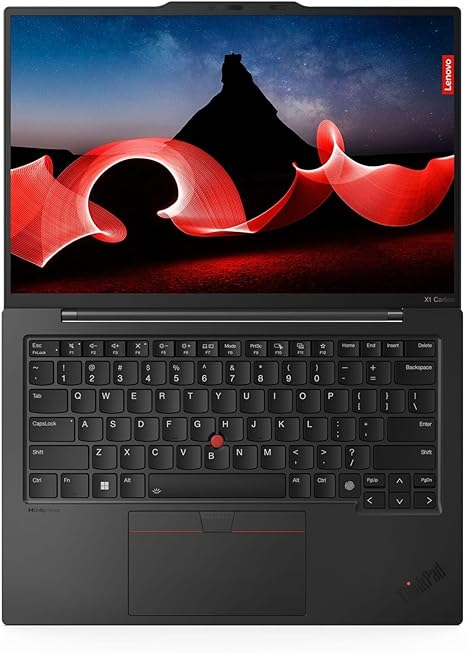
For storage, Lenovo has equipped this machine with a 512 GB SSD, which is more than sufficient for everyday users, providing fast read and write speeds. This SSD is especially important for improving boot times and file transfers, helping you stay productive without being held up by slow load times. The 14-inch WUXGA display, with a 1920 x 1200 resolution, strikes a balance between size and clarity. It’s perfect for media consumption, offering crisp visuals for movies, documents, and everyday tasks, though it’s not quite 4K. Still, for most users, this resolution should deliver sharp text and images for general use and some light media editing.
When it comes to real-world performance, the Lenovo ThinkPad X1 Carbon shines in office productivity scenarios. From browsing the web with many tabs open to video conferencing, it handles multitasking like a pro. The 32 GB of RAM ensures that even with several demanding apps running, performance remains smooth. This is ideal for business users or students who need a reliable machine for work-related tasks like email, spreadsheets, and word processing. The Intel Core Ultra 7 processor, built for both power and efficiency, doesn’t let you down when it comes to performance during these activities.
Media consumption on this laptop is also quite enjoyable. The 14-inch touchscreen display might not be OLED or mini-LED, but the WUXGA resolution is still a solid choice for casual streaming and video watching. Watching movies or TV shows is an immersive experience, with vibrant colors and good contrast, especially when paired with the Dolby Audio system for clear sound. However, if you’re a creator or media professional who needs higher-end color accuracy, you may want to look at more premium displays, but for general use, it’s more than sufficient.
Now, let’s talk about gaming. While this is not a gaming laptop, the integrated Intel GPU is capable of handling casual titles and some older games at lower settings. Don’t expect it to run modern AAA titles at ultra settings, but if you’re into less demanding games like indie titles or older classics, it can still give you a decent experience. Realistically, though, if gaming is a priority, you’ll want to look elsewhere for something with a dedicated GPU.
Thermal performance is something worth mentioning. Under light use, the X1 Carbon stays relatively cool, which is a big plus for comfort when using it on your lap. However, during intensive tasks, like streaming a high-definition movie or handling heavy workloads, the laptop does get noticeably warm, especially on the underside. While the cooling system does its job well enough to prevent overheating, it’s not completely silent. During sustained heavy use, like long video editing sessions, the fan noise becomes audible, though it isn’t excessively loud.
In terms of battery life, this Lenovo laptop delivers decent performance, but the exact duration will depend on your use case. For light office tasks like word processing, browsing, and streaming videos, you can expect around 7 to 9 hours on a full charge. When performing more demanding tasks, such as video conferencing or running several applications simultaneously, expect the battery life to drop to about 5 to 6 hours. The 65-watt charger provides fast recharging, so you won’t be tethered to an outlet for long. However, considering the slim and light form factor, the battery size may not offer the longest lasting performance compared to larger laptops with bigger batteries.
When it comes to comfort, typing on the X1 Carbon is a pleasure. The keyboard offers solid key travel with good tactile feedback, making it great for long typing sessions. Whether you’re working on an essay or responding to emails, your fingers won’t feel fatigued after hours of typing. The trackpad is smooth and accurate, with excellent palm rejection, ensuring that accidental inputs are minimal. It also supports multi-touch gestures, which is a nice touch for power users who want to navigate through documents or presentations with ease.
Connectivity on the ThinkPad X1 Carbon is top-notch. It offers a wide variety of ports, including two USB-C Thunderbolt 4 ports, two USB-A ports, an HDMI port for external displays, and a microSD card reader. It’s great for users who want to connect to external monitors, docking stations, or use other peripherals without having to rely on adapters. Wi-Fi 6 ensures strong and reliable internet speeds, and Bluetooth 5.2 adds compatibility with modern wireless devices, making this laptop a solid choice for anyone needing robust connectivity options.
In terms of build quality, the X1 Carbon is incredibly well-made. The chassis is constructed from carbon fiber and magnesium alloy, making it both lightweight and durable. At just 2.49 pounds and only 0.6 inches thick, it’s one of the most portable ultrabooks you can find. Whether you’re a student carrying it around campus or a professional commuting between meetings, this laptop’s lightweight design makes it an excellent travel companion.
So, what are the strengths and weaknesses of this laptop? The X1 Carbon excels in portability, comfort, and performance for general office work. The solid build quality, excellent keyboard, and responsive trackpad make it a great choice for long work sessions. However, if you’re looking for a gaming machine or need a high-end display for professional creative work, the X1 Carbon might not fully meet those needs.
In terms of value, it’s important to consider the price. The ThinkPad X1 Carbon Gen 12 is a premium machine, and the price reflects that. However, when compared to other business ultraportables in this category, the X1 Carbon stands out with its combination of build quality, performance, and overall user experience. Models like the Dell XPS 13 or the HP Spectre x360 14 offer some stiff competition in terms of performance and display quality, but the X1 Carbon is a great option if you prioritize portability, keyboard comfort, and durability.
Overall, the Lenovo ThinkPad X1 Carbon Gen 12 is an excellent choice for professionals, students, and business users who need a portable, high-performance ultrabook. Its combination of a fast processor, 32 GB of RAM, and solid battery life makes it ideal for productivity and media consumption. If you need a laptop for gaming or high-end creative tasks, though, you may want to explore other options with better GPUs and displays.
Thanks for watching! If you want to check out the Lenovo ThinkPad X1 Carbon Gen 12, the link is in the comments box. Let me know if you have any questions or if you’ve already used this laptop—I’d love to hear about your experience. Don’t forget to like, subscribe, and hit the bell icon so you never miss a review from “Reviews inside tv.” Until next time, keep your tech smart and your decisions smarter!
Available to buy here:


