

Available to buy here:
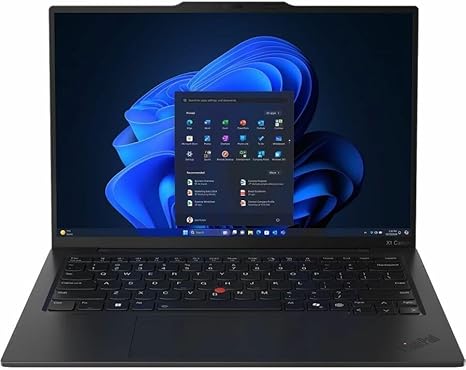
Welcome to Reviews inside tv. Today I’ve got for you a full, no‑fluff look at the Lenovo ThinkPad X1 Carbon Gen 13 21NX00FRUS — a 14‑inch ultraportable that wants to be everything from student notebook to traveling business tool to light creative machine. Let’s break down whether it pulls that off, and who should consider buying it.
Right out of the gate, this X1 Carbon is built around an Intel Core Ultra 5 225U processor, paired with 16 GB of LPDDR5x‑8400 RAM soldered on, and a 512 GB M.2 NVMe SSD. The screen is a 14‑inch WUXGA (1920×1200) IPS panel — anti‑glare, 500 nits brightness, 100% sRGB, 60 Hertz refresh rate, and optimized for low power. Battery-wise, you get a 57 Wh cell with a bundled 65 W USB‑C PD charger. The chassis is feather‑light — it’s an ultraportable through and through.
In plain talk: that CPU means snappy responsiveness for everyday tasks — multiple browser tabs, Word documents, spreadsheets, video calls — and the 16 GB RAM is enough for multitasking comfortably, though it’s soldered, so no upgrades later. The SSD is fast NVMe, so boot, app load, and file operations feel fluid. The display won’t wow a creative seeking HDR magic or deep blacks, but for regular office work, browsing, or Netflix it’s bright, crisp, and color‑accurate. Battery size and efficient hardware suggest solid portability — good for all‑day work away from the plug.
In everyday use you’ll likely find this laptop excels for productivity: web browsing with many tabs, editing documents, spreadsheets, video calls all feel smooth. Media streaming or watching movies on the IPS panel comes through cleanly, with enough brightness for indoor and moderately bright spaces. Since there’s no discrete GPU, heavy content creation (like 4K video editing or 3D work) isn’t ideal — but for light photo edits, casual video edits, or music production, it’s acceptable; though slower than a workstation‑class laptop. Gaming is not really the target here; with integrated graphics the experience will be limited to light or older games at modest settings. Day‑to‑day performance is responsive; sleep‑resume, trackpad use, typing feel smooth, Wi‑Fi and general system stability work as expected.
Thermals and noise remain reasonable in typical use: with light workloads temperature and fan noise should stay low, making it comfortable for lap use or long typing sessions. Under heavier workloads the fans might ramp up a bit, but you’re unlikely to hear persistent roar or feel extreme heat — just the usual working‑laptop warmth.
Battery life and portability are where this model shines for its class: for light office tasks or writing you can expect full‑day use without plugging in. A 57 Wh battery, paired with efficient components and a low‑power screen, often delivers several hours of productivity or media playback on a charge. The charger is compact and travel‑friendly, which makes topping up on the go easy. And the weight and size make carrying it around all day comfortable.
The keyboard — as is often the case with ThinkPads — is a highlight: key travel and feedback feel excellent for long typing sessions, ideal for writing or office work. Layout is familiar and practical. The trackpad is decently sized and accurate, though some may find physical click buttons plus touchpad feel a bit small compared to larger glass trackpads. Inputs cover the essentials: you get USB‑C (with charging and likely Thunderbolt support), USB‑A for legacy devices, HDMI for external display, headphone jack. That means connectivity is enough for docks, monitors, or external drives, though there’s no SD‑card reader — a small downside if you often move photos or media directly from cameras. RAM being soldered and only a single M.2 SSD slot limits long‑term expandability.
Overall, this X1 Carbon feels like a thoughtful balance of portability, efficiency, and competence. It doesn’t try to be a high‑end creative workstation or a gaming rig — it plays to its strengths: being a lightweight, reliable, battery‑efficient daily driver for professionals, students, and frequent travelers.
If I were you and needed a laptop for heavy creative workloads, video editing, or gaming, I’d probably skip this — go for something with discrete GPU and more raw power. But if you want a travel‑ready machine that handles all office work, web tasks, document editing, light media editing, and regular media consumption with grace, this ThinkPad delivers a compelling mix of portability, build quality, and battery life.
Thanks for watching. If you’ve got questions or already own this laptop — drop a comment below with your thoughts or experiences. See you next time here on Reviews inside tv — and stay productive out there.
Available to buy here:


