

Available to buy here:
Welcome to “Reviews inside tv,” where we dive into the details of the latest and greatest tech to help you make the best buying decisions. Today, we’re taking a close look at the Lenovo ThinkPad X1 Carbon Gen 13, an ultrabook that combines power, portability, and practicality for professionals on the go. Whether you’re a student, a business user, or someone who needs a reliable machine for daily tasks and creative work, this could be the laptop you’ve been searching for. Let’s see if it lives up to the hype.
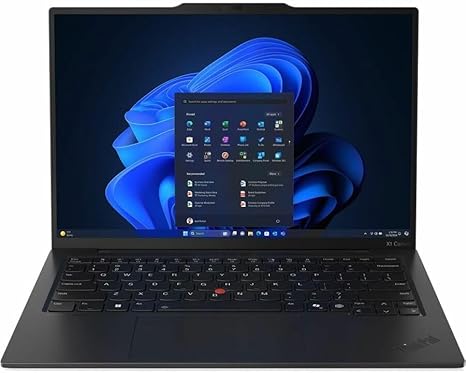
The Lenovo ThinkPad X1 Carbon Gen 13, model 21NX00FSUS, comes packed with a host of features aimed at delivering performance and portability in a sleek design. It’s powered by the Intel Core Ultra 5 235U, which utilizes hybrid architecture to enhance multitasking and optimize both media creation and AI-powered collaboration. The 14-inch display boasts a 1920×1200 WUXGA resolution, delivering vibrant colors and sharp detail, with wide viewing angles, making it perfect for everything from productivity to media consumption.
Looking at the specs, this ultrabook comes equipped with 16GB of RAM and a 512GB SSD. That’s more than enough for your everyday office tasks, web browsing, and media consumption, while also offering enough headroom for more demanding applications like photo and video editing. The storage is an SSD, meaning fast boot times and quick access to files, and with 16GB of RAM, you’ll be able to multitask without experiencing significant slowdowns. That hybrid architecture of the Intel Core Ultra 5 processor is particularly noticeable in applications that leverage multiple cores and threads, offering smooth performance even under heavier workloads.
When it comes to display quality, the 14″ WUXGA screen doesn’t disappoint. The resolution hits that sweet spot for productivity, giving you more screen space than the typical 1080p display without being too dense for comfortable viewing. The color accuracy is strong, and the brightness levels, while not extreme, are sufficient for most indoor environments. If you’re a creator or someone who spends time editing visuals, the wide color gamut will ensure your work looks sharp and detailed. However, the 60Hz refresh rate might leave gamers wanting more, especially for fast-paced titles, but for the average user, this won’t be an issue.
In terms of real-world usage, the Lenovo ThinkPad X1 Carbon Gen 13 excels at tasks like web browsing, handling multiple tabs, word processing, and spreadsheet management. Whether you’re working on documents or hopping between video calls, the performance feels snappy and responsive, thanks to that Intel Core Ultra 5 chip. Streaming video on services like Netflix or YouTube looks sharp, with no visible lag or screen tearing. For content creators, whether you’re editing photos or videos, the ThinkPad’s performance will handle it well, though longer export times might push the CPU to its limits.
When it comes to gaming, this laptop is not designed for high-end gaming, but it will manage casual or less demanding titles at medium settings. For instance, in a game like Fortnite, you can expect smooth performance at 1080p, but for AAA titles like Cyberpunk 2077, you’d need to dial back the settings quite a bit to achieve playable frame rates. It’s not a gaming powerhouse, but for those who just want to enjoy lighter gaming in their downtime, it’s more than capable.
Now, let’s talk about thermals and noise. Under light use, like web browsing or office tasks, the ThinkPad X1 Carbon Gen 13 remains cool, and the fan is virtually silent. However, during more intensive tasks, like video editing or gaming, you might hear the fans kick in, though they’re still relatively quiet compared to some other ultrabooks. The chassis itself doesn’t get uncomfortably hot, but you might feel some warmth on the underside during long sessions. Over time, the thermal performance holds up decently, with no major throttling issues during short bursts of heavy tasks, although extended periods of high load could lead to some drop-offs in performance.
Battery life is one of the standout features of this ultrabook. With a 512GB SSD and a power-efficient Intel Core Ultra processor, the ThinkPad X1 Carbon Gen 13 offers an impressive runtime of around 8-10 hours with moderate use. This includes tasks like web browsing, document work, and streaming video. If you’re pushing it with more demanding workloads, such as video editing or heavy multitasking, you might see closer to 6-7 hours, but that’s still very respectable for a laptop of this performance caliber. Charging is quick too, with the laptop reaching 80% in just under an hour, which is perfect for a quick top-up during meetings or short breaks.
For a device that’s designed with portability in mind, the X1 Carbon Gen 13 doesn’t disappoint. At just 2.49 pounds and measuring only 0.6 inches thick, it’s light enough to carry around in a backpack all day without feeling weighed down. Whether you’re hopping between meetings or traveling for business, it won’t be a burden to carry. The slim profile also adds to its professional aesthetic, making it an excellent option for anyone looking for an ultrabook that looks as good as it performs.
The keyboard on this model is one of Lenovo’s best, with deep key travel and responsive feedback, which makes long typing sessions much more comfortable. The layout is well-organized, and the arrow keys are full-sized, so navigating documents or spreadsheets is a breeze. The trackpad is large and accurate, with excellent palm rejection, and the clicks feel solid without being too loud or jarring. This makes it a pleasure to use in both work and casual settings.
When it comes to ports and connectivity, the ThinkPad X1 Carbon Gen 13 has you covered with two USB-C Thunderbolt 4 ports, two USB-A ports, HDMI, and a headphone jack. This makes it easy to connect to external monitors, docks, or peripherals. It also supports Wi-Fi 6 and Bluetooth 5.2, ensuring reliable and fast wireless performance. The laptop doesn’t include an SD card reader, though, which might be a downside for photographers or videographers who rely on one for quick file transfers.
In terms of value for money, the Lenovo ThinkPad X1 Carbon Gen 13 is positioned as a premium ultrabook, and it certainly delivers on performance and build quality. It’s ideal for professionals who need a reliable, powerful, and portable laptop. At its price point, there are alternatives like the Dell XPS 13 or the MacBook Air M2, both of which offer similar performance in a more compact design. However, the ThinkPad X1 Carbon Gen 13 has the advantage of a more robust port selection, better thermals, and a proven business-oriented design.
Overall, if you’re looking for an ultrabook that excels in productivity, media consumption, and light content creation, the Lenovo ThinkPad X1 Carbon Gen 13 is a fantastic choice. Its performance is reliable, battery life is impressive, and it’s built to last. It’s not a gaming laptop, and it’s not designed for heavy video editing or rendering, but for most other tasks, it’s a powerhouse that’s ready to go wherever you need it.
Thanks for watching! Be sure to check out the link in the comments to grab the Lenovo ThinkPad X1 Carbon Gen 13 for yourself. If you already own one, let us know how it’s been working for you. Don’t forget to like, subscribe, and hit that bell icon so you don’t miss our next review. Until next time, happy computing!
Available to buy here:


