

Available to buy here:
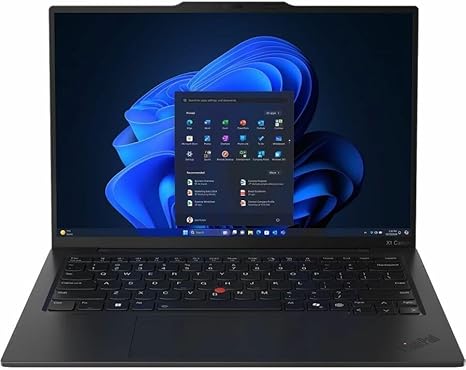
Welcome back to Reviews inside tv! Today, we’ve got a detailed look at the Lenovo ThinkPad X1 Carbon Gen 13, a sleek, high-performance ultrabook designed to tackle both productivity and creative tasks with ease. Featuring the latest Intel Core Ultra 7 processor, this model promises adaptive performance and cutting-edge AI features. But how does it really perform in the real world? Let’s break it down.
The ThinkPad X1 Carbon Gen 13 is powered by Intel’s Core Ultra 7 265U processor, part of the new Intel Evo platform, which is built to offer impressive multitasking abilities and efficient power management. With 32 GB of RAM and a 1 TB SSD, you can expect top-tier performance whether you’re working with complex spreadsheets, multi-tab browsing, or editing large files. For storage, the 1 TB NVMe SSD ensures that files load quickly, and you won’t face those annoying delays when accessing larger files or booting up applications. This setup should handle even the most demanding office tasks and light creative work without breaking a sweat.
The display is a 14-inch WUXGA (1920 x 1200) touchscreen. It’s a nice step up from Full HD, offering crisp resolution and vibrant colors, ideal for productivity tasks, streaming media, and light photo editing. Though it’s a 60 Hz panel, it still offers smooth visuals and vibrant color reproduction, with wide viewing angles to accommodate sharing your screen with colleagues or friends. For those who work on the go, the touchscreen functionality adds a layer of convenience, making it easier to navigate through apps or jot quick notes. However, if you’re expecting a 120 Hz refresh rate or OLED vibrancy, this is where the X1 Carbon might fall short for gamers or heavy media creators.
When it comes to real-world performance, this ultrabook excels in productivity environments. Web browsing with multiple tabs open is fluid, and the multitasking experience is seamless. Running through a typical office workload—word processing, spreadsheets, and video calls—feels effortless. For media consumption, the screen holds up well for streaming movies or shows, with vivid colors and a solid contrast ratio. The speakers, though not as rich as those found in more entertainment-focused laptops, still deliver a decent experience for video calls or casual listening.
In terms of content creation, the Core Ultra 7 processor supports AI-enhanced workflows, making it suitable for light photo and video editing. If you’re into music production or creating on the go, the 32 GB RAM ensures smooth handling of larger projects, but do keep in mind that the 60 Hz display and lack of dedicated GPU might limit your performance in high-end video editing or 3D rendering tasks. However, for lighter editing, this laptop should handle the job with ease.
Thermals are one of the most important aspects of ultrabooks, and the ThinkPad X1 Carbon doesn’t disappoint. Under normal workloads, the laptop stays cool, and the fan noise is almost imperceptible. However, under heavier loads—such as extended video editing or gaming—the fans do kick in. You may notice a bit more noise, but the overall thermal performance remains solid with minimal throttling. This means the laptop can sustain performance over time, and you won’t see huge slowdowns even under prolonged usage.
Battery life is another area where the X1 Carbon shines. With a 57 Wh battery, you can expect around 8 to 10 hours of productivity work. Watching videos or web browsing will likely drain the battery at a slower pace, while heavier tasks like video editing or gaming will obviously require more frequent charging. Still, it’s more than enough to get through a day’s work without scrambling for a charger. Charging speeds are decent, with quick top-ups that won’t leave you waiting for too long.
In terms of portability, the X1 Carbon is impressively lightweight at just 2.5 lbs. The slim profile and compact design make it an excellent choice for professionals on the go, students, and anyone who needs a powerful laptop that won’t weigh them down. You can easily slide it into your backpack or carry it around for long hours without feeling the strain. The build quality, as always with Lenovo, is top-notch—solid, durable, and reassuringly premium with its carbon fiber and magnesium alloy body.
As for the keyboard, the typing experience on the ThinkPad X1 Carbon is a standout. The key travel is just right, providing enough feedback for comfortable typing sessions. Whether you’re composing emails or working on longer documents, the layout is intuitive, with a large trackpad that’s responsive and easy to use. The power button is conveniently placed above the right corner of the keyboard, which doubles as a fingerprint scanner for easy, secure login.
For connectivity, the ThinkPad X1 Carbon offers a solid selection of ports, including two USB-C Thunderbolt 4 ports, USB-A, HDMI, and a headphone jack. There’s also an SD card reader, which can be especially useful for photographers or videographers. With Wi-Fi 6E and Bluetooth 5.2, you’ll have a stable connection whether you’re working from home or at a café. One thing to note, however, is that the RAM and storage are soldered, so upgrading these down the line won’t be an option.
Now, let’s talk about the competition. At its price point, the X1 Carbon faces competition from other premium ultrabooks like the Dell XPS 13 or the HP Spectre x360. While the X1 Carbon has a slightly better keyboard and more robust ports, it does fall behind in display refresh rates and GPU performance compared to some of the competition. If you need a laptop for gaming or high-end creative work, you might want to look elsewhere, but for professional tasks and office use, the X1 Carbon holds its own.
In conclusion, the Lenovo ThinkPad X1 Carbon Gen 13 is an outstanding choice for business professionals, students, and anyone looking for a lightweight, high-performance ultrabook. It strikes a great balance between power, portability, and durability, and it’s optimized for those who need a reliable laptop for day-to-day productivity and light creative tasks. While it might not be the best option for gamers or those who need a high-refresh-rate screen, it excels in every other area, making it a smart choice for its target audience.
Before you go, don’t forget to like, subscribe, and hit that bell icon for more in-depth reviews. If you’ve used the X1 Carbon or have any questions, drop a comment below—I’d love to hear your thoughts!
Thanks for watching, and as always, stay tuned for more reviews from Reviews inside tv.
Available to buy here:


