

Available to buy here:
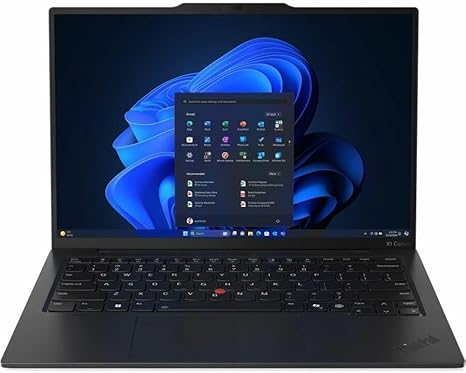
Welcome to “Reviews inside tv!” Today, we’re checking out the Lenovo ThinkPad X1 Carbon Gen 13, a sleek, business-focused ultrabook that promises both power and portability. With its 14-inch touchscreen, Intel Core Ultra 7 processor, and the Intel Evo platform, this model aims to meet the needs of professionals, students, and creators alike. But does it live up to the hype? Let’s dive into the details.
The ThinkPad X1 Carbon Gen 13 boasts some impressive specs. At its heart is the Intel Core Ultra 7 255U processor, part of Intel’s latest generation, designed to provide superior performance with AI-enhanced tasks. It’s paired with 16GB of RAM, which strikes a solid balance between multitasking ability and overall system responsiveness. The 512GB SSD offers fast, responsive storage with ample room for most users’ needs, providing quick access to files, documents, and apps. When it comes to the display, you’re looking at a 14-inch WUXGA touchscreen, offering a resolution of 1920 x 1200, with vibrant colors and wide viewing angles—perfect for both work and entertainment. As for battery life, the ThinkPad X1 Carbon comes equipped with a solid battery that promises to power through a full day of productivity, but we’ll get into real-world performance a bit later. And with a weight of just 2.5 pounds, it’s light enough to carry around all day without breaking your back.
In terms of real-world performance, the ThinkPad X1 Carbon Gen 13 handles typical office and productivity tasks with ease. Web browsing, email management, and video calls all run smoothly without a hitch. The 16GB of RAM helps ensure that multiple browser tabs and applications can be open simultaneously, without significant slowdowns. For media consumption, the WUXGA display is bright and sharp, making it a pleasure for watching videos or presentations. The screen offers good color accuracy and wide viewing angles, ensuring that you won’t miss out on detail from any angle. If you’re into content creation, the AI-powered enhancements of the Core Ultra 7 processor are definitely noticeable. Tasks like photo editing and even basic video editing feel snappy, and if you’re dealing with heavy media, the processing power keeps things efficient. Gaming, however, isn’t the ThinkPad X1 Carbon’s strong suit. The lack of a dedicated GPU means you’re limited to light gaming or older titles, but for anything graphically intense, it’s probably not your best bet.
When it comes to thermals, the X1 Carbon does a decent job keeping temperatures in check. Under light use, the keyboard deck remains cool, and the fan is nearly silent. But as you ramp up usage, such as during longer work sessions or media exports, the fans do get a little louder, although they don’t get overly intrusive. While it doesn’t suffer from major thermal throttling, you may notice some mild performance dip during prolonged gaming or video editing sessions. The keyboard itself feels great for long typing sessions, offering just the right amount of key travel and feedback. The trackpad is responsive and accurate, with smooth palm rejection, making for a comfortable, precise input experience.
When it comes to battery life, you can expect around 8 to 10 hours under typical office use, depending on screen brightness and task intensity. Streaming media will probably knock that down a bit, but it’s still well-suited for all-day use. The ThinkPad X1 Carbon charges quickly, and its slim, lightweight design makes it a breeze to carry around. Whether you’re hopping from meeting to meeting or on a long flight, its portability is top-notch.
The I/O options here are plentiful for a laptop this thin. You get two USB-C ports, both supporting Thunderbolt 4, a USB-A port, HDMI 2.0, and a microSD card reader. This makes connecting to external monitors, docks, and accessories easy. Wi-Fi 6E ensures fast, reliable wireless connections, and Bluetooth 5.2 adds further flexibility for peripherals. It’s worth noting that the storage and RAM are soldered, meaning you can’t upgrade these components after purchase. This could be a consideration for future-proofing your device, especially if you think you’ll need more storage or memory down the line.
So, let’s talk pros and cons. The ThinkPad X1 Carbon Gen 13 excels in portability, with its lightweight design and long battery life. Its performance is more than enough for everyday tasks, office work, and light content creation. The display is sharp and vibrant, and the keyboard and trackpad provide a satisfying typing experience. On the downside, gaming is not really an option unless you’re sticking to older titles, and the thermals could be better under extended heavy use. Also, the lack of upgradable RAM and storage may turn some buyers off, especially those who like to customize their machines over time.
Now, when it comes to value for money, the ThinkPad X1 Carbon is certainly on the higher end of the price spectrum. But given its premium build quality, excellent display, and solid performance for productivity tasks, it holds its value for the right buyer. If you’re looking for an ultrabook that’s light, powerful, and great for office work or creative tasks, it’s hard to beat. That said, if you’re after something with more gaming power, or a machine that offers more flexibility in terms of upgradability, you might want to look elsewhere.
When compared to other ultrabooks like the Dell XPS 13 or the HP Spectre x360, the ThinkPad X1 Carbon shines in build quality and keyboard comfort, but it may fall short when it comes to gaming or long-term upgradability. Still, for business professionals and students, it’s a top-tier choice.
In terms of build, the X1 Carbon uses a carbon fiber and magnesium alloy construction, making it both durable and lightweight. The chassis feels rigid and premium, and the hinge is solid, ensuring no wobble when adjusting the screen. Lenovo’s reputation for reliability further backs up the overall quality of this device. If there’s any downside, it’s that some of the ports might feel a bit cramped for those used to more connectivity options.
Lenovo’s customer support is solid, with good warranty coverage and support options available worldwide. If anything goes wrong, you can count on a fairly smooth experience when getting assistance.
In conclusion, the Lenovo ThinkPad X1 Carbon Gen 13 is a fantastic ultrabook for those seeking a powerful, portable, and reliable machine for office work, productivity, and light creative tasks. It’s especially ideal for professionals and students who need a solid, no-frills device that gets the job done with ease. However, if you’re looking for more flexibility or gaming performance, it might not be the best fit.
Thanks for tuning in! If you’ve got any questions or already own this laptop, feel free to drop a comment below. Don’t forget to like, subscribe, and hit the bell for more in-depth reviews. Until next time, happy computing, and remember: keep your tech inside for the best reviews.
Available to buy here:


