
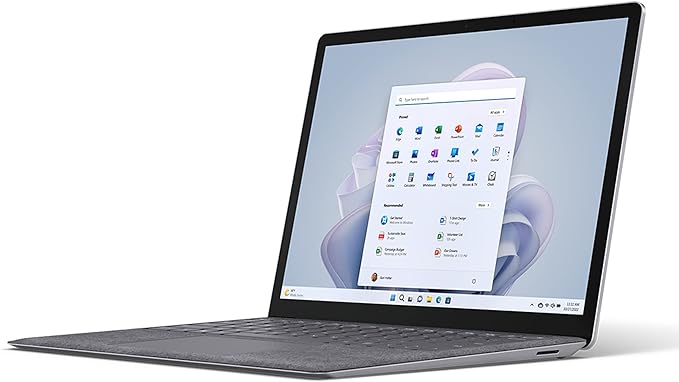

Available to buy here:
Welcome back to Reviews inside tv. Today, we’re taking a closer look at the Microsoft Surface Laptop 5, a 13.5-inch ultra-portable laptop that blends productivity, performance, and style into a sleek package. With its impressive Intel Core i5 processor, vibrant PixelSense touchscreen, and long-lasting battery, this is a device that claims to handle everything from office work to streaming, and even a bit of light gaming. But, does it live up to the hype? Let’s find out.
At the heart of this laptop lies the Intel Core i5 processor, part of the Intel Evo platform. This means you’re getting a performance boost with better power efficiency and responsiveness. With four cores and eight threads, it’s more than capable of handling your daily office tasks, browsing with multiple tabs, streaming videos, and light multitasking. The 8GB of RAM may sound a bit limiting for heavy tasks like video editing, but it’s actually quite sufficient for day-to-day office work, browsing, and media consumption. For storage, you’ve got 256GB of SSD space, which is quick, and ensures that boot-ups, file transfers, and app launches are snappy. If you need more, you’ll have to look into cloud storage or external options since the storage is not upgradeable.
When it comes to the display, the 13.5-inch PixelSense touchscreen with a 3:2 aspect ratio is a standout feature. The higher vertical screen real estate makes a huge difference for productivity, especially when working with documents, web browsing, or having multiple windows open. You get vibrant colors and sharp details, though the resolution of 2256 x 1504 may not quite reach the crispness of higher-end 4K displays. Still, for most users, it’s more than sufficient for media consumption and light photo editing. The touch functionality is smooth, and it complements the experience when navigating or drawing, if you happen to use a stylus.
Battery life is where the Surface Laptop 5 shines, with Microsoft claiming up to 18 hours of usage. Realistically, with mixed usage like productivity, video calls, and media streaming, you’re likely to get somewhere around 12 to 14 hours, which is still impressive for such a slim device. The fast-charging feature is another win—just a 30-minute charge can get you several hours of use, which is great for people on the go.
Let’s talk about the keyboard and trackpad. The Surface Laptop 5 offers a satisfying typing experience with great key travel and feedback. If you spend hours typing, you’ll appreciate how comfortable the keyboard feels, and it’s whisper-quiet, making it ideal for late-night work sessions. The trackpad is large, responsive, and smooth, with accurate palm rejection and easy navigation. If you’re into gestures or need precision, this trackpad will not let you down.
In terms of connectivity, the Surface Laptop 5 has a Thunderbolt 4 port, which is a big win if you plan on connecting high-resolution external monitors or transferring large files quickly. You also get a USB-A port, a headphone jack, and a Surface Connect port for charging. Wi-Fi 6 is supported, so you’re looking at faster, more reliable wireless connections, especially when it comes to streaming and large file transfers. It’s missing an SD card reader, though, which could be a drawback for photographers or creators who rely on quick media transfers.
Now, how does this laptop handle real-world tasks? For office work, it’s absolutely solid. Web browsing with multiple tabs, word processing, and working on spreadsheets is a breeze. The Intel Core i5 combined with 8GB of RAM offers smooth multitasking, though you might feel the performance dip if you push the laptop with heavier apps or too many tasks at once. For streaming, the display quality does a fantastic job of rendering movies and shows in vivid detail. The built-in speakers are clear enough for casual watching, but they don’t provide deep bass, so if you’re an audiophile, you’ll want to use headphones or external speakers.
As for light gaming, the integrated Intel Iris Xe GPU can handle casual titles like “Stardew Valley” or “Minecraft,” but you’re not going to get smooth frame rates in graphically demanding games like “Cyberpunk 2077” or “Call of Duty: Warzone.” If gaming is a priority, this laptop probably isn’t the best option, but it can handle the occasional game if that’s not your primary use case.
On the thermal front, the Surface Laptop 5 doesn’t get excessively hot, but it can get warm under load, particularly around the keyboard and underside. This is typical for thin laptops, but it’s important to note that it doesn’t throttle performance due to heat. The fan noise is minimal, and it generally stays quiet even when running at higher loads, which is a relief for users who need a distraction-free workspace.
When it comes to portability, the Surface Laptop 5 is lightweight and slim, weighing just 2.44 pounds. It’s easy to carry around in a backpack or even a large bag, making it a great choice for students or professionals who need something that won’t weigh them down. The battery life makes it even more attractive for on-the-go use, as you won’t have to scramble to find a charger halfway through your workday.
Let’s quickly run through some of the pros and cons. On the positive side, the Surface Laptop 5 offers a fantastic display, great battery life, and a comfortable typing experience. It’s incredibly portable and has solid connectivity, with Thunderbolt 4 and Wi-Fi 6. However, the 8GB of RAM might be limiting for those who want to run more demanding applications or need a higher multitasking ceiling. The lack of an SD card reader is another downside, especially for creatives who work with large media files.
In terms of value for money, the Surface Laptop 5 is a great choice for anyone who needs a reliable laptop for office work, media consumption, or casual tasks. At its current price, it competes well against other ultrabooks like the Dell XPS 13 or the Apple MacBook Air M2. Both of those alternatives are more powerful for demanding tasks but come at a higher price point. The Surface Laptop 5 is a solid all-rounder for those who prioritize portability, battery life, and an excellent display.
Looking at competitors, the Surface Laptop 5 stacks up nicely against the MacBook Air M2, which offers better performance but at a higher price. If you’re looking for Windows, though, and need something that’s just as sleek and functional without breaking the bank, this laptop is definitely worth considering.
Build quality is where Microsoft typically excels. The Surface Laptop 5 feels premium, with its aluminum finish and sturdy hinge. It’s not the most rugged laptop out there, but it’s built to last and feels solid in hand. Microsoft is known for solid customer service, and while you may not need it often, it’s reassuring to know that they offer good support in case anything goes wrong.
In conclusion, the Surface Laptop 5 is a fantastic choice for those looking for a lightweight, portable laptop that offers solid performance for everyday tasks. It’s perfect for students, office workers, and anyone who needs a dependable laptop that’s easy to carry around. If you’re looking for something with higher-end performance for gaming or video editing, you might want to look elsewhere, but for everyday tasks, this laptop does it all with style and grace.
Thanks for watching, and if you’re interested in picking up the Surface Laptop 5, check out the link in the comments below. If you already own this laptop, feel free to share your experience in the comments section. See you next time, and as always, stay productive and keep it light!
Available to buy here:


