

Available to buy here:
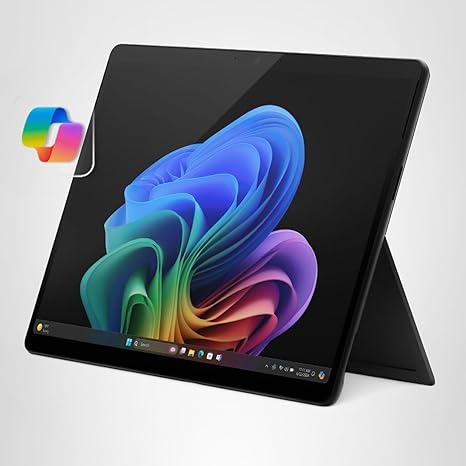
The Microsoft Surface Pro 2-in-1 Laptop/Tablet, 2024, represents a bold leap into the future of computing with its AI-powered Copilot+ PC features, making this a unique offering in the market. Whether you’re a student, professional, or creator, this flexible device promises to adapt to your needs. But does it live up to the hype? Let’s find out.
First, let’s break down the core specs: it comes equipped with a Snapdragon X Plus 10-core processor, 16GB of RAM, and 512GB of storage. These specs point to a machine that aims to deliver solid performance across a variety of tasks—from basic office work to more demanding workloads, all with a touch of AI to elevate your experience. The 13-inch touchscreen display is a nice balance between portability and workspace, offering a resolution that’s sharp and vibrant, though it’s not the highest out there. It’s certainly good for everyday use, but the contrast and color accuracy might not satisfy pro-level content creators who require the best possible visual fidelity.
The Snapdragon X Plus is an impressive chip, especially for a device like this. It’s marketed as faster than the MacBook Air M3, but that comparison is worth exploring further. While the chip does have a powerful NPU (Neural Processing Unit), the experience you get in real-world tasks like web browsing, video calls, or light media consumption will be smooth. However, when pushed with heavier tasks like photo editing or video rendering, this chip will show its limits compared to Intel or AMD’s top offerings in more traditional laptops.
Storage comes in the form of a 512GB SSD, which is NVMe-based, ensuring quick file transfers and snappy app launches. This is a good amount of space for most users, but keep in mind that you may need an external drive if you plan on storing large media libraries or heavy work files. With 16GB of RAM, multitasking should feel comfortable, though you might notice a bit of sluggishness if you run multiple memory-heavy applications side by side.
Battery life is one of the standout features of this device, offering up to 14 hours of use. In everyday scenarios like browsing the web or watching videos, it should easily get you through a full day. Even more intensive tasks, like office work or streaming, shouldn’t drain the battery too quickly. The fast charging capability is also a nice bonus, with a 65W PSU via Surface Connect or USB-C—giving you some flexibility in how you charge it.
When it comes to performance, the Surface Pro 2-in-1 delivers a solid experience for the average office user or media consumer. If you’re just using this for document work, web browsing, or video calls, it’ll do the job well. Media consumption is pleasant, and the speakers, while not the loudest, do the trick in a quiet environment. For content creation, it can handle some basic tasks, but don’t expect it to replace a full-fledged laptop with a dedicated GPU for video editing or 3D rendering.
Now, let’s talk about the more exciting part: the AI features. Copilot+ is a major selling point here, and while some of these features are still rolling out, they provide real value. The ability to recall documents, emails, and web pages through an explorable timeline is a game-changer for productivity. The AI also enhances video calls with noise cancellation, better lighting, and background blur—features that could make your video meetings feel more professional.
However, if you’re into gaming or other performance-heavy tasks, you may want to lower your expectations. This device isn’t designed with gaming in mind, and while it can handle lighter games, you’ll likely see significant performance dips in graphically demanding titles. The thermal performance is also an area of concern; while the laptop remains relatively cool under light use, it can heat up a bit under sustained loads, though it doesn’t seem to throttle severely.
On the comfort side, the keyboard layout and trackpad feel comfortable for typing sessions. The keys have decent travel and feedback, making it a good option for long work periods. The trackpad is responsive, and palm rejection works well, so you won’t have to worry about accidental clicks while typing. The 2-in-1 nature also means you can detach the keyboard and use it as a tablet for casual browsing or note-taking, which is a neat feature for students or creatives on the go.
The display itself is sharp, but not mind-blowing—it’s great for everyday tasks, though if you’re looking for something that can be used in direct sunlight or for color-critical work, it might fall short. The color reproduction is decent, but the brightness could be higher for outdoor use.
In terms of ports, this device offers USB-C, Surface Connect, and a headphone jack, but it lacks traditional USB-A ports and an HDMI. For some, this might mean needing additional adapters to connect to external devices or monitors. However, for a portable device, this is fairly standard, especially given that it’s designed with portability in mind.
Build quality is solid, with a premium feel, though it’s lighter than many traditional laptops, making it easy to carry around. The device is sleek and feels sturdy, but the lack of a number pad or extra USB-A ports could be a downside for those who need them.
Now, let’s weigh the pros and cons: On the plus side, the Surface Pro is incredibly portable, offers impressive battery life, and the AI features are genuinely useful for productivity. The screen is sharp, and the keyboard is comfortable. However, it’s not the best choice for heavy workloads, and the gaming performance is underwhelming. The lack of USB-A ports and the relatively low brightness of the display might also be dealbreakers for some.
When it comes to value for money, the Surface Pro 2-in-1 sits at a premium price point, so you’re paying for flexibility, portability, and those unique Copilot+ features. If you’re looking for something that can easily transition between tablet and laptop mode, it’s worth considering. However, if you need something with better performance for gaming, content creation, or general multitasking, there are other devices in this price range that might suit your needs better.
Comparing it to other laptops in the same class, such as the Lenovo ThinkPad X1 Yoga or the Dell XPS 13 2-in-1, the Surface Pro holds its own with excellent portability and AI-powered features, but it may fall behind in raw processing power and display brightness.
Overall, the Surface Pro 2-in-1 is best suited for students, office workers, and creators who prioritize flexibility and portability over raw power. If you’re someone who values an all-day battery, AI-driven productivity tools, and a device that’s easy to carry around, this could be a great option. But for those who need more power for gaming, intense multitasking, or media creation, you might want to look elsewhere.
Thanks for watching! The link to get the Microsoft Surface Pro 2-in-1 can be found in the comments box below. Feel free to share your thoughts if you already own one, or ask any questions you might have. Take care, and don’t forget to hit that like button and subscribe for more reviews inside TV!
Available to buy here:


