

Available to buy here:
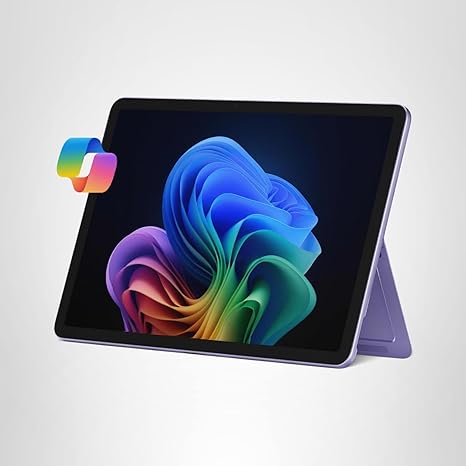
Welcome to Reviews inside tv! Today, we’re exploring the Microsoft Surface Pro 2-in-1 Laptop/Tablet, a versatile device designed to be your productivity companion wherever you go. This isn’t just a laptop—it’s a tablet with the power of a full PC, all in one sleek package. So, what makes this 2-in-1 unique? Let’s take a closer look.
The Surface Pro 2025 comes with the latest Snapdragon X Plus processor, an 8-core powerhouse that’s optimized for multitasking and AI-enhanced performance. With 16GB of RAM and 512GB of storage, it offers more than enough power for everyday tasks, office work, and content creation. The Snapdragon X Plus chipset, designed to handle everything from web browsing to media consumption, provides a responsive, fast experience. And with 45 trillion operations per second, it promises smooth multitasking with no lag. But how does this all translate into real-world use? We’ll dive into that soon.
This device features a 12-inch PixelSense touchscreen display, which is crisp and vibrant—ideal for both work and entertainment. The 1200p resolution looks sharp, and the color reproduction is vivid, though for color-critical tasks, you might want to check the exact sRGB coverage. The refresh rate is set at 60Hz, which is fine for most users, though it may not feel as smooth for high-end gaming or content creators who need higher frame rates for their work. Still, for daily use, watching movies, browsing the web, or editing photos, it holds up nicely.
In terms of performance, the Surface Pro is designed for those who need speed but don’t necessarily demand top-tier GPU power. While it can handle casual gaming and some light content creation tasks, you won’t be running AAA titles or heavy-duty video editing apps with ease. This is a device built for office work, media consumption, and light productivity tasks. The RAM and storage are well-suited for a seamless work experience—16GB of RAM ensures that multitasking, with multiple tabs open or documents running simultaneously, won’t cause a slow down. The 512GB SSD is quick, allowing for fast boot-ups and file access, though it’s worth noting that it’s not NVMe, which might slow things down in more demanding scenarios.
When it comes to battery life, the Surface Pro boasts up to 16 hours of use, which is impressive. In real-world usage, that means you could comfortably get through a day of web browsing, video calls, and light document editing without worrying about reaching for the charger. The charging experience is smooth, and it’s relatively fast, meaning you’ll spend less time tethered to a power outlet and more time being productive.
As for the build quality, the Surface Pro is light and portable. At just around 1.9 lbs, it’s easy to carry around in a backpack or bag, making it a great choice for students or professionals who need something both powerful and portable. The device’s sleek design adds to its premium feel, though some might prefer a more rigid, metal construction in lieu of the plastic build. However, the overall rigidity is solid, and the hinge feels durable, which is crucial for a 2-in-1 device that needs to withstand frequent transitions between laptop and tablet mode.
Now, let’s talk about the keyboard and trackpad experience. While the Surface Pro Keyboard is sold separately, when added, it provides an impressive typing experience. The key travel is just right, and the feedback is comfortable for longer typing sessions. The trackpad is responsive and accurate, with good palm rejection, making it easy to navigate through tasks without any hiccups. If you’re using the device primarily in tablet mode, the touchscreen is highly responsive and accurate, offering great precision for sketching or document editing.
In terms of connectivity, this Surface Pro model is equipped with USB-C ports, which support Thunderbolt 4, providing fast data transfer and charging capabilities. However, the lack of USB-A ports and an HDMI port might be a dealbreaker for some, especially if you rely on older accessories. For wireless connectivity, it supports Wi-Fi 6 and Bluetooth 5.1, ensuring stable and fast connections for streaming or using peripherals.
One area where the Surface Pro may face some challenges is thermals. In light use, the device stays cool, but under heavier workloads, such as extended media streaming or multitasking, you might notice the fans kicking in. The fan noise isn’t unbearable but can become noticeable if the device is being pushed for long periods. For those doing extensive content creation or gaming, this might be something to consider.
When comparing this Surface Pro to other similar devices in its range, it holds up quite well. However, devices like the iPad Pro with M2 chip or the Lenovo ThinkPad X12 Detachable offer competing features, with the iPad Pro being slightly more powerful for creative work and the Lenovo being more oriented toward productivity and business use. The Microsoft Surface Pro sets itself apart with the unique inclusion of the Snapdragon X Plus processor and its seamless integration of AI features, which could be a game-changer for those who need that extra bit of smart assistance in their workflow.
As for the price, it is on the higher end for what it offers in terms of pure performance. But considering the versatility, build quality, battery life, and AI-powered tools, it’s not bad if you’re after an ultra-portable laptop with the flexibility of a tablet. It’s best suited for students, office workers, or casual creators who want a lightweight device that can tackle everyday tasks without compromising on performance or portability.
Overall, the Microsoft Surface Pro 2-in-1 is a well-rounded option for those seeking an adaptable laptop-tablet hybrid. It’s not the best choice for hardcore gamers or professional video editors, but for most users who need a portable, powerful device with solid battery life and impressive AI capabilities, it’s a strong contender.
Thanks for watching! Be sure to like, subscribe, and hit the bell icon to stay updated on all our latest reviews. If you have any questions or already own the Surface Pro, let us know in the comments below. You can also find the link to grab one in the comments box. Catch you in the next review—stay tech-savvy!
Available to buy here:


