

Available to buy here:
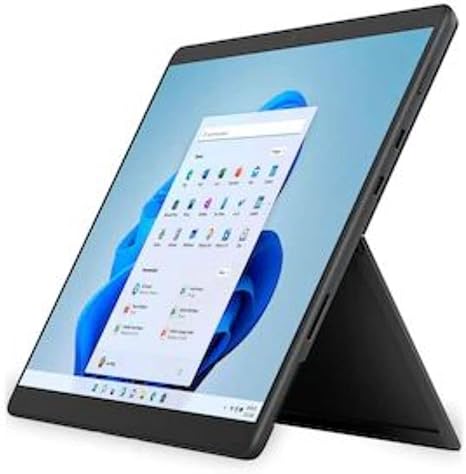
The Microsoft Surface Pro 8 is a versatile device that blends the power of a laptop with the flexibility of a tablet. Built on the Intel Evo platform, it features the latest Intel Core i7 processor, 16GB of RAM, and a 256GB SSD—ideal for multitasking and a wide range of productivity tasks. This 13-inch touchscreen device offers exceptional portability, perfect for students, professionals, and creators who need something lightweight yet powerful. With its iconic built-in Kickstand and detachable keyboard, it allows you to adjust your setup for any task, whether you’re working on spreadsheets, watching videos, or creating digital art.
The Intel Core i7 processor is a standout here, offering solid performance for most everyday tasks. It delivers quick responsiveness when switching between tabs, handling office documents, and working with larger files in applications like Excel. Whether you’re editing a presentation, creating content, or browsing with multiple tabs open, the Surface Pro 8 holds up well. For more demanding tasks, such as photo and video editing, the processor handles these without significant lag, though it’s not built for extreme heavy lifting like high-end gaming or large-scale rendering. Its Intel Iris Xe graphics are adequate for casual gaming and media consumption, though don’t expect to run graphically intense titles at high settings. However, for less demanding gaming, such as lighter indie games or older titles, it’s more than capable.
When it comes to RAM, the 16GB on this model is more than sufficient for multitasking, providing a smooth experience whether you’re using word processors, web browsing, or even running multiple apps simultaneously. The 256GB SSD is a solid choice for storage—faster than traditional SATA drives, it offers quick boot times and responsive app launches, although for heavy media creators, it might feel a bit tight over time, especially with large video files. If you plan to store a lot of media locally, an external drive or cloud storage might be necessary.
The 13-inch PixelSense display stands out with vibrant colors and sharp details, making it excellent for media consumption, creative tasks, and general use. The 120Hz refresh rate adds a smoothness to interactions, particularly noticeable when scrolling, gaming, or navigating between apps. It’s bright enough for indoor use, but outdoors in direct sunlight, you might struggle a bit to see the screen clearly. For content creators, the sRGB color accuracy is impressive, ensuring that photos and videos look true to life.
Battery life is one of the areas where the Surface Pro 8 shines. Thanks to its efficient Intel Evo platform, it can last through a full workday of web browsing, document editing, and light media consumption, with typical use delivering around 8 to 10 hours. Heavier workloads or media streaming will naturally reduce that number, but it’s still better than most ultrabooks in this class. Charging is relatively fast, too, and you can get a significant charge boost in just under an hour, which is great for professionals who need to quickly power up between meetings.
The keyboard is comfortable for extended typing sessions, offering decent key travel and responsive feedback. It’s backlit, which is useful for low-light environments, and the function row of keys gives you quick access to media controls and other functions. The trackpad is precise and smooth, with good palm rejection, and the touchscreen adds an extra layer of versatility, especially if you plan to use a stylus for drawing or taking notes. The Surface Slim Pen 2 works seamlessly with the device, offering a near-instant response for creative work, and is stored securely in the keyboard.
In terms of connectivity, the Surface Pro 8 has a couple of USB-C ports with Thunderbolt support, along with a Surface Connect port for charging and docking, which is great for connecting to external displays and peripherals. The device also includes Wi-Fi 6 for faster internet speeds and Bluetooth 5.1 for better peripheral connectivity. Unfortunately, there’s no USB-A port or HDMI output, which might limit options for users who rely on those connections for older devices or monitors. For expandability, the Surface Pro 8 has some limitations, with no room for RAM or storage upgrades, so you’ll want to get the configuration that fits your needs upfront.
When it comes to performance, the Surface Pro 8 stays cool under light use but can heat up a bit when pushed with tasks like video editing or gaming. The fan noise is relatively quiet under normal conditions, though it can become more noticeable during heavy workloads. This is something to consider if you plan on using the device in a quiet environment for extended periods.
The build quality is solid, with a premium feel thanks to its magnesium alloy body. It’s slim, lightweight, and portable, making it easy to carry in a bag all day. Weighing in at just under 1.9 pounds, it’s a great choice for anyone who needs a powerful, portable device for working on the go.
In terms of value, the Surface Pro 8 sits in the mid-range ultrabook category, making it a strong contender for those looking for a high-performance, portable device. If you need something versatile for both work and play, this laptop has you covered. However, if you’re looking for a device that can handle more demanding creative or gaming tasks, you might want to explore other options with dedicated GPUs.
Compared to its competitors, like the Apple iPad Pro or the Dell XPS 13, the Surface Pro 8 offers more flexibility with its detachable keyboard and touchscreen functionality. It’s a great choice for students, office workers, and creators who need a powerful, portable device but don’t need top-tier gaming or extreme creative workload capabilities.
In conclusion, the Microsoft Surface Pro 8 is a fantastic option for anyone looking for a sleek, portable laptop that can handle a variety of tasks with ease. It excels in productivity, media consumption, and light creative work, all while providing solid battery life and a premium experience. If you’re looking for a device that does it all and offers the flexibility of a tablet when you need it, this one is worth considering.
Thank you for watching! If you have any questions about the Surface Pro 8, feel free to drop them in the comments. And don’t forget to like, subscribe, and hit the bell icon so you don’t miss out on our next review. Catch you in the next one!
Available to buy here:


