

Available to buy here:
Welcome to Reviews inside tv! Today, we’re looking at the Microsoft Surface Pro 8, a 13-inch touchscreen device that’s built to blend the power of a laptop with the flexibility of a tablet. If you’re someone who values portability and versatility in their tech, this might be exactly what you’re looking for, but let’s break down the specs to see if it’s really the right choice for you.
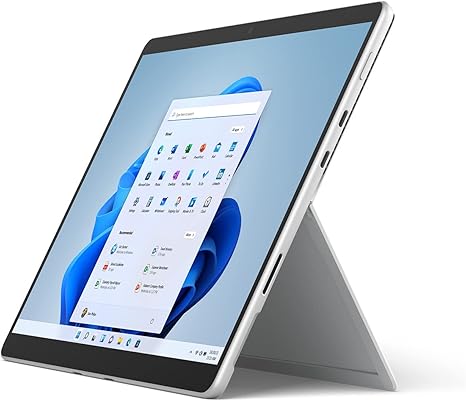
This Surface Pro 8 comes equipped with the Intel® Evo platform, featuring an Intel Core™ i7 processor, 16GB of RAM, and a 1TB SSD. Whether you’re tackling office tasks, media consumption, or even light creative work, this machine is designed to handle it all. The 13-inch touchscreen display offers a 2880×1920 resolution, providing sharp, vivid visuals. This screen type is perfect for anyone who needs clarity on the go, whether it’s for streaming your favorite shows or working on high-resolution documents. It’s also backed by a solid build quality, offering that iconic Surface look in a sleek platinum finish, weighing in at just 1.96 pounds.
The performance, thanks to the Intel Evo platform, is designed to keep up with multitasking demands. With the 11th-generation Core i7 processor, you can run multiple apps smoothly, handle heavier workloads in office software like Word, Excel, and PowerPoint, and even dabble in more creative tasks, such as photo and video editing. The 16GB of RAM ensures that you can keep plenty of apps open without feeling that familiar lag, while the 1TB SSD offers fast storage speeds for quick file access and larger project storage.
But how does it actually perform day-to-day? In real-world use, the Surface Pro 8 handles office and productivity tasks with ease. You can run your usual suite of apps, browse with multiple tabs open, and juggle email and video calls without much effort. For media consumption, whether you’re streaming shows or watching videos, the 13-inch display delivers crisp visuals and decent color accuracy. The touch interface is responsive, and the device’s hybrid nature lets you shift between tablet and laptop modes, depending on the task at hand. It’s lightweight and portable, making it an excellent choice for students, frequent travelers, or anyone who needs a device that can easily go from work to play.
For those looking at this as a creative tool, the Surface Pro 8 is pretty capable. Photo editing in programs like Adobe Photoshop or Lightroom feels smooth, though it might not replace a high-end workstation for heavy-duty video editing. But for lighter workloads, it’s more than sufficient. The inclusion of the Surface Slim Pen 2 adds a nice touch for those who prefer sketching or writing directly on the screen. And the Surface Signature Keyboard, while compact, offers a full function row, backlit keys, and a solid typing experience—perfect for longer work sessions.
When it comes to gaming, it’s important to set realistic expectations. The integrated Iris Xe graphics will get you by in casual games, but this isn’t a device for playing the latest AAA titles at high settings. If you’re into lighter gaming, you’ll be able to run older games or indie titles without much issue, but don’t expect smooth performance in graphically demanding games.
Battery life is where the Surface Pro 8 truly shines. Thanks to the Intel Evo platform’s focus on energy efficiency, you can expect up to 10-12 hours of real-world use under typical workloads, which is impressive given its compact form factor. If you’re doing lighter tasks like web browsing and document work, you could stretch that even further. For such a thin device, this is a solid performance. And when it’s time to recharge, the Surface Pro 8 charges relatively quickly, so you won’t be stuck waiting for long.
When it comes to comfort, the keyboard and trackpad are a pleasure to use. The keyboard has good key travel and feedback, making it suitable for extended typing sessions. The trackpad is responsive, with good palm rejection, though it’s smaller compared to some other laptops. As for connectivity, the Surface Pro 8 is a bit minimalistic—there are two USB-C ports with Thunderbolt 4 support, a headphone jack, and the Surface Connect port. No traditional USB-A ports, which might be an issue if you rely on legacy peripherals. The lack of an SD card slot might be a downside for creatives who need to quickly transfer files from cameras, but it’s not a dealbreaker for most users.
In terms of thermals, the Surface Pro 8 is a cool performer under typical loads. It doesn’t get excessively hot, even during extended productivity work or media streaming. However, push it to its limits with gaming or heavy creative tasks, and the fan noise will pick up. While it’s not deafening, it’s something to keep in mind if you’re sensitive to noise during quiet work sessions.
So, what are the pros and cons of this device? On the positive side, you get an ultra-portable, versatile 2-in-1 device with solid performance, great battery life, and a responsive touchscreen. It’s ideal for students, office workers, and those who need a mix of work and play. The downsides? Well, if you’re a gamer or someone who requires intensive processing power for creative tasks like 4K video editing, this might not be the best fit. The lack of USB-A and an SD card reader might also be a turnoff for those who need more ports. But overall, if you’re looking for a well-rounded, portable device, the Surface Pro 8 offers great value.
When it comes to pricing, the Surface Pro 8 is positioned as a premium device. It competes with other 2-in-1 laptops like the Lenovo ThinkPad X1 Titanium and the HP Spectre x360, but it’s more portable and offers better battery life in a slim package. That said, the price might be a bit higher than similar specs in other ultrabooks, but the flexibility of the 2-in-1 design and the premium build quality help justify the cost.
As for build quality, the Surface Pro 8 is solidly constructed with a high-quality aluminum chassis. It feels premium in hand and should hold up well over time, although long-term durability data is still limited for this specific model. The hinge is sturdy, and the device feels solid overall, with minimal flex.
When it comes to support, Microsoft’s customer service is generally reliable. They offer a one-year limited warranty with options for extended coverage through their Microsoft Complete service plan. For international buyers, the support experience can vary by region, but overall, Microsoft’s support reputation is strong.
In conclusion, the Surface Pro 8 is a fantastic device for users who prioritize portability, versatility, and solid performance for everyday tasks. It’s not for heavy-duty gaming or extreme creative workflows, but it shines as a 2-in-1 hybrid that’s perfect for students, office workers, and casual creators. If you need a machine that does it all while being light and portable, the Surface Pro 8 is hard to beat. Just make sure you’re okay with its minimal port selection and a higher price tag.
If you’re thinking about picking up the Surface Pro 8, you can find the link in the comments box below. Thanks for watching, and don’t forget to hit the like button, subscribe, and ring the bell for more in-depth reviews like this one. See you in the next video!
Available to buy here:


