

Available to buy here:
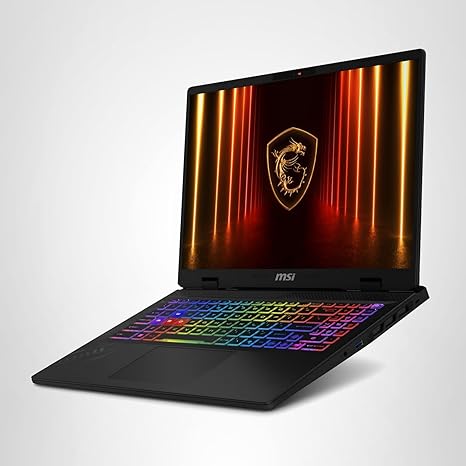
Welcome to “Reviews inside tv”! Today, we’re looking at the MSI Crosshair A16 HX, a gaming laptop that aims to deliver a powerhouse experience across both work and play. With its AMD Ryzen 9 8940HX processor, NVIDIA GeForce RTX 5060 graphics, and a 16” QHD+ 240Hz display, this laptop promises top-tier performance. But does it truly live up to the hype? Let’s break it down.
The MSI Crosshair A16 HX features a 16” QHD+ display with a 2560×1600 resolution, which strikes a great balance between clarity and screen size. The high refresh rate of 240Hz ensures buttery-smooth visuals, particularly beneficial for fast-paced gaming. When it comes to gaming, this high refresh rate will definitely help you gain an edge, allowing for smoother motion and a more immersive experience, especially when paired with the RTX 5060 graphics card.
Speaking of graphics, the RTX 5060, built on the Blackwell architecture, brings AI-enhanced graphics and DLSS 4 technology to the table. This means that whether you’re playing demanding titles or multitasking with creative workloads, you’re getting smoother gameplay and better overall visual clarity. The laptop also supports ray tracing, offering enhanced lighting and more realistic shadows, adding a layer of immersion to your gaming. When it comes to handling those graphically intense games, this laptop does a solid job of balancing performance with visual fidelity.
Under the hood, you’ve got the AMD Ryzen 9 8940HX, a high-performance processor that really excels at multitasking. Whether you’re running multiple apps, editing photos, or streaming videos, the Ryzen 9 is fast and responsive, ensuring a smooth experience. Paired with 16GB of DDR5 RAM, this laptop can handle multitasking without breaking a sweat, making it a good choice for creators and professionals who juggle heavy workloads. The 1TB NVMe SSD is another highlight, offering plenty of fast storage for your games, videos, and projects, with quick boot times and snappy app launches.
Now, let’s talk about battery life. Given the power-packed specs, you might expect this laptop to drain its battery quickly, but MSI’s Cooler Boost 5 technology helps to mitigate that. The dual fans and multi-direction airflow keep temperatures under control, even during extended gaming sessions. Still, as is the case with most gaming laptops, you’ll get around 4 to 6 hours of battery life with typical use, such as light office work or media consumption. When it comes to heavy workloads like gaming or video editing, expect to see that number drop closer to 2 or 3 hours. On the upside, the charging speed is decent, so it won’t take too long to top up.
Thermals are always a concern in gaming laptops, but MSI’s Cooler Boost technology does a commendable job. The fans kick in when needed but aren’t overwhelmingly loud. The laptop stays fairly cool on the underside, but it can heat up around the keyboard during heavy tasks like gaming or rendering. While you won’t find the fans to be silent, they are fairly unobtrusive, which is a plus for those who use the laptop for work or long sessions.
The keyboard is another area where MSI shines. It features a 24-zone RGB keyboard, offering customization for lighting preferences, which is a nice touch for gamers. Key travel and feedback are solid, and the layout is comfortable for long typing sessions, which is crucial for those who plan to use this laptop for both gaming and productivity. The trackpad is responsive and accurate, with decent palm rejection and a smooth clicking experience.
As for connectivity, the Crosshair A16 HX has you covered. With Wi-Fi 6E, you’ll enjoy fast and stable wireless internet, and the USB-C ports are a welcome addition for modern peripherals. There’s also an HDMI port, which makes it easy to connect to an external monitor, and an SD card reader, a nice feature for creators who need to transfer large files quickly. One downside here, though, is that the RAM is soldered, which limits future upgradability. The 16GB of RAM should be enough for most users, but power users might find this limiting in a few years.
When it comes to build quality, the MSI Crosshair A16 HX feels solid. The chassis is well-constructed, with a good balance of rigidity and portability. It’s not the lightest gaming laptop around, weighing in at about 5.3 pounds, so if portability is a top concern, this might not be the easiest to carry around all day. That said, it’s built well enough to handle the rigors of gaming and creative work.
For gamers, the MSI Crosshair A16 HX provides strong performance, but how does it actually perform in real-world gaming? Based on benchmark data, in titles like Cyberpunk 2077 and Call of Duty: Warzone, you can expect an average FPS in the range of 80-100 at high settings with ray tracing enabled. The 240Hz display, though, is definitely overkill for games running at those FPS numbers, so while it offers a super smooth experience, it might not fully capitalize on the laptop’s hardware. The one percent low FPS also holds up well, ensuring that the experience stays smooth, even in more demanding moments.
In terms of value, the MSI Crosshair A16 HX offers solid gaming performance paired with a high-quality display, making it a great choice for gamers who want to play at a competitive level. The AMD Ryzen 9 and RTX 5060 combo is a strong one, but it’s worth noting that for the price, there are alternatives like the ASUS ROG Strix or the Lenovo Legion 5 Pro that come with similar specs but may offer a slightly better build or different port options, so it’s worth considering what you prioritize in a gaming laptop.
So, who is this laptop for? If you’re a gamer who also needs a machine for productivity and creative work, the MSI Crosshair A16 HX is a great option. It’s also well-suited for anyone who needs a high-refresh display for smooth gameplay, along with the power to handle video editing, 3D rendering, and multitasking with ease. However, if you’re strictly looking for an ultraportable laptop or don’t need the raw power for gaming and content creation, you might want to consider a lighter, more affordable option.
If you’ve got any questions or have used this laptop yourself, feel free to share your thoughts in the comments below. Thanks for watching, and remember to like, subscribe, and hit that bell icon to stay updated on all our latest reviews. See you in the next video – happy gaming, and don’t forget to check out the link in the comments if you’re looking to grab one for yourself!
Available to buy here:


