

Available to buy here:
Welcome to “Reviews inside tv”! Today, we’re taking a close look at the MSI Thin A15, a 15.6” gaming laptop that blends speed, power, and efficiency into a sleek package. With its AMD Ryzen 5-7535HS processor, NVIDIA GeForce RTX 2050 graphics, and a fast 144Hz display, this laptop promises to handle everything from gaming to creative tasks with ease. But does it live up to the hype? Let’s find out.
At the heart of the MSI Thin A15 is the AMD Ryzen 5 7535HS, a powerful chip built for modern multitasking. With 6 cores and 12 threads, it’s designed to tackle everything from demanding games to resource-heavy creative applications. Whether you’re editing videos, rendering images, or switching between multiple tasks, the Ryzen 5 offers a smooth experience that won’t leave you waiting. In combination with the NVIDIA GeForce RTX 2050, which is based on Ada Lovelace architecture, you can expect sharp visuals and smooth frame rates, even in graphically intense titles. The RTX 2050 also brings ray tracing into the mix, enhancing light and shadow effects for a more realistic experience in supported games and apps.
When it comes to memory, the MSI Thin A15 comes with 8GB of DDR5 RAM, which is more than sufficient for most multitasking needs, including gaming, browsing, and light content creation. However, for heavy multitaskers or creators working with large files, an upgrade to 16GB might be beneficial. As for storage, the 512GB NVMe SSD offers fast read and write speeds, meaning your system boots up quickly, and loading times for both games and software are minimized. NVMe storage is far superior to the older SATA SSDs, offering faster data transfer speeds, which is key for an enhanced overall experience.
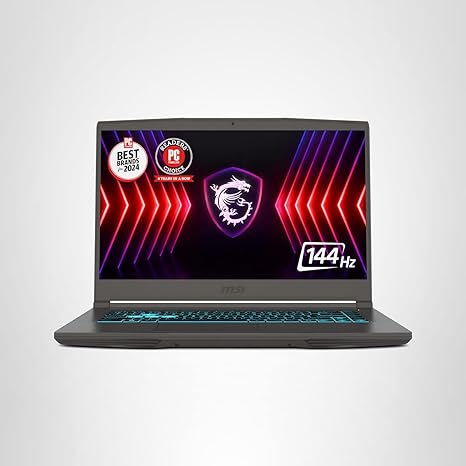
The 15.6” display of the MSI Thin A15 is an FHD panel with a 144Hz refresh rate. For gaming, this means smoother gameplay with less motion blur and a more responsive feel during fast-paced action. If you’re a competitive gamer, you’ll appreciate the fluid visuals this screen provides. The colors are decent for an IPS panel, but it doesn’t reach the vibrancy and depth of higher-end screens like OLED or mini-LED. That said, the display is still solid for everyday use, media consumption, and gaming. Just don’t expect to be blown away by the colors or contrast.
Battery life on the MSI Thin A15 is decent, with its 52Wh battery offering a good balance between performance and longevity. During light office work or web browsing, you can expect anywhere from 6 to 8 hours of usage, but this drops significantly when gaming or handling intensive workloads. This isn’t the type of laptop you’ll use all day unplugged if you’re working on heavy tasks or gaming for extended periods. Charging speed is pretty standard, with the laptop refueling to about 50% in around 30 minutes, which should get you through a quick session of work or play.
Now, let’s talk about the comfort factor—keyboard and trackpad. The keyboard on the MSI Thin A15 has a satisfying key travel with decent tactile feedback, which makes typing for extended periods feel pretty comfortable. The layout is solid, with well-sized arrow keys and a full number pad, which is always handy for productivity. The trackpad is responsive and accurate, but not quite as large as some other models in this price range. It works well for most tasks but could be a bit cramped for precision gestures or heavy multitasking.
When it comes to thermals, MSI has incorporated their Cooler Boost 5 technology, which features dual fans and a smart thermal design. Under heavy load, such as during gaming sessions or video rendering, the laptop does get warm but doesn’t overheat. The fans kick in, but they aren’t overly loud, keeping noise levels manageable for most users. However, under sustained heavy load, the system may experience slight thermal throttling, where performance dips due to the heat. This is something to keep in mind if you plan on using the laptop for extended gaming or creative tasks without a cooling pad.
As for ports, the MSI Thin A15 offers a good range, including USB-A and USB-C, HDMI for external displays, and an SD card reader for quick file transfers. While the selection is standard, it could have benefited from Thunderbolt support, especially for those looking to use external GPUs or docks. Wi-Fi 6 ensures fast, stable internet connections, and Bluetooth 5.2 supports a wide range of peripherals.
The build quality is solid, with a slim and lightweight chassis that’s easy to carry around at around 4.4 pounds. It’s not the lightest laptop out there, but it’s a good balance of portability and sturdiness. The exterior has a simple, matte black finish, which gives it a professional look. It doesn’t scream “gaming laptop,” but the understated design could appeal to both gamers and creators who don’t want a flashy device.
Let’s talk about value for money. At its price point, the MSI Thin A15 offers solid performance for both gaming and productivity. Compared to other laptops in the same range, like the ASUS TUF Dash F15 or the Acer Nitro 5, the MSI Thin A15 holds its own. Its 144Hz display and RTX 2050 are great for those looking for entry-level gaming performance without breaking the bank. The build quality is also a notch above some of its competitors, offering a more premium feel. However, it’s worth considering whether you’ll need more RAM or a better display for your needs, especially if you’re into content creation or looking for something more immersive in terms of visuals.
In terms of who this laptop is best for, the MSI Thin A15 is ideal for gamers who want solid entry-level performance at a reasonable price. It’s also a good choice for students or professionals who need a machine capable of handling both work and play without compromise. If you’re a content creator, you might find the display a bit limiting, but for most gaming and productivity tasks, it’s more than adequate. If you’re after a machine that can handle demanding AAA games or professional creative tasks, you might want to consider something with a more powerful GPU or a higher-end display.
Overall, the MSI Thin A15 delivers a great combination of performance, design, and value. It’s not the absolute best in any one category, but it’s a solid all-around performer that offers good performance for the price. If you’re after a versatile laptop that balances gaming and productivity with a sleek design, this might be the one for you.
Thanks for watching! If you have any questions about the MSI Thin A15, feel free to drop them in the comments. And if you’ve already got your hands on one, let us know how it’s working out for you. Don’t forget to like, subscribe, and hit that bell icon so you don’t miss out on any of our latest reviews. Until next time, this is “Reviews inside tv,” signing off—stay tuned for more great tech insights!
Available to buy here:


