

Available to buy here:
Welcome to “Reviews inside tv,” where we bring you the latest insights on the most talked-about products. Today, we’re taking a close look at the Razer BlackWidow V3 TKL Mechanical Gaming Keyboard. Now, for any gamer, having the right keyboard is a big deal, whether you’re diving into a fast-paced FPS, grinding in an MMORPG, or just vibing in a solo campaign. But with so many options out there, how do you know if this one stands out? Let’s break it down.
The Razer BlackWidow V3 TKL comes equipped with Razer’s Yellow Mechanical Switches, which are engineered for speed. These switches have an actuation point of just 1.2mm, offering a quick, responsive feel, perfect for those who need to act fast. And for gamers who appreciate a quiet setup, the sound dampeners built into these switches help keep noise to a minimum, allowing you to game without disturbing others or hearing that loud, clicky feedback typical of other mechanical switches. This focus on smoothness and silence may be just what you’re looking for if you’re after speed without the noise.
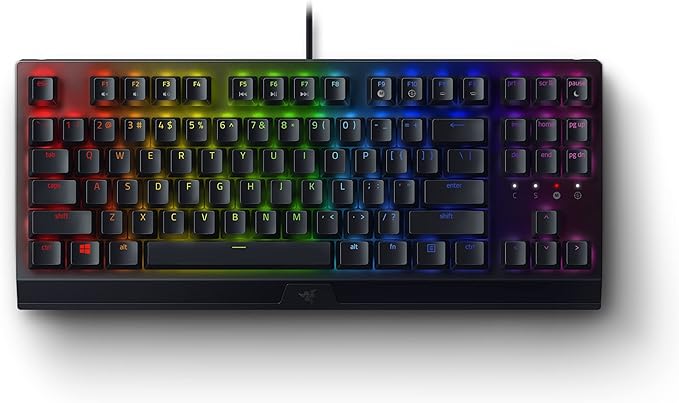
In terms of personalization, the Razer BlackWidow V3 TKL shines with its Chroma RGB feature. With 16.8 million colors available, each key on the keyboard is individually backlit, making it highly customizable. Not only that, but it syncs with popular games, Razer hardware, and even your Philips Hue lights. If you’re the type of person who likes their gaming environment to match the mood of the game, this keyboard’s RGB capabilities will let you create a fully immersive experience.
Let’s talk about the form factor. The tenkeyless design means that the number pad is gone, and this gives you more space on your desk for precise mouse movements and a more minimalist setup. If you’ve been looking for a keyboard that doesn’t take up too much real estate but still gives you that mechanical feel, this compact layout might just be the right choice.
For those who love customizing their gameplay, the BlackWidow V3 TKL allows you to program macros for every key. Using Razer’s Hypershift feature, you can remap keys or even assign complex commands to make sure every action is just a tap away. This could make a big difference for competitive gamers who rely on lightning-fast actions or want to streamline repetitive tasks in-game.
Durability isn’t an afterthought here either. The BlackWidow V3 TKL is built to last with a military-grade metal top plate. It’s designed to endure up to 80 million key presses, so you can count on it for the long haul, even during intense gaming sessions or heavy typing days. This level of robustness ensures that the keyboard can handle whatever you throw at it without losing performance or reliability.
Then, there’s the Snap Tap feature. This technology aims to enhance your in-game response by prioritizing input between two assigned keys. If you’re playing a fast-paced game and need that extra level of responsiveness, Snap Tap can give you the edge by ensuring that your key presses are registered in the optimal order. It’s turned off by default but can be toggled on in Razer Synapse 4, so it’s up to you whether you want to use it.
Now, let’s dig into the practical side of things. Setting up the BlackWidow V3 TKL was straightforward. You just plug it in, and Razer Synapse does the rest for customization, including syncing the RGB lighting or adjusting key assignments. The keyboard feels sturdy right out of the box, with the switches offering that signature tactile feedback that’s both smooth and responsive. I tested it across several scenarios—gaming, typing, and general use—and the experience was consistently solid. During extended gaming sessions, it held up well without any noticeable delay or key malfunctions.
On the flip side, while the compact form factor is ideal for those with limited desk space or those who prefer a cleaner setup, some users might miss the numeric keypad. If you’re someone who regularly uses the numpad for productivity tasks or gaming, this could be a downside. But for gamers who want a dedicated gaming keyboard without extra bulk, the TKL design could be exactly what they need.
In terms of performance, the Razer BlackWidow V3 TKL does an excellent job. The switches are incredibly fast, the RGB looks fantastic, and the durability makes it feel like a reliable companion for any gaming adventure. But it’s not perfect. The absence of a full-size layout could turn off some users, especially if you frequently work with spreadsheets or need to use a numpad in other areas of your life. Additionally, while the build is rock-solid, the overall design isn’t much of a departure from Razer’s other offerings, so if you’re looking for something radically different in aesthetics, this might not be the standout you were hoping for.
When it comes to value for money, the BlackWidow V3 TKL sits in a competitive price range for gaming keyboards. It’s priced similarly to other high-end mechanical keyboards, but what sets it apart is the combination of its responsive switches, customizable features, and durable construction. There are cheaper options out there, but none with the same level of premium feel and performance that Razer brings to the table. If you’re someone who wants a keyboard that looks as good as it feels and lasts as long as it performs, the BlackWidow V3 TKL could justify its price.
When we compare it to other gaming keyboards in the same price bracket, like the Corsair K70 or the Logitech G Pro X, the BlackWidow V3 TKL holds its own in terms of performance and features. The Razer Yellow switches are a bit quieter than the Corsair’s Cherry MX Reds, and the customizability of the Chroma RGB lighting gives it a more immersive feel. However, some may prefer the added features of the K70, like its wrist rest or the extra media controls. On the other hand, the compact design of the BlackWidow makes it a better fit for gamers who value space-saving. Ultimately, it comes down to what you value most—size, features, or design.
The build quality of the BlackWidow V3 TKL is top-notch. The military-grade metal top plate feels solid and premium, with no flex or wobble, even during intense gaming sessions. The key switches feel durable, and with a lifespan of up to 80 million presses, you can expect this keyboard to last for a long time. While there haven’t been widespread reports of long-term reliability issues, Razer has built a solid reputation over the years, and it’s likely this keyboard will continue to hold up for the foreseeable future.
As for customer support, Razer’s reputation is generally good. While I didn’t personally need to reach out to them, their support team is known for being responsive and helpful. They also provide robust software updates for their products, so you can expect continued enhancements for the BlackWidow V3 TKL, especially with features like Synapse 4 and potential firmware updates.
To wrap it all up, the Razer BlackWidow V3 TKL is a fantastic mechanical keyboard that ticks all the boxes for competitive gamers and casual users alike. Its fast switches, durable build, customizable RGB lighting, and compact form factor make it a solid choice for anyone looking to elevate their gaming experience. It’s not perfect—it’s missing the numpad and might feel a bit familiar in design—but if you prioritize speed, performance, and personalization, it’s a strong contender.
If you’re on the hunt for a new gaming keyboard and the BlackWidow V3 TKL piques your interest, check out the comments below for a link to grab one for yourself. Have you already tried it? Drop your thoughts in the comments—I’d love to hear how it’s working out for you. Thanks for watching, and don’t forget to like, subscribe, and ring that bell for more in-depth reviews from “Reviews inside tv.” Until next time, game on and may your key presses always be quick!
Available to buy here:


